Modern DirectAdmin builds expose one binary, da, that wraps most of what used to be a collection of scripts and manual file edits. It updates the panel, drives CustomBuild, reads and writes directadmin.conf with validation, and offers a growing set of user-management subcommands. For anyone automating servers — provisioning scripts, configuration management, or just a consistent runbook — it is the interface to standardise on, because the underlying files and their formats change between releases while the CLI stays stable. The tool is self-documenting; da --help and da <subcommand> --help list what your build supports, and this guide covers the subcommands that matter day to day.
Table of Contents
Short answer: da update upgrades the panel on the channel set by update_channel, da build <target> wraps CustomBuild, da config-get and da config-set read and write directadmin.conf with validation and an automatic reload since 1.710, and da suspend-user, da unsuspend-user and da login-url cover account tasks. Keep production servers on the stable channel and use da <subcommand> --help to see what the installed build supports.
Version and channels
DirectAdmin releases every two to three weeks; 1.711 shipped on 2026-09-22 and 1.712 is expected shortly. Releases flow through four channels: alpha, beta, current and stable. current receives each release as it is published; stable lags by a release or two so that regressions found by current users are fixed first. Production hosting nodes belong on stable; a staging server on current tells you what is coming.
da version
da config-get update_channel
da config-set update_channel stable
Note that ./build update_versions in CustomBuild no longer updates DirectAdmin itself since 1.704; it only refreshes CustomBuild’s version list. The panel is updated with:
da updateThat fetches the newest build for the configured channel and restarts the service. Updates are also applied automatically by the daily task queue when auto-updates are enabled in Admin Level → Admin Settings, which we recommend on the stable channel given the security fixes in recent releases (the 1.711 TLS privilege-escalation fix is a recent example). To pin a server temporarily, disable the automatic update in Admin Settings rather than changing channels, so you do not forget the channel change later.
The CustomBuild wrapper
da build is a wrapper around /usr/local/directadmin/custombuild/build. The two forms are interchangeable, and the wrapper saves a cd:
da build update
da build versions
da build options | grep webserver
da build set php1_release 8.4
da build php
da build rewrite_confs
da build update refreshes the CustomBuild scripts and version metadata; run it before any other build target on a server that has not been touched for a while. da build versions compares installed and available versions of everything CustomBuild manages, which is the quickest way to see that PHP or MariaDB is behind. da build set writes options.conf with validation, so a typo in an option name is rejected rather than silently ignored. Every target that ./build accepts works through da build.
Reading and writing directadmin.conf
da config-get and da config-set are the supported way to change panel settings. They validate the key, write /usr/local/directadmin/conf/directadmin.conf, and since 1.710 reload the running service automatically, so a systemctl restart directadmin after each change is no longer needed:
da config-get ssl
da config-set dkim 1
da config-set acme_disable_after_failures 5
da config | grep ^acme_
Editing the file by hand still works but bypasses validation, and a malformed line stops the panel from starting. Keys that existed only in old releases are removed on update — 1.703 dropped the letsencrypt_* family in favour of acme_* — so a provisioning script that sets a removed key gets an error from config-set, which is exactly what you want rather than a silently ignored setting.
A few keys need a full restart even now, notably anything affecting the listening port or bind address. da config-set prints a note when that applies.
User administration
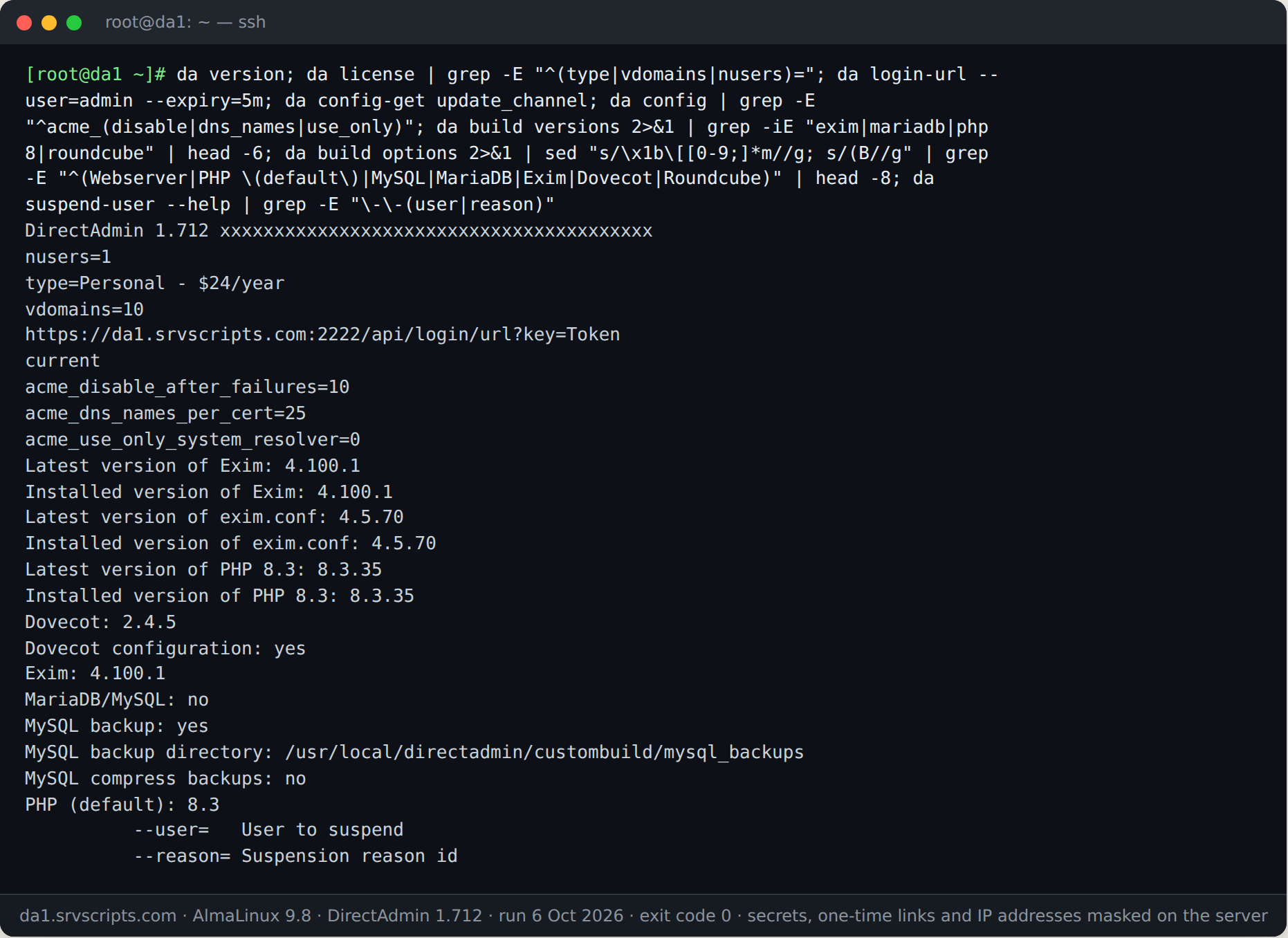
DirectAdmin 1.712 has no da user command group, so older examples with da user list or da user suspend fail. Suspending and unsuspending are top-level commands that take --user or --domain and a reason id; the ids (billing, abuse, spam, inactive, other and the quota ones) are listed in /usr/local/directadmin/data/templates/suspension_reason.txt. The account list is the user data directory, and instead of setting a password on the command line you create a short-lived single-sign-on link. We ran da suspend-domain and da unsuspend-domain on a DirectAdmin 1.712 test server (the site returned 403 while suspended and 200 after); da suspend-user takes the same options. Run da --help to see the commands on your build.
ls /usr/local/directadmin/data/users/
da suspend-user --user=example --reason=billing
da unsuspend-user --user=example
da suspend-domain --domain=example.com --reason=abuse
da unsuspend-domain --domain=example.com
da login-url --user=example --expiry=10m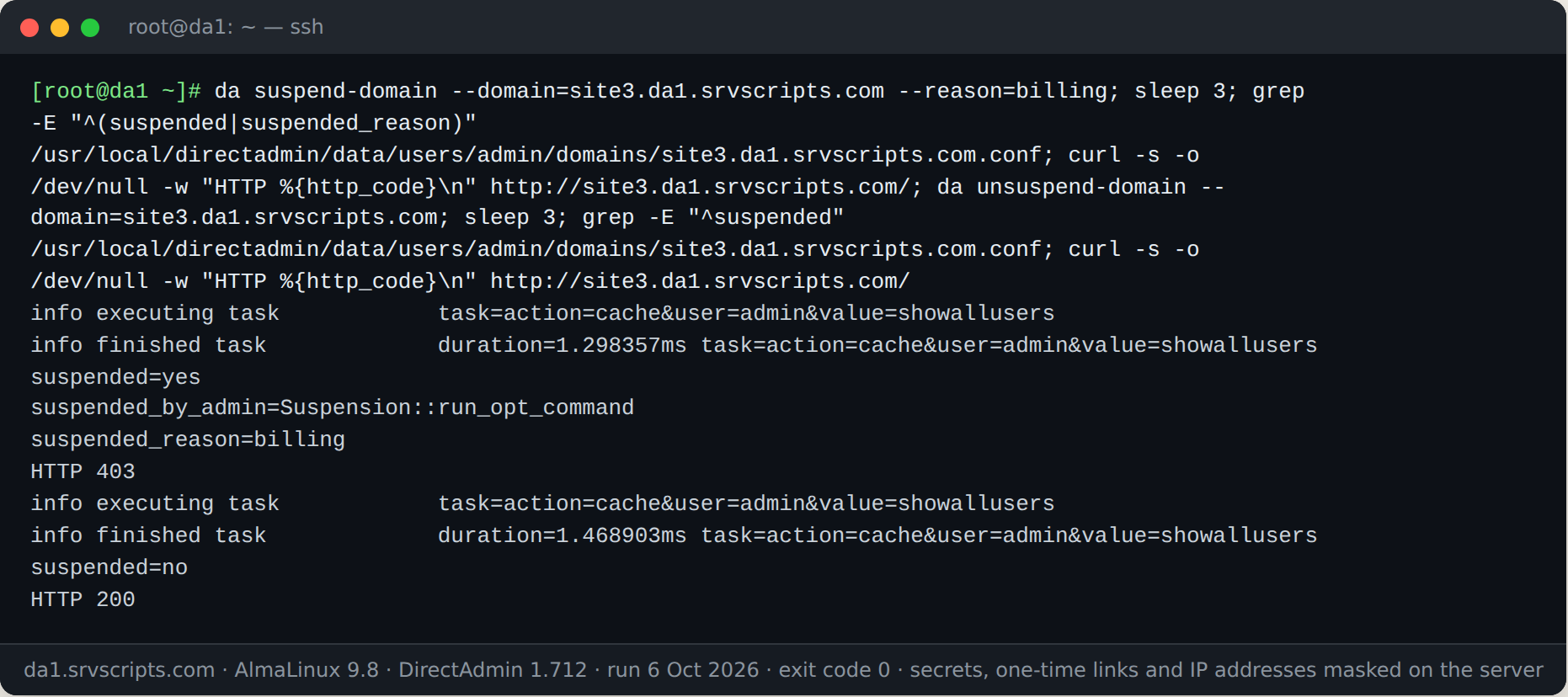
For anything not covered, the /api/ HTTP endpoints are the alternative. The legacy CMD_* endpoints are being removed release by release (CMD_AJAX_GET_COUNTS in 1.704, the limits endpoints in 1.706, the file-manager tree endpoint in 1.711, CMD_AJAX_SEARCH in 1.712), so scripts written against them need updating; Replacing removed legacy API endpoints has the mapping.
Task queue and service control
Some operations are still queued rather than executed by the CLI. The task queue file is processed every minute:
echo "action=rewrite&value=named" >> /usr/local/directadmin/data/task.queue
echo "action=rewrite&value=httpd" >> /usr/local/directadmin/data/task.queue
Failures land in /var/log/directadmin/errortaskq.log. Service restarts go through systemd, and since 1.691 the panel’s Service Monitor is systemd-only, so use systemctl restart exim rather than legacy init scripts.
Common pitfall: running da as the wrong user
da must run as root. Running it under sudo from a user shell works, but running it as the diradmin service user does not, and the failure modes are confusing: config-set reports success while writing to a file the panel never reads, or build cannot write to custombuild/. Provisioning tools should invoke it from a root session and check the exit code.
Verify
After any change, confirm the setting took effect and the panel is healthy:
da config-get update_channel
da version
systemctl is-active directadmin
tail -n 20 /var/log/directadmin/error.log
For CustomBuild changes, da build versions should show the installed version matching the option you set. Keep a short script that runs these four commands after every update; it takes seconds and catches the one release in twenty that needs a manual follow-up. Update-related failures, including license refresh problems, are covered in DirectAdmin license errors and da update failures.
DirectAdmin da CLI at a glance
Official documentation: DirectAdmin documentation, Linux man pages.
Related guides: DirectAdmin removed legacy API endpoints in 2025–2026: what they were and their /api/ replacements · Broken custom Apache/nginx templates after the DOCROOT token change in DirectAdmin 1.710 · Installing DirectAdmin on AlmaLinux 9/10 and Debian 13 (modern license, web installer vs CLI).
Frequently asked questions
Does da config-set also work on older DirectAdmin builds?
The da binary and its config-set subcommand exist on all Go-based builds, but the automatic reload only arrived in 1.710; on earlier releases run systemctl restart directadmin after changing a setting.
How long does da update take?
Typically under a minute: the download is a single binary of a few tens of megabytes and the service restart takes seconds, so users notice at most a brief interruption to the panel interface.
Can I undo this?
A da config-set change is reversed by setting the previous value again, and CustomBuild options by da build set with the old value. Reverting a panel update means switching to a channel that still carries the older release and running da update, which is rarely needed.