Load jumps to 40, PHP workers are all busy, and the question is always the same: who is doing this? On a server with two hundred vhosts, tailing one log does not answer it. This access log top IPs report reads every access log changed in the time window you choose, across all vhosts, and gives you the IPs, user agents and URLs responsible, plus the WordPress login and XML-RPC floods that cause most of these incidents.
Table of Contents
It works on the combined log format used by Apache, LiteSpeed and Nginx, finds the logs itself on cPanel, DirectAdmin, Nginx and LiteSpeed servers, and handles log time zones correctly, so “the last 15 minutes” means the same thing in every file.
What the access log top IPs report shows
- Requests per status class (2xx to 5xx), with a warning when 5xx is 5% or more of traffic.
- Requests per vhost, taken from the log file name (
example.com-ssl_log,example.com.log,example.com.access.log). - Top IPs, top user agents and top URLs, with query strings removed so
/?p=1and/?p=2group together. - Top 404 and top 5xx URLs, per vhost.
- Crawler counts by name (Googlebot, bingbot, AhrefsBot, SemrushBot, GPTBot, Bytespider and others), generic bots and tools, and empty user agents.
- IPs claiming to be Googlebot or bingbot. With
--verify-bots, each one is checked with reverse DNS and a matching forward lookup, the method Google documents in verifying Googlebot. - POSTs to
wp-login.phpandxmlrpc.phpper IP, with a WARN for any IP above the flood threshold.
Usage
curl -fsSL https://srvscripts.com/get/web-log-top-ips/ -o web-log-top-ips.sh
bash web-log-top-ips.sh                               # last hour, all vhosts found
bash web-log-top-ips.sh --since=15m --top=20          # right now, longer lists
bash web-log-top-ips.sh --log /var/log/nginx/access.log --since=2h
bash web-log-top-ips.sh --dir /home/acme/logs --since=1d
bash web-log-top-ips.sh --verify-bots                 # catch fake Googlebots
Sample output
web-log-top-ips on web01 — last 1h (since 2026-10-01 09:12:04)
Log files read: 5   Requests in window: 791

== Top 5 IPs ==
       120  15.2%  45.95.1.10
        60   7.6%  185.10.2.3
        50   6.3%  192.0.2.77
        49   6.2%  198.51.100.7
        40   5.1%  54.36.148.7

== IPs claiming Googlebot ==
        30  66.249.66.1                              verified  crawl-66-249-66-1.googlebot.com
        25  203.0.113.50                             FAKE      no PTR
  WARN  203.0.113.50 claims Googlebot but reverse DNS is missing (25 requests)

== WordPress login and XML-RPC POSTs ==
  POST wp-login.php: 120
       120  45.95.1.10
  WARN  45.95.1.10 sent 120 POSTs to wp-login.php in 1h (brute force / flood)
  POST xmlrpc.php: 60
        60  185.10.2.3
  WARN  185.10.2.3 sent 60 POSTs to xmlrpc.php in 1h (brute force / flood)
Three findings, three blocks. The top two IPs are a login brute force and an XML-RPC flood; both are safe to block in the firewall. The “Googlebot” with no PTR record is a scraper borrowing Google’s name, and blocking it costs you nothing in search. If one site shows up in every section, block xmlrpc.php for it if nothing uses XML-RPC, and turn the login POSTs into a ban rule with the fail2ban regex generator.
Tested on a real server
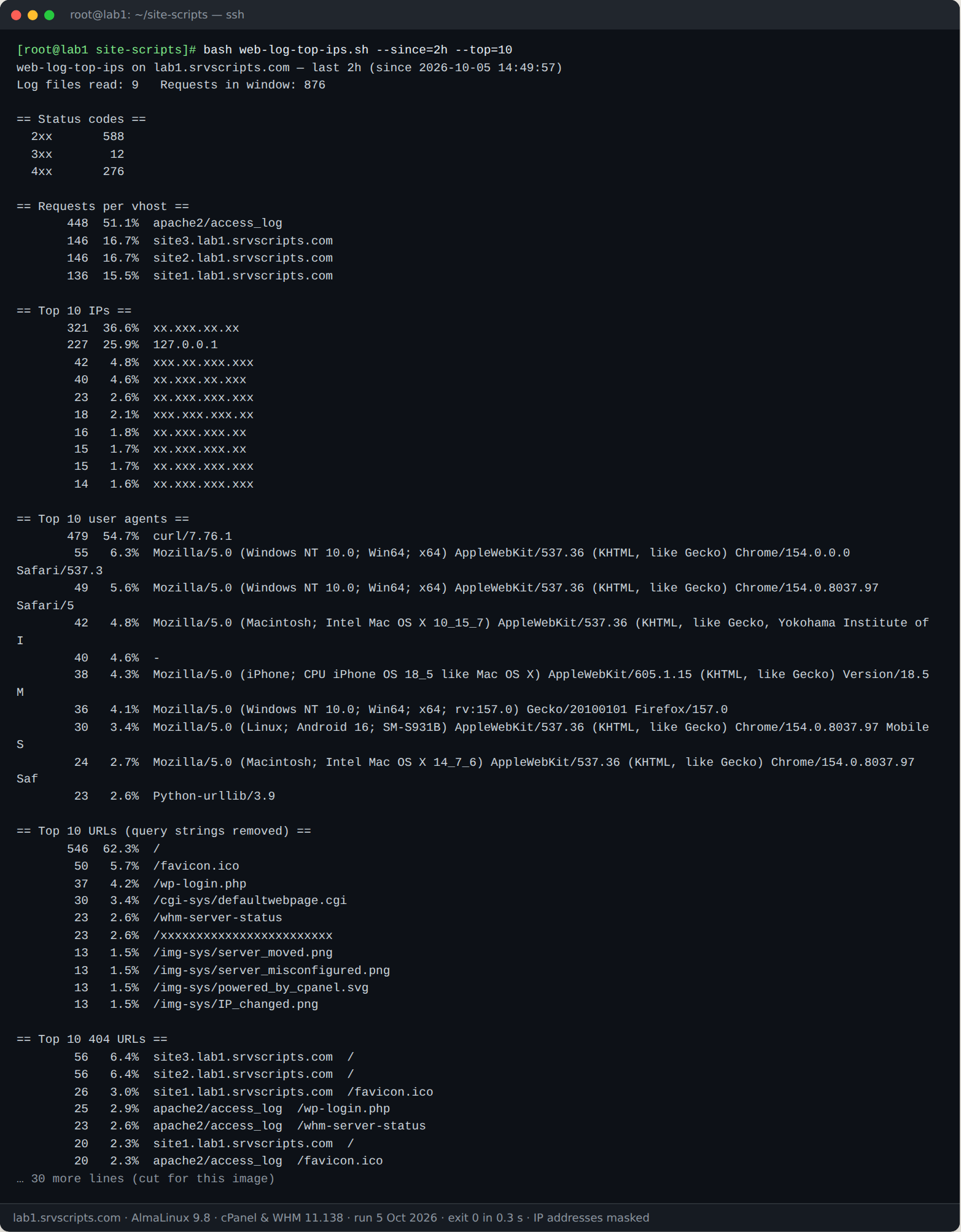
We ran this script on our lab server on 5 October 2026: AlmaLinux 9.8 with cPanel & WHM 11.138, MariaDB 10.11 and three WordPress test accounts. The screenshot is the real terminal output; only IP addresses are masked, and long output is cut where marked.
Options
--since=DUR— window:30s,15m,2h,1d(default1h). Only files modified inside the window are opened.--top=N— lines per section (default 10).--log FILE— read a specific log; repeatable,.gzaccepted.--dir DIR— read every access log in a directory (two levels deep).--verify-bots— reverse and forward DNS for claimed Googlebot and bingbot IPs.--flood=N— POSTs per IP towp-login.phporxmlrpc.phpthat count as a flood (default 50).
Running it from cron
*/15 * * * * /root/bin/web-log-top-ips.sh --since=15m --flood=100 > /root/toplog.txt || mail -s "Web flood on $(hostname)" you@example.com < /root/toplog.txtExit code 1 means a flood, a fake bot (with --verify-bots) or a high 5xx rate.
Notes
Read-only; it never blocks anything itself. Lines that are not in combined format are ignored rather than miscounted. On cPanel, domlogs are emptied after each stats run, so a long window may be incomplete; archived copies live in each user’s ~/logs when log archiving is on, and can be read with --dir. Behind Cloudflare or another proxy, the logged IP is the proxy’s unless the web server restores the visitor IP. Verification sends one DNS query per claimed bot IP and nothing else leaves the server.
Access log top IPs at a glance
Official documentation: DirectAdmin documentation, cPanel & WHM documentation, AlmaLinux wiki.
Related guides: CSF Fork 2026: Which Reliable Replacement After ConfigServer? · Best VPS for cPanel and DirectAdmin in 2026: What to Check · Disk full on a production server: recovery runbook.
The script
#!/usr/bin/env bash
# Access Log Top IPs and Bots Report (v1.0.0) - from srvScripts.com
# Source, docs and updates: https://srvscripts.com/scripts/web-log-top-ips/
# Copyright (c) 2026 srvScripts.com. MIT licence: if you copy, share or adapt this script, keep this notice and credit srvScripts.com.
# web-log-top-ips.sh — who is hitting the web server right now: top IPs, agents, URLs, bots and WordPress floods
# https://srvscripts.com/scripts/web-log-top-ips/   License: MIT
#
# Read-only. Parses Apache / LiteSpeed / Nginx access logs in combined format for the last
# N minutes or hours. Finds the logs itself on cPanel, DirectAdmin, Nginx and LiteSpeed.
#   bash web-log-top-ips.sh                        # last hour, all vhosts
#   bash web-log-top-ips.sh --since=15m --top=20
#   bash web-log-top-ips.sh --log /var/log/nginx/access.log --since=2h
#   bash web-log-top-ips.sh --verify-bots          # reverse-DNS check of "Googlebot"/"bingbot"
set -uo pipefail
export LC_ALL=C

usage() {
  cat <<'EOF'
Usage: web-log-top-ips.sh [options]

Options:
  --since=DUR      time window: 30s, 15m, 2h, 1d (default 1h)
  --top=N          lines per section (default 10)
  --log FILE       read this access log (repeatable; .gz is fine)
  --dir DIR        read every access log in DIR (repeatable)
  --verify-bots    reverse + forward DNS check of IPs claiming Googlebot/bingbot
  --flood=N        POSTs to wp-login.php or xmlrpc.php from one IP that count as
                   a flood (default 50)
  --no-color       plain output even on a terminal
  -h, --help       show this help

Without --log/--dir the script looks in cPanel domlogs, DirectAdmin
/var/log/httpd/domains, /var/log/nginx, /usr/local/lsws/logs and the stock
Apache log directories. Only files changed inside the window are read.

Exit codes: 0 nothing unusual, 1 flood / fake bots / high 5xx rate, 2 usage error
EOF
}

SINCE=1h; TOP=10; VERIFY=0; FLOOD=50; COLOR=1
LOGS=(); DIRS=()
while (( $# )); do
  case $1 in
    --since=*) SINCE=${1#*=} ;;
    --since) SINCE=${2:-}; shift ;;
    --top=*) TOP=${1#*=} ;;
    --top) TOP=${2:-}; shift ;;
    --log=*) LOGS+=("${1#*=}") ;;
    --log) LOGS+=("${2:-}"); shift ;;
    --dir=*) DIRS+=("${1#*=}") ;;
    --dir) DIRS+=("${2:-}"); shift ;;
    --verify-bots) VERIFY=1 ;;
    --flood=*) FLOOD=${1#*=} ;;
    --no-color) COLOR=0 ;;
    -h|--help) usage; exit 0 ;;
    *) echo "Unknown option: $1 (see --help)" >&2; exit 2 ;;
  esac
  shift
done
[[ $TOP =~ ^[0-9]+$ && $FLOOD =~ ^[0-9]+$ ]] || { echo "--top and --flood need a number" >&2; exit 2; }
if [[ $SINCE =~ ^([0-9]+)([smhd]?)$ ]]; then
  case ${BASH_REMATCH[2]} in
    s) SECS=${BASH_REMATCH[1]} ;; m|'') SECS=$(( BASH_REMATCH[1] * 60 )) ;;
    h) SECS=$(( BASH_REMATCH[1] * 3600 )) ;; d) SECS=$(( BASH_REMATCH[1] * 86400 )) ;;
  esac
else
  echo "Bad --since value: $SINCE (use e.g. 15m, 2h, 1d)" >&2; exit 2
fi

C_WARN=''; C_OFF=''
[[ -t 1 && $COLOR -eq 1 ]] && { C_WARN=$'\e[33m'; C_OFF=$'\e[0m'; }
hr()   { printf '\n== %s ==\n' "$*"; }
warn() { printf '  %sWARN%s  %s\n' "$C_WARN" "$C_OFF" "$*"; PROBLEMS=$((PROBLEMS + 1)); }
PROBLEMS=0

# ---- collect log files ----------------------------------------------------------------
declare -A SEEN=()
FILES=()
add_file() { local r; r=$(readlink -f "$1") || return; [[ -f $r && -z ${SEEN[$r]:-} ]] || return; SEEN[$r]=1; FILES+=("$r"); }
MMIN=$(( SECS / 60 + 2 ))
# $1 = dir, $2 = depth, $3 = 1 to take only names containing "access"
scan_dir() {
  local f
  while IFS= read -r -d '' f; do
    case ${f##*/} in
      .*|*error_log*|*error.log*|*bytes_log*|*.bytes|ftpxferlog*|*ftp_log*|*.offset|*.bkup*|*stderr*|*lsrestart*) continue ;;
    esac
    [[ $3 == 1 && ${f##*/} != *access* ]] && continue
    add_file "$f"
  done < <(find "$1/" -maxdepth "$2" -type f -mmin -"$MMIN" -print0 2>/dev/null)
}
for f in "${LOGS[@]}"; do [[ -r $f ]] || { echo "Cannot read $f" >&2; exit 2; }; add_file "$f"; done
for d in "${DIRS[@]}"; do [[ -d $d ]] || { echo "Not a directory: $d" >&2; exit 2; }; scan_dir "$d" 2 0; done
if (( ${#LOGS[@]} + ${#DIRS[@]} == 0 )); then
  for d in /var/log/apache2/domlogs /usr/local/apache/domlogs /etc/apache2/logs/domlogs /var/log/httpd/domains; do
    [[ -d $d ]] && scan_dir "$d" 2 0
  done
  for d in /var/log/nginx /usr/local/lsws/logs /var/log/httpd /var/log/apache2; do
    [[ -d $d ]] && scan_dir "$d" 1 1
  done
fi
if (( ${#FILES[@]} == 0 )); then
  echo "No access logs changed in the last $SINCE were found. Use --log FILE or --dir DIR." >&2; exit 2
fi

# vhost label from a log file name: example.com-ssl_log, example.com.log, example.com.access.log ...
vhost_of() {
  local b=${1##*/}
  b=${b%.gz}
  [[ $b =~ ^(.+)\.[0-9]+$ ]] && b=${BASH_REMATCH[1]}          # rotated copies: access.log.1
  local file=$b
  b=${b%-ssl_log}; b=${b%.access.log}; b=${b%-access.log}; b=${b%_access.log}; b=${b%.log}
  case $b in access|access_log) b="$(basename "$(dirname "$1")")/$file" ;; esac
  printf '%s' "$b"
}

# ---- parse: one TSV line per request inside the window --------------------------------
TMP=$(mktemp) || exit 2
trap 'rm -f "$TMP"' EXIT
NOW=$(date +%s); CUTOFF=$(( NOW - SECS ))
# Combined format: IP ident user [dd/Mon/yyyy:HH:MM:SS +zzzz] "METHOD URL PROTO" status bytes "referer" "agent"
# Split on double quotes: $1 = IP..timestamp, $2 = request, $3 = status bytes, $6 = user agent.
# Timestamps are turned into epoch seconds with plain arithmetic, so mawk works too.
AWK_PARSE='
function days(y, m, d) { if (m <= 2) { y--; m += 12 }
  return 365*y + int(y/4) - int(y/100) + int(y/400) + int((153*(m-3)+2)/5) + d - 719469 }
BEGIN { FS = "\""; mon = "JanFebMarAprMayJunJulAugSepOctNovDec" }
{
  n = split($1, a, " "); if (n < 5) next
  ts = a[4]; tz = a[5]
  if (ts !~ /^\[[0-9][0-9]\/[A-Z][a-z][a-z]\/[0-9][0-9][0-9][0-9]:/) next
  mo = (index(mon, substr(ts, 5, 3)) + 2) / 3; if (mo < 1) next
  t = days(substr(ts, 9, 4) + 0, mo, substr(ts, 2, 2) + 0) * 86400 + substr(ts, 14, 2) * 3600 + substr(ts, 17, 2) * 60 + substr(ts, 20, 2)
  off = substr(tz, 2, 2) * 3600 + substr(tz, 4, 2) * 60; if (substr(tz, 1, 1) == "-") off = -off
  if (t - off < cutoff) next
  split($2, r, " "); split($3, s, " ")
  url = r[2]; q = index(url, "?"); if (q) url = substr(url, 1, q - 1); if (url == "") url = "-"
  ua = $6; gsub(/\t/, " ", ua); if (ua == "") ua = "-"
  printf "%s\t%s\t%s\t%s\t%s\t%s\n", vh, a[1], s[1], r[1], url, ua
}'
HAVE_GZIP=0; command -v gzip >/dev/null 2>&1 && HAVE_GZIP=1
for f in "${FILES[@]}"; do
  if [[ $f == *.gz && $HAVE_GZIP -eq 0 ]]; then echo "skipped: $f (gzip not installed)"; continue; fi
  if [[ $f == *.gz ]]; then
    gzip -dc -- "$f"
  else
    cat -- "$f"
  fi | awk -v vh="$(vhost_of "$f")" -v cutoff="$CUTOFF" "$AWK_PARSE" >> "$TMP"
done

TOTAL=$(wc -l < "$TMP")
echo "web-log-top-ips on $(hostname) — last $SINCE (since $(date -d "@$CUTOFF" '+%F %T' 2>/dev/null || echo "$CUTOFF"))"
echo "Log files read: ${#FILES[@]}   Requests in window: $TOTAL"
(( TOTAL == 0 )) && { echo "No requests in the window."; exit 0; }

# count | sort | print "count  share  value"
top() { sort | uniq -c | sort -rn | head -n "$TOP" | awk -v t="$TOTAL" '{ c = $1; sub(/^ *[0-9]+ /, ""); printf "  %8d %5.1f%%  %s\n", c, c * 100 / t, $0 } END { if (NR == 0) print "  none" }'; }
col() { cut -f"$1" "$TMP"; }

hr "Status codes"
awk -F'\t' '{ c[substr($3, 1, 1) "xx"]++ } END { for (k in c) printf "  %-4s %8d\n", k, c[k] }' "$TMP" | sort
ERR5=$(awk -F'\t' '$3 ~ /^5/' "$TMP" | wc -l)
(( TOTAL >= 100 && ERR5 * 100 / TOTAL >= 5 )) && warn "5xx responses are $(( ERR5 * 100 / TOTAL ))% of requests"

hr "Requests per vhost";           col 1 | top
hr "Top $TOP IPs";                  col 2 | top
hr "Top $TOP user agents";          col 6 | cut -c1-110 | top
hr "Top $TOP URLs (query strings removed)"; col 5 | top
hr "Top $TOP 404 URLs";             awk -F'\t' '$3 == "404" { print $1 "  " $5 }' "$TMP" | top
hr "Top $TOP 5xx URLs";             awk -F'\t' '$3 ~ /^5/ { print $3 "  " $1 "  " $5 }' "$TMP" | top

hr "Crawlers and bots (by user agent)"
awk -F'\t' '
  BEGIN { n = split("Googlebot|bingbot|YandexBot|Baiduspider|Applebot|DuckDuckBot|AhrefsBot|SemrushBot|MJ12bot|DotBot|PetalBot|Bytespider|GPTBot|ClaudeBot|Amazonbot|meta-externalagent|facebookexternalhit|DataForSeoBot|CCBot", b, "|") }
  { hit = 0
    for (i = 1; i <= n; i++) if (index($6, b[i])) { c[b[i]]++; hit = 1; break }
    if (!hit && tolower($6) ~ /bot|crawl|spider|scan|curl|wget|python|go-http|java\//) c["other bots/tools"]++
    if ($6 == "-") c["empty user agent"]++ }
  END { for (k in c) printf "  %8d  %s\n", c[k], k }' "$TMP" | sort -rn | head -n "$TOP"

# Anyone can put "Googlebot" in a user agent. Real ones reverse-resolve to Google/Microsoft
# names that resolve forward to the same IP.
ptr() {
  if command -v dig >/dev/null 2>&1; then dig +short -x "$1" | head -n1 | sed 's/\.$//'
  elif command -v host >/dev/null 2>&1; then host "$1" 2>/dev/null | awk '/pointer/ { print $NF; exit }' | sed 's/\.$//'
  else getent hosts "$1" | awk '{ print $2; exit }'; fi
}
fwd() {
  if command -v dig >/dev/null 2>&1; then { dig +short A "$1"; dig +short AAAA "$1"; }
  elif command -v host >/dev/null 2>&1; then host "$1" 2>/dev/null | awk '/has (IPv6 )?address/ { print $NF }'
  else getent ahosts "$1" | awk '{ print $1 }' | sort -u; fi
}
for bot in Googlebot bingbot; do
  hr "IPs claiming $bot"
  list=$(awk -F'\t' -v b="$bot" 'index($6, b) { print $2 }' "$TMP" | sort | uniq -c | sort -rn | head -n "$TOP")
  [[ -z $list ]] && { echo "  none"; continue; }
  if (( ! VERIFY )); then awk '{ printf "  %8d  %s\n", $1, $2 }' <<<"$list"; echo "  (add --verify-bots to check these with reverse DNS)"; continue; fi
  if [[ $bot == Googlebot ]]; then re='\.(googlebot|google)\.com$'; else re='\.search\.msn\.com$'; fi
  while read -r cnt ip; do
    name=$(ptr "$ip")
    if [[ -n $name && $name =~ $re ]] && fwd "$name" | grep -qx "$ip"; then
      printf '  %8d  %-40s verified  %s\n' "$cnt" "$ip" "$name"
    else
      printf '  %8d  %-40s FAKE      %s\n' "$cnt" "$ip" "${name:-no PTR}"
      warn "$ip claims $bot but reverse DNS is ${name:-missing} ($cnt requests)"
    fi
  done <<<"$list"
done

hr "WordPress login and XML-RPC POSTs"
for target in wp-login.php xmlrpc.php; do
  n=$(awk -F'\t' -v t="/$target" '$4 == "POST" && substr($5, length($5) - length(t) + 1) == t' "$TMP" | wc -l)
  echo "  POST $target: $n"
  (( n == 0 )) && continue
  while read -r cnt ip; do
    printf '  %8d  %s\n' "$cnt" "$ip"
    (( cnt >= FLOOD )) && warn "$ip sent $cnt POSTs to $target in $SINCE (brute force / flood)"
  done < <(awk -F'\t' -v t="/$target" '$4 == "POST" && substr($5, length($5) - length(t) + 1) == t { print $2 }' "$TMP" | sort | uniq -c | sort -rn | head -n "$TOP")
done

hr "Result"
if (( PROBLEMS )); then echo "  $PROBLEMS warning(s)."; exit 1; fi
echo "  OK  nothing unusual"
exit 0
ba9e293083311acdabb99373082678fd18f21201106b509763254551d0845be6curl -fsSL -o web-log-top-ips.sh https://scr.srvscripts.com/web-log-top-ips/web-log-top-ips.sh && curl -fsSL https://scr.srvscripts.com/web-log-top-ips/web-log-top-ips.sh.sha256 | sha256sum -cInvoke-WebRequest -Uri 'https://scr.srvscripts.com/web-log-top-ips/web-log-top-ips.sh' -OutFile 'web-log-top-ips.sh'; if ((Get-FileHash 'web-log-top-ips.sh' -Algorithm SHA256).Hash -eq 'BA9E293083311ACDABB99373082678FD18F21201106B509763254551D0845BE6') { 'OK: the file is intact' } else { 'MISMATCH: do not run this file' }curl and sha256sum are not the Linux tools, so use the PowerShell line there.Also on GitHub: github.com/srvscripts/scripts
Frequently asked questions
Which log locations does it find on its own?
cPanel domlogs (/var/log/apache2/domlogs, /usr/local/apache/domlogs), DirectAdmin /var/log/httpd/domains, /var/log/nginx, /usr/local/lsws/logs and the stock Apache directories.
How big a log can it handle?
It streams each file once through awk, so a few gigabytes are fine; skipping files not touched in the window keeps short windows fast.
Does it work with mawk on Ubuntu?
Yes. Timestamps are converted with plain arithmetic instead of gawk-only functions such as mktime, so it runs the same on gawk (AlmaLinux, Rocky) and mawk (Ubuntu, Debian).
Why is an IP flagged even though its user agent says Googlebot?
Anyone can send that user agent. Only IPs whose reverse DNS ends in googlebot.com or google.com, and resolves back to the same IP, are real.