A full disk rarely arrives without warning. It creeps up at a few gigabytes a day until MariaDB cannot write its binlog, Exim starts deferring mail and every PHP session write fails at once. The inode version is worse: df -h shows 40% free, yet nothing can create a file because a cache directory or a mail queue holds four million tiny files. This disk and inode alert watches both, remembers yesterday’s numbers, and tells you how many days you have left.
Table of Contents
What the disk and inode alert checks
- Every real filesystem from
df. Pseudo filesystems (tmpfs, devtmpfs, overlay, squashfs, ramfs, efivarfs) are skipped, and so are cPanel’s/home/virtfsjail bind mounts, which would otherwise show the same disk hundreds of times. - Space and inode use against
--warnand--crit(80% and 90% by default). The same thresholds apply to both. - Growth per day since a baseline sample kept in
/var/lib/srvscripts/disk-inode-alert.state. The baseline is refreshed every 12 hours, so a job that runs every five minutes still measures growth over hours, not over minutes. - Days until full, from that growth rate. When inodes will run out before space does, the estimate is marked
(i). A filesystem that will fill within--days(default 7) is a WARN even if it is only at 50%. - On every filesystem over a threshold, the ten largest directories (
du -x --max-depth=2) and, when inodes are the problem, the ten directories holding the most files (du --inodes). Each scan has a time limit so the script cannot hang on a 10 TB volume.
Usage
curl -fsSL https://srvscripts.com/get/disk-inode-alert/ -o disk-inode-alert.sh
bash disk-inode-alert.sh                              # warn 80%, crit 90%, full within 7 days
bash disk-inode-alert.sh --warn 85 --crit 95 --days 14
bash disk-inode-alert.sh --no-scan                    # table only, skip du
bash disk-inode-alert.sh -q --mail ops@example.com    # silent unless there is a problem
Sample output
== Filesystems (warn 80%, crit 90%, or full within 7 days) ==
  STATUS MOUNT                    TYPE            SIZE     FREE  SPACE  INODES   GROWTH/DAY   FULL IN
  WARN   /                        xfs             50GB    9.1GB    82%     14%      +380.2MB     24.5d
  CRIT   /home                    xfs            500GB     31GB    94%     61%        +2.4GB     13.2d
  WARN   /var                     ext4            20GB     12GB    40%     88%      +12.0MB   3.1d(i)
  OK     /boot                    xfs            960MB    612MB    37%      1%             0         -

== Largest directories on /home (du -x, depth 2) ==
             182GB  /home/acmehost
             141GB  /home/acmehost/mail
              64GB  /home/shopsite
              38GB  /home/shopsite/public_html
      (du stopped after 60s; list is partial — raise --du-timeout)

== Most files (inodes) on /var (du --inodes, depth 2) ==
           4107342  /var/lib
           3988120  /var/lib/php
            211406  /var/spool

3 filesystem(s) need attention on web1.example.com.
/home is the obvious one: 94% and growing 2.4 GB a day, mostly one account’s mail. The line that would have been missed is /var: space is fine, but inodes are at 88% and will run out in about three days. The inode scan points straight at /var/lib/php, which is almost always PHP session files that the session garbage collector is not cleaning up.
Tested on a real server
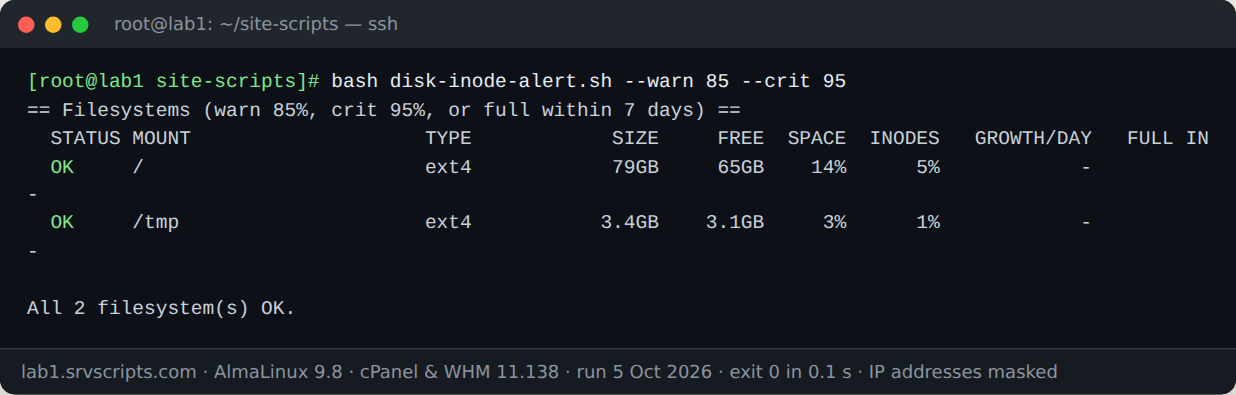
We ran this script on our lab server on 5 October 2026: AlmaLinux 9.8 with cPanel & WHM 11.138, MariaDB 10.11 and three WordPress test accounts. The screenshot is the real terminal output; only IP addresses are masked.
Options
--warn PCT/--crit PCT— thresholds for both space and inodes (80 / 90).--days N— warn when a filesystem will fill within N days (7;0turns it off).--state FILE/--no-state— where the baseline is kept, or run without growth tracking.--no-scan/--du-timeout SEC— skip the directory scans, or change their time limit (60 seconds each).--mail ADDRESS— mail the report when there is a problem, usingmailor/usr/sbin/sendmail.-q— print nothing when everything is OK.--no-colorfor plain output.
Running it from cron
*/30 * * * * /root/bin/disk-inode-alert.sh -q --mail ops@example.comThe exit code is 1 for any WARN or CRIT and 0 otherwise, so it also works as a check command in Nagios-style monitoring or behind || your-alert-command. Growth needs one baseline at least an hour old, so the GROWTH/DAY column fills in after the first hour of runs.
Notes
The script only reads, apart from its own small state file. du walks the filesystem and can take a while and cause I/O on large volumes; the time limit and the fact that it only runs on filesystems already over a threshold keep that bounded. Filesystems without a fixed inode table (btrfs, ZFS) show - in the INODES column. Growth estimates are linear: a nightly backup that writes 30 GB and deletes it in the morning will make the estimate jumpy, so use --days as an early hint and the percentage thresholds as the real alarm. For a per-account breakdown on cPanel, cPanel Disk Usage Report splits usage into files, mail and databases.
Disk and inode alert at a glance


Official documentation: DirectAdmin documentation, cPanel & WHM documentation, AlmaLinux wiki.
Related guides: Install DirectAdmin on AlmaLinux 9/10 and Debian 13: Easy 2026 Guide · CSF Fork 2026: Which Reliable Replacement After ConfigServer? · Disk full on a production server: recovery runbook.
The script
#!/usr/bin/env bash
# Disk and Inode Alert (v1.0.0) - from srvScripts.com
# Source, docs and updates: https://srvscripts.com/scripts/disk-inode-alert/
# Copyright (c) 2026 srvScripts.com. MIT licence: if you copy, share or adapt this script, keep this notice and credit srvScripts.com.
# disk-inode-alert.sh — warn before a filesystem runs out of space or inodes, with growth rate and days-to-full
# https://srvscripts.com/scripts/disk-inode-alert/   License: MIT
#
# Checks every real filesystem (tmpfs, devtmpfs, overlay, squashfs and friends are skipped)
# for block and inode usage. Keeps a tiny state file so each run can report growth since the
# previous run and estimate how many days are left. Over a threshold it lists the largest and
# the most inode-heavy directories on that filesystem.
#   bash disk-inode-alert.sh                          # warn 80%, crit 90%
#   bash disk-inode-alert.sh --warn 85 --crit 95 --days 14
#   bash disk-inode-alert.sh -q --mail ops@example.com  # cron: silent unless there is a problem
# Exit codes: 0 all OK, 1 at least one WARN/CRIT, 2 usage or dependency error.
set -uo pipefail
export LC_ALL=C

WARN=80; CRIT=90; DAYS=7; QUIET=0; MAILTO=""; COLOR=1; SCAN=1; DU_TIMEOUT=60
STATE=/var/lib/srvscripts/disk-inode-alert.state; USE_STATE=1
GROWTH_MIN=3600; BASE_MAX=43200      # growth is measured against a baseline 1h..12h old
SKIP_TYPES="tmpfs devtmpfs overlay squashfs ramfs iso9660 efivarfs nsfs fuse.lxcfs"

usage() {
  cat <<'EOF'
Usage: disk-inode-alert.sh [options]
  --warn PCT         warning threshold for space and inodes (default 80)
  --crit PCT         critical threshold for space and inodes (default 90)
  --days N           also warn when a filesystem is estimated to fill within N days (default 7, 0 = off)
  --state FILE       state file for growth tracking (default /var/lib/srvscripts/disk-inode-alert.state)
  --no-state         do not read or write the state file
  --no-scan          do not run du on filesystems over threshold
  --du-timeout SEC   time limit for each du scan (default 60)
  --mail ADDRESS     mail the report to ADDRESS when there is a problem (needs mail or sendmail)
  -q, --quiet        print nothing when everything is OK
  --no-color         plain output
  -h, --help         this help
EOF
}

need_arg() { [[ $# -ge 2 && -n "$2" ]] || { echo "Option $1 needs a value" >&2; exit 2; }; }
while [[ $# -gt 0 ]]; do
  case "$1" in
    --warn) need_arg "$@"; WARN=$2; shift 2 ;;
    --crit) need_arg "$@"; CRIT=$2; shift 2 ;;
    --days) need_arg "$@"; DAYS=$2; shift 2 ;;
    --state) need_arg "$@"; STATE=$2; shift 2 ;;
    --no-state) USE_STATE=0; shift ;;
    --no-scan) SCAN=0; shift ;;
    --du-timeout) need_arg "$@"; DU_TIMEOUT=$2; shift 2 ;;
    --mail) need_arg "$@"; MAILTO=$2; shift 2 ;;
    -q|--quiet) QUIET=1; shift ;;
    --no-color) COLOR=0; shift ;;
    -h|--help) usage; exit 0 ;;
    *) echo "Unknown option: $1 (try --help)" >&2; exit 2 ;;
  esac
done
for n in "$WARN" "$CRIT" "$DAYS" "$DU_TIMEOUT"; do
  [[ "$n" =~ ^[0-9]+$ ]] || { echo "Thresholds must be whole numbers, got '$n'" >&2; exit 2; }
done
(( WARN < CRIT )) || { echo "--warn ($WARN) must be lower than --crit ($CRIT)" >&2; exit 2; }
command -v df >/dev/null || { echo "df not found" >&2; exit 2; }
[[ -t 1 ]] || COLOR=0

if (( COLOR )); then R=$'\e[31m'; Y=$'\e[33m'; G=$'\e[32m'; N=$'\e[0m'; else R=""; Y=""; G=""; N=""; fi
hr() { printf '\n== %s ==\n' "$*"; }
human() { numfmt --to=iec --suffix=B "$1" 2>/dev/null || echo "${1}B"; }   # takes bytes

# ---- read the previous state: "mount used_kb iused epoch" per line --------------------------
declare -A PREV_USED PREV_IUSED PREV_TS
if (( USE_STATE )) && [[ -r "$STATE" ]]; then
  while read -r m u i t; do
    [[ -n "$m" && "$t" =~ ^[0-9]+$ ]] || continue
    PREV_USED[$m]=$u; PREV_IUSED[$m]=$i; PREV_TS[$m]=$t
  done < "$STATE"
fi

# ---- collect filesystems -----------------------------------------------------------------------
# GNU df --output gives space and inodes in one pass; -x drops pseudo filesystems.
skip_args=()
for t in $SKIP_TYPES; do skip_args+=(-x "$t"); done
NOW=$(date +%s)
declare -a ROWS=()
declare -A SEEN
while read -r src fstype size used avail pcent itotal iused ipcent target; do
  [[ "$size" =~ ^[0-9]+$ ]] && (( size > 0 )) || continue
  [[ "$target" == /home/virtfs/* ]] && continue     # cPanel jailshell bind mounts
  [[ -n "${SEEN[$src]:-}" && "$src" == /dev/* ]] && continue   # same device bind-mounted twice
  SEEN[$src]=1
  ROWS+=("$target|$fstype|$size|$used|$avail|${pcent%\%}|$itotal|$iused|${ipcent%\%}")
done < <(df -k --output=source,fstype,size,used,avail,pcent,itotal,iused,ipcent,target "${skip_args[@]}" 2>/dev/null | tail -n +2)
(( ${#ROWS[@]} )) || { echo "No filesystems returned by df (GNU coreutils df is required)" >&2; exit 2; }

# ---- helpers -------------------------------------------------------------------------------------
level_of() {   # percent -> 0 ok, 1 warn, 2 crit
  local p=$1
  [[ "$p" =~ ^[0-9]+$ ]] || { echo 0; return; }
  if (( p >= CRIT )); then echo 2; elif (( p >= WARN )); then echo 1; else echo 0; fi
}
days_left() {  # free, grown, seconds -> days until full (empty if not growing)
  awk -v f="$1" -v g="$2" -v s="$3" 'BEGIN{ if (g <= 0 || s <= 0) exit; d = f / (g * 86400 / s); printf "%.1f", d }'
}
top_dirs() {   # mount, du-mode(space|inodes)
  local mnt=$1 mode=$2 out rc
  local args=(-x --max-depth=2)
  [[ "$mode" == inodes ]] && args+=(--inodes) || args+=(-k)
  out=$(timeout "$DU_TIMEOUT" du "${args[@]}" "$mnt" 2>/dev/null); rc=$?
  printf '%s\n' "$out" | awk -v m="$mnt" -F'\t' '$2 != m' | sort -rn | head -10 |
    while IFS=$'\t' read -r n path; do
      if [[ "$mode" == inodes ]]; then printf '      %12s  %s\n' "$n" "$path"
      else printf '      %12s  %s\n' "$(human $(( n * 1024 )))" "$path"; fi
    done
  (( rc == 124 )) && printf '      (du stopped after %ss; list is partial — raise --du-timeout)\n' "$DU_TIMEOUT"
}

# ---- report ------------------------------------------------------------------------------------
PROBLEMS=0
declare -a HOT=()
report() {
  local row mnt fstype size used avail pct itot iused ipct lvl ilvl worst status grow gtxt full ifull el ibased
  hr "Filesystems (warn ${WARN}%, crit ${CRIT}%$( (( DAYS )) && printf ', or full within %s days' "$DAYS"))"
  printf '  %-6s %-24s %-11s %8s %8s %6s %7s %12s %9s\n' STATUS MOUNT TYPE SIZE FREE SPACE INODES GROWTH/DAY "FULL IN"
  for row in "${ROWS[@]}"; do
    IFS='|' read -r mnt fstype size used avail pct itot iused ipct <<<"$row"
    lvl=$(level_of "$pct"); ilvl=$(level_of "$ipct")
    worst=$(( lvl > ilvl ? lvl : ilvl ))
    gtxt="-"; full="-"; ibased=0
    # growth needs a baseline at least GROWTH_MIN old, so short spikes do not produce silly estimates
    if [[ -n "${PREV_TS[$mnt]:-}" ]] && (( NOW - PREV_TS[$mnt] >= GROWTH_MIN )); then
      el=$(( NOW - PREV_TS[$mnt] ))
      grow=$(( used - PREV_USED[$mnt] ))          # KB since last run
      gtxt=$(awk -v g="$grow" -v s="$el" 'BEGIN{ d = g * 1024 * 86400 / s; sgn = (d < 0) ? "-" : "+"; if (d < 0) d = -d
        if (g == 0) { printf "0"; exit }; split("B KB MB GB TB", u, " "); i = 1; while (d >= 1024 && i < 5) { d /= 1024; i++ } printf "%s%.1f%s", sgn, d, u[i] }')
      full=$(days_left "$avail" "$grow" "$el")
      if [[ "$itot" =~ ^[0-9]+$ ]] && (( itot > 0 )) && [[ "${PREV_IUSED[$mnt]:-}" =~ ^[0-9]+$ ]]; then
        ifull=$(days_left $(( itot - iused )) $(( iused - PREV_IUSED[$mnt] )) "$el")
        if [[ -n "$ifull" ]] && { [[ -z "$full" ]] || awk -v a="$ifull" -v b="$full" 'BEGIN{exit !(a < b)}'; }; then
          full="$ifull"; ibased=1             # inodes will run out before space
        fi
      fi
      if [[ -n "$full" ]]; then
        (( DAYS > 0 )) && awk -v a="$full" -v d="$DAYS" 'BEGIN{exit !(a < d)}' && (( worst < 1 )) && worst=1
        full="${full}d"; (( ibased )) && full="${full}(i)"
      else
        full="-"
      fi
    fi
    case $worst in
      2) status="${R}CRIT${N}  " ;;
      1) status="${Y}WARN${N}  " ;;
      *) status="${G}OK${N}    " ;;
    esac
    if (( worst > 0 )); then PROBLEMS=$(( PROBLEMS + 1 )); HOT+=("$mnt|$lvl|$ilvl"); fi
    [[ "$ipct" =~ ^[0-9]+$ ]] && ipct="${ipct}%" || ipct="-"     # btrfs/zfs report no inode limit
    printf '  %s %-24s %-11.11s %8s %8s %5s%% %7s %12s %9s\n' "$status" "$mnt" "$fstype" \
      "$(human $(( size * 1024 )))" "$(human $(( avail * 1024 )))" "$pct" "$ipct" "$gtxt" "$full"
  done
  if (( SCAN )) && (( ${#HOT[@]} )); then
    command -v du >/dev/null || { echo "  skipped: du not installed"; return; }
    for row in "${HOT[@]}"; do
      IFS='|' read -r mnt lvl ilvl <<<"$row"
      if (( lvl > 0 )); then hr "Largest directories on $mnt (du -x, depth 2)"; top_dirs "$mnt" space; fi
      if (( ilvl > 0 )); then hr "Most files (inodes) on $mnt (du --inodes, depth 2)"; top_dirs "$mnt" inodes; fi
    done
  fi
}

TMP_OUT=$(mktemp) || exit 2
trap 'rm -f "$TMP_OUT"' EXIT
report > "$TMP_OUT"      # plain redirection, not a pipe: PROBLEMS and HOT stay in this shell

# ---- save state for the next run ----------------------------------------------------------------
if (( USE_STATE )); then
  if mkdir -p "$(dirname "$STATE")" 2>/dev/null && : > "$STATE.tmp" 2>/dev/null; then
    for row in "${ROWS[@]}"; do
      IFS='|' read -r mnt _ _ used _ _ _ iused _ <<<"$row"
      [[ "$mnt" == *" "* ]] && continue      # keep the state file one-record-per-line simple
      if [[ -n "${PREV_TS[$mnt]:-}" ]] && (( NOW - PREV_TS[$mnt] < BASE_MAX )); then
        # keep the older baseline so frequent runs still measure growth over hours, not minutes
        printf '%s %s %s %s\n' "$mnt" "${PREV_USED[$mnt]}" "${PREV_IUSED[$mnt]}" "${PREV_TS[$mnt]}" >> "$STATE.tmp"
      else
        printf '%s %s %s %s\n' "$mnt" "$used" "${iused//-/0}" "$NOW" >> "$STATE.tmp"
      fi
    done
    mv -f "$STATE.tmp" "$STATE"
  else
    echo "  INFO  state not saved: cannot write $STATE (run as root or use --state)" >> "$TMP_OUT"
  fi
fi

if (( PROBLEMS )); then
  printf '\n%d filesystem(s) need attention on %s.\n' "$PROBLEMS" "$(hostname)" >> "$TMP_OUT"
else
  printf '\nAll %d filesystem(s) OK.\n' "${#ROWS[@]}" >> "$TMP_OUT"
fi
if (( ! QUIET || PROBLEMS )); then cat "$TMP_OUT"; fi

# ---- optional mail -------------------------------------------------------------------------------
if [[ -n "$MAILTO" ]] && (( PROBLEMS )); then
  subject="Disk/inode alert on $(hostname): $PROBLEMS filesystem(s)"
  body=$(sed 's/\x1b\[[0-9;]*m//g' "$TMP_OUT")
  if command -v mail >/dev/null; then
    printf '%s\n' "$body" | mail -s "$subject" "$MAILTO" || echo "mail command failed" >&2
  elif [[ -x /usr/sbin/sendmail ]]; then
    printf 'To: %s\nSubject: %s\n\n%s\n' "$MAILTO" "$subject" "$body" | /usr/sbin/sendmail -t || echo "sendmail failed" >&2
  else
    echo "skipped: --mail given but neither mail nor sendmail is installed" >&2
  fi
fi
exit $(( PROBLEMS > 0 ? 1 : 0 ))
9c3ab83c0bdce47611091b3b5dcbe78d288368e819f0614bd0b12dd411032e9fcurl -fsSL -o disk-inode-alert.sh https://scr.srvscripts.com/disk-inode-alert/disk-inode-alert.sh && curl -fsSL https://scr.srvscripts.com/disk-inode-alert/disk-inode-alert.sh.sha256 | sha256sum -cInvoke-WebRequest -Uri 'https://scr.srvscripts.com/disk-inode-alert/disk-inode-alert.sh' -OutFile 'disk-inode-alert.sh'; if ((Get-FileHash 'disk-inode-alert.sh' -Algorithm SHA256).Hash -eq '9C3AB83C0BDCE47611091B3B5DCBE78D288368E819F0614BD0B12DD411032E9F') { 'OK: the file is intact' } else { 'MISMATCH: do not run this file' }curl and sha256sum are not the Linux tools, so use the PowerShell line there.Also on GitHub: github.com/srvscripts/scripts
Frequently asked questions
Why does df show free space but the server says “No space left on device”?
The filesystem has run out of inodes. Check with df -i; this script reports inode use next to space use and lists the directories with the most files.
Does it work on cPanel and DirectAdmin servers?
Yes. It reads df like any Linux server and skips cPanel’s /home/virtfs bind mounts so each disk is listed once.
Why is GROWTH/DAY empty on the first run?
Growth is measured against a saved baseline that must be at least an hour old. After that, every run shows the rate and the estimated days until full.
Does it send any data off the server?
No. It makes no network calls; with --mail it hands the report to the local mail or sendmail command and your mail server delivers it.