Table of Contents
Why check over the network
AutoSSL, certbot and acme.sh all say “renewed” in their logs and then a site still shows an expired certificate: the web server was not reloaded, a CDN is serving an old cert, or the renewal covered example.com but not mail.example.com. Checking the file on disk tells you nothing about that. This script connects like a browser or a mail client would and reads what is actually served, including SNI and STARTTLS for mail ports.
Usage
curl -fsSL https://srvscripts.com/get/ssl-expiry-check/ -o ssl-expiry-check.sh
bash ssl-expiry-check.sh example.com mail.example.com:993 smtp.example.com:587
bash ssl-expiry-check.sh -f domains.txt -w 14        # warn under 14 days
bash ssl-expiry-check.sh -f domains.txt -w 14 -q     # quiet: only problems
bash ssl-expiry-check.sh --cpanel -q                 # every domain on this cPanel server
domains.txt is one host[:port] per line; # comments are fine. Ports 25, 587, 110, 143 and 21 automatically use STARTTLS.
Sample output
example.com                               OK       61 days  2026-11-29  [Let's Encrypt]
mail.example.com:993                      WARN      9 days  2026-10-08  [Sectigo]
shop.example.net                          EXPIRED  -3 days  2026-09-26  [Let's Encrypt]
old.example.org                           ERROR  could not fetch certificate
Checked 4 host(s); 3 problem(s).
A CN mismatch (the certificate is for a different name, usually the server hostname because the vhost has no cert) is shown in brackets after the issuer.
Tested on a real server
We ran this script on our lab server on 5 October 2026: AlmaLinux 9.8 with cPanel & WHM 11.138, MariaDB 10.11 and three WordPress test accounts. The screenshot is the real terminal output; only IP addresses are masked.

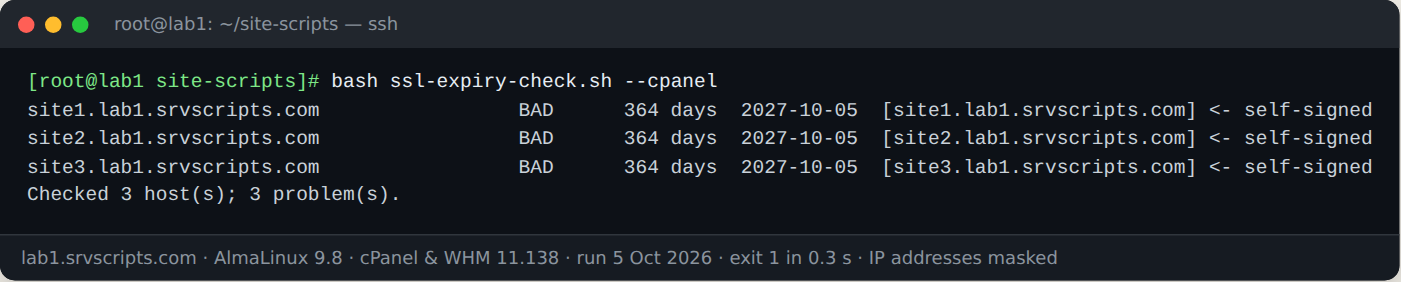
What the test changed: Our lab test found a bug in version 1.0.0: cPanel’s self-signed certificates were reported as OK because only the expiry date was checked. Version 1.1.0 also verifies the chain and the host name, as the first screenshot shows on public test certificates.
Cron
30 6 * * * /root/bin/ssl-expiry-check.sh -f /root/domains.txt -w 14 -q || mail -s "TLS expiry warning on $(hostname)" you@example.comWith -q nothing is printed when everything is fine, and the exit code is 1 only when there is something to look at.
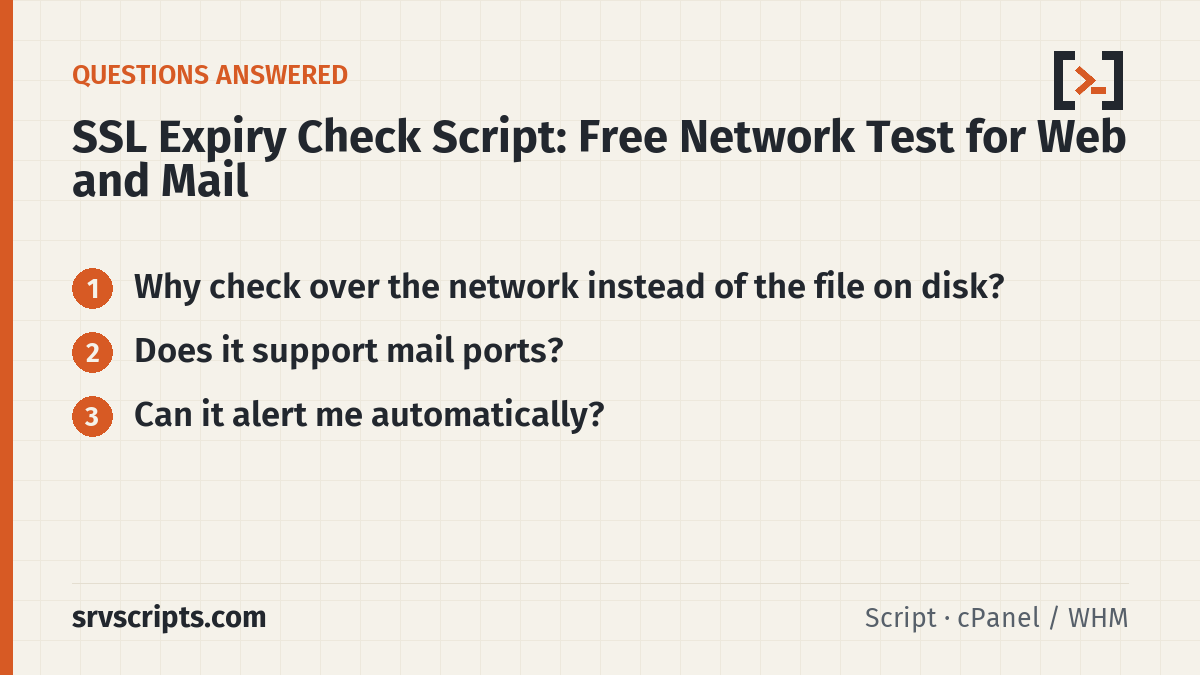
SSL expiry check at a glance
Official documentation: Let’s Encrypt documentation, cPanel & WHM documentation, AlmaLinux wiki.
Related guides: KernelCare on cPanel and DirectAdmin servers: setup, verification and rollback · Replacing cxs: malware scanning with LMD (maldet), ClamAV and ImunifyAV on hosting servers · Incident response after a cPanel root-escalation CVE: rotating keys, hunting .sorry, auditing sessions.
The script
#!/usr/bin/env bash
# SSL Expiry Check Script: Free Network Test for Web and Mail (v1.1.0) - from srvScripts.com
# Source, docs and updates: https://srvscripts.com/scripts/ssl-expiry-check/
# Copyright (c) 2026 srvScripts.com. MIT licence: if you copy, share or adapt this script, keep this notice and credit srvScripts.com.
# ssl-expiry-check.sh — warn before TLS certificates expire, and flag certificates browsers would reject
# https://srvscripts.com/scripts/ssl-expiry-check/   License: MIT   Version 1.1.0
#
# Checks live certificates over the network (so it catches what visitors actually see,
# including CDN/proxy certs), not files on disk. Needs openssl. No root required.
# Also verifies the chain and the host name (self-signed, untrusted, wrong host = problem);
# use --allow-untrusted to report those without counting them as problems.
#   bash ssl-expiry-check.sh example.com mail.example.com:993 imap.example.net:143
#   bash ssl-expiry-check.sh -f domains.txt -w 14           # warn under 14 days
#   bash ssl-expiry-check.sh -f domains.txt -w 14 -q        # quiet: only print problems (cron)
#   bash ssl-expiry-check.sh --cpanel                        # every domain on this cPanel server
# domains.txt: one host[:port] per line, # comments allowed. Port 25/110/143/587 use STARTTLS.
set -u
WARN=21; QUIET=0; FILE=""; CPANEL=0; TIMEOUT=8; HOSTS=(); ALLOWU=0
while [[ $# -gt 0 ]]; do
  case "$1" in
    -w) WARN=$2; shift 2 ;;
    -f) FILE=$2; shift 2 ;;
    -q) QUIET=1; shift ;;
    -t) TIMEOUT=$2; shift 2 ;;
    --cpanel) CPANEL=1; shift ;;
    --allow-untrusted) ALLOWU=1; shift ;;
    -h|--help) sed -n '2,15p' "$0"; exit 0 ;;
    *) HOSTS+=("$1"); shift ;;
  esac
done
command -v openssl >/dev/null || { echo "openssl not found" >&2; exit 2; }

if [[ -n "$FILE" ]]; then
  while IFS= read -r l; do l=${l%%#*}; l=${l//[[:space:]]/}; [[ -n "$l" ]] && HOSTS+=("$l"); done < "$FILE"
fi
if (( CPANEL )); then
  [[ -r /etc/userdomains ]] || { echo "/etc/userdomains not readable (not cPanel or not root)" >&2; exit 2; }
  while IFS=: read -r d _; do [[ "$d" == "*" || "$d" == \*.* ]] && continue; HOSTS+=("$d"); done < /etc/userdomains
fi
[[ ${#HOSTS[@]} -eq 0 ]] && { echo "No hosts given. See --help." >&2; exit 2; }

problems=0; now=$(date +%s)
# Trust store: pass the system CA bundle explicitly where we know it (some openssl builds have no default path).
CAOPT=(); for f in /etc/pki/tls/certs/ca-bundle.crt /etc/ssl/certs/ca-certificates.crt /etc/ssl/cert.pem; do [[ -r $f ]] && { CAOPT=(-CAfile "$f"); break; }; done
HNOK=0; openssl s_client -help 2>&1 | grep -q -- '-verify_hostname' && HNOK=1
for h in "${HOSTS[@]}"; do
  host=${h%%:*}; port=443; [[ "$h" == *:* ]] && port=${h##*:}
  st=""; case $port in 25|587) st="-starttls smtp" ;; 110) st="-starttls pop3" ;; 143) st="-starttls imap" ;; 21) st="-starttls ftp" ;; esac
  vh=(); if (( HNOK )); then if [[ $host =~ ^[0-9.]+$ || $host == *:* ]]; then vh=(-verify_ip "$host"); else vh=(-verify_hostname "$host"); fi; fi
  raw=$(timeout "$TIMEOUT" openssl s_client -servername "$host" -connect "$host:$port" $st ${CAOPT[@]+"${CAOPT[@]}"} ${vh[@]+"${vh[@]}"} </dev/null 2>/dev/null)
  cert=$(printf '%s\n' "$raw" | openssl x509 -noout -enddate -subject -issuer 2>/dev/null)
  vrc=$(printf '%s\n' "$raw" | sed -n 's/^ *Verify return code: \([0-9]*\) (\(.*\))/\1|\2/p' | tail -1)
  if [[ -z "$cert" ]]; then
    printf '%-40s  %s\n' "$h" "ERROR  could not fetch certificate"; problems=$((problems+1)); continue
  fi
  end=$(echo "$cert" | awk -F= '/^notAfter/{print $2}')
  ends=$(date -d "$end" +%s 2>/dev/null || date -j -f '%b %d %T %Y %Z' "$end" +%s 2>/dev/null)
  days=$(( (ends - now) / 86400 ))
  issuer=$(echo "$cert" | sed -n 's/^issuer=.*O *= *\([^,/]*\).*/\1/p' | head -1)
  [[ -z $issuer ]] && issuer=$(echo "$cert" | sed -n 's/^issuer=.*CN *= *\([^,/]*\).*/\1/p' | head -1)
  code=${vrc%%|*}; why=${vrc#*|}; note=""
  case $code in
    ''|0) ;;
    18|19) note=" self-signed" ;;
    62) note=" wrong host name" ;;
    10) ;;                                  # expired: reported by the date check below
    *) note=" untrusted: $why" ;;
  esac
  if (( days < 0 )); then state="EXPIRED"; problems=$((problems+1))
  elif [[ -n $note ]] && (( ! ALLOWU )); then state="BAD"; problems=$((problems+1))
  elif (( days <= WARN )); then state="WARN"; problems=$((problems+1))
  else state="OK"; fi
  mismatch=${note:+ <-$note}
  if (( ! QUIET )) || [[ "$state" != "OK" ]]; then
    printf '%-40s  %-7s %4d days  %s  [%s]%s\n' "$h" "$state" "$days" "$(date -d "@$ends" +%Y-%m-%d 2>/dev/null)" "${issuer:-?}" "$mismatch"
  fi
done
(( QUIET )) && (( problems == 0 )) && exit 0
echo "Checked ${#HOSTS[@]} host(s); $problems problem(s)."
exit $(( problems > 0 ? 1 : 0 ))
182c20c699c090db2a22352a2a1e424ac5fc3a41b097a761195a96ac150bc222curl -fsSL -o ssl-expiry-check.sh https://scr.srvscripts.com/ssl-expiry-check/ssl-expiry-check.sh && curl -fsSL https://scr.srvscripts.com/ssl-expiry-check/ssl-expiry-check.sh.sha256 | sha256sum -cInvoke-WebRequest -Uri 'https://scr.srvscripts.com/ssl-expiry-check/ssl-expiry-check.sh' -OutFile 'ssl-expiry-check.sh'; if ((Get-FileHash 'ssl-expiry-check.sh' -Algorithm SHA256).Hash -eq '182C20C699C090DB2A22352A2A1E424AC5FC3A41B097A761195A96AC150BC222') { 'OK: the file is intact' } else { 'MISMATCH: do not run this file' }curl and sha256sum are not the Linux tools, so use the PowerShell line there.Also on GitHub: github.com/srvscripts/scripts
Frequently asked questions
Why check over the network instead of the file on disk?
The file can be renewed while the web server or a CDN still serves the old certificate. An SSL expiry check over the network sees what clients actually get.
Does it support mail ports?
Yes. It uses STARTTLS for ports 25, 587 and 110/143 and direct TLS for 465, 993 and 995.
Can it alert me automatically?
Run it from cron with -w for a warning threshold, or use our free uptime SSL blacklist monitor for e-mail alerts.