Table of Contents
Why not just use WHM?
WHM’s Show Current Disk Usage gives you one number per account and is often stale (it reads the quota cache). When /home is at 92% you want to know which account, and whether it is a 40 GB mailbox that can be archived, a database that has ballooned, or actual site files. This script runs du live per account and separates the three.
Usage
curl -fsSL https://srvscripts.com/get/cpanel-disk-usage-report/ -o cpanel-disk-usage-report.sh
bash cpanel-disk-usage-report.sh              # all accounts, table
bash cpanel-disk-usage-report.sh --top 15     # biggest 15
bash cpanel-disk-usage-report.sh --csv > usage-$(date +%F).csv
Sample output
ACCOUNT              FILES_MB    MAIL_MB   MYSQL_MB   TOTAL_MB   QUOTA_MB
acmehost               8412.3    31220.5     1840.2    41473.0      51200
shopsite              12980.1      410.7     6120.9    19511.7  unlimited
blogco                 2210.4     1902.3      380.0     4492.7      10240

Accounts: 64   Total: 412.8 GB
/home: 458G used of 500G (92%)
acmehost is the one to talk to — 31 GB of mail.
Tested on a real server
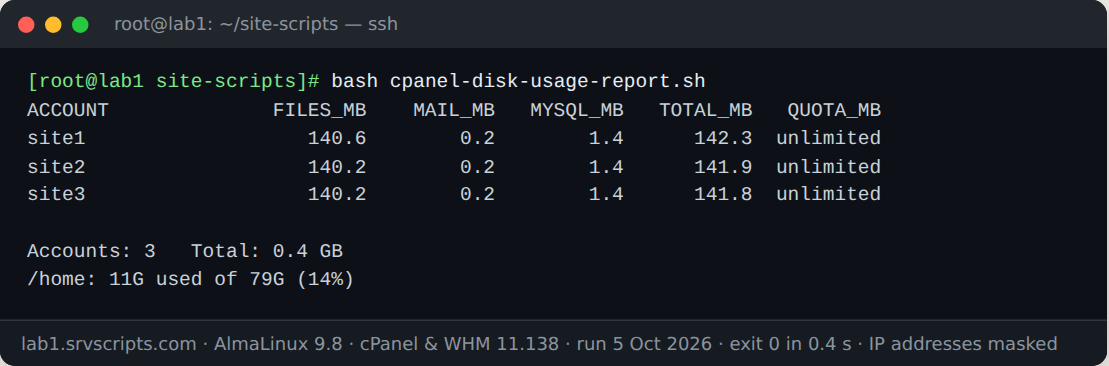
We ran this script on our lab server on 5 October 2026: AlmaLinux 9.8 with cPanel & WHM 11.138, MariaDB 10.11 and three WordPress test accounts. The screenshot is the real terminal output; only IP addresses are masked.
How MySQL size is measured
The script sums the on-disk size of every database directory under the MariaDB datadir whose name starts with the account’s database prefix (user_), plus a database named exactly after the user. That matches cPanel’s naming and needs no database credentials beyond what root already has. It counts InnoDB .ibd files per table; if innodb_file_per_table is off (rare on modern cPanel) the shared tablespace is not attributed to anyone.
Notes
du on a very large /home takes time — a few minutes on 500 GB of small files. Run it in screen or from cron at night and keep the CSVs; comparing week to week shows you who is growing before it becomes a ticket.
CPanel disk usage report at a glance

Official documentation: cPanel & WHM documentation, Linux man pages.
Related guides: Account quotas show “unlimited”: fixquotas and XFS/ext4 quota repair on cPanel · Disk full on a cPanel server: cleaning /var/log, /backup, mail queues and cPanel caches · Replacing AWStats and Webalizer with GoAccess before cPanel 140 removes them.
The script
#!/usr/bin/env bash
# cPanel Disk Usage Report (v1.0.0) - from srvScripts.com
# Source, docs and updates: https://srvscripts.com/scripts/cpanel-disk-usage-report/
# Copyright (c) 2026 srvScripts.com. MIT licence: if you copy, share or adapt this script, keep this notice and credit srvScripts.com.
# cpanel-disk-usage-report.sh — per-account disk usage on a cPanel/WHM server
# https://srvscripts.com/scripts/cpanel-disk-usage-report/   License: MIT
#
# Shows every cPanel account with home size, mail size, MySQL size and quota,
# sorted by total. Read-only. Run as root.
#   bash cpanel-disk-usage-report.sh              # table
#   bash cpanel-disk-usage-report.sh --top 15     # top 15 only
#   bash cpanel-disk-usage-report.sh --csv        # CSV for a spreadsheet
set -u
[[ $EUID -ne 0 ]] && { echo "Run as root." >&2; exit 1; }
[[ -d /var/cpanel/users ]] || { echo "This does not look like a cPanel server (/var/cpanel/users missing)." >&2; exit 1; }

TOP=0; CSV=0
while [[ $# -gt 0 ]]; do
  case "$1" in
    --top) TOP=${2:-0}; shift 2 ;;
    --csv) CSV=1; shift ;;
    *) echo "Unknown option: $1" >&2; exit 1 ;;
  esac
done

mb() { # bytes -> MB with one decimal
  awk -v b="${1:-0}" 'BEGIN{printf "%.1f", b/1048576}'
}

rows=()
for f in /var/cpanel/users/*; do
  u=$(basename "$f")
  [[ "$u" == "system" || "$u" == "nobody" ]] && continue
  home=$(awk -F= '/^HOMEDIRPATHS=/{print $2}' "$f"); home=${home:-/home/$u}
  [[ -d "$home" ]] || continue
  files=$(du -sb --exclude=mail --exclude=.trash "$home" 2>/dev/null | cut -f1)
  mail=$(du -sb "$home/mail" 2>/dev/null | cut -f1); mail=${mail:-0}
  db=0
  # MySQL: sum datadir dirs owned by this user's prefix
  datadir=$(mysql -Nse 'SELECT @@datadir' 2>/dev/null)
  if [[ -n "$datadir" ]]; then
    prefix=${u:0:16}
    db=$(du -sbc "$datadir"/"${prefix}"_* "$datadir"/"${u}" 2>/dev/null | tail -1 | cut -f1); db=${db:-0}
  fi
  quota=$(awk -F= '/^DISK_BLOCK_LIMIT=/{print $2}' "$f"); quota=${quota:-0}  # KB blocks
  quota_mb=$(( quota / 1024 ))
  total=$(( ${files:-0} + mail + db ))
  rows+=("$total|$u|$(mb "${files:-0}")|$(mb "$mail")|$(mb "$db")|$(mb "$total")|$quota_mb")
done

sorted=$(printf '%s\n' "${rows[@]}" | sort -t'|' -k1,1nr)
[[ $TOP -gt 0 ]] && sorted=$(echo "$sorted" | head -n "$TOP")

if (( CSV )); then
  echo "account,files_mb,mail_mb,mysql_mb,total_mb,quota_mb"
  echo "$sorted" | awk -F'|' '{printf "%s,%s,%s,%s,%s,%s\n",$2,$3,$4,$5,$6,($7==0?"unlimited":$7)}'
else
  printf '%-18s %10s %10s %10s %10s %10s\n' ACCOUNT FILES_MB MAIL_MB MYSQL_MB TOTAL_MB QUOTA_MB
  echo "$sorted" | awk -F'|' '{printf "%-18s %10s %10s %10s %10s %10s\n",$2,$3,$4,$5,$6,($7==0?"unlimited":$7)}'
  echo
  echo "$sorted" | awk -F'|' '{t+=$6} END{printf "Accounts: %d   Total: %.1f GB\n", NR, t/1024}'
  df -hP /home | awk 'NR==2{printf "/home: %s used of %s (%s)\n",$3,$2,$5}'
fi
6b730eb0fa23d14ff4fcca54f2f82d277be0998d68a4100ed9f10e06031d7a93curl -fsSL -o cpanel-disk-usage-report.sh https://scr.srvscripts.com/cpanel-disk-usage-report/cpanel-disk-usage-report.sh && curl -fsSL https://scr.srvscripts.com/cpanel-disk-usage-report/cpanel-disk-usage-report.sh.sha256 | sha256sum -cInvoke-WebRequest -Uri 'https://scr.srvscripts.com/cpanel-disk-usage-report/cpanel-disk-usage-report.sh' -OutFile 'cpanel-disk-usage-report.sh'; if ((Get-FileHash 'cpanel-disk-usage-report.sh' -Algorithm SHA256).Hash -eq '6B730EB0FA23D14FF4FCCA54F2F82D277BE0998D68A4100ED9F10E06031D7A93') { 'OK: the file is intact' } else { 'MISMATCH: do not run this file' }curl and sha256sum are not the Linux tools, so use the PowerShell line there.Also on GitHub: github.com/srvscripts/scripts
Frequently asked questions
Why not use WHM’s disk usage page?
WHM shows one number per account from the quota cache, which is often stale. The cPanel disk usage report measures live and separates files, mail and databases.
Is it safe on a busy server?
It only reads. On very large servers run it with nice and ionice or at a quiet time, because du walks every file.
Can I schedule it?
Yes. Run it from cron with –csv and keep the files to see which accounts grow fastest.