Short answer: On a fresh Debian 12 server, download Sangoma’s sng_freepbx_debian_install.sh and run it as root, with --opensourceonly if you do not want the commercial modules. It installs Asterisk 22, PHP 8.2, MariaDB and FreePBX 17 in about 20 minutes. In our test the open-source-only run stopped half way because one commercial module (oracle_connector) refuses to uninstall; a one-line change gets past it. Afterwards secure the first admin login, put a firewall in front of SIP and fix fail2ban, because the open-source install leaves the SIP jail reading an empty log.
We ran every step on 6 October 2026 on a 4 vCPU / 4 GB VPS with Debian 12 (installer version 1.15, FreePBX 17.0.33, Asterisk 22.11). The screenshots are the real terminal output with IP addresses masked.
Table of Contents
Before you start
- A fresh Debian 12 (bookworm) 64-bit server. The installer adds repositories, Apache, MariaDB and PHP 8.2 and is not meant for a server that already runs a website.
- At least 2 vCPU and 2 GB RAM for a small office; we used 4 vCPU and 4 GB.
- A hostname that resolves to the server, root SSH access with a key, and your own public IP address at hand (you will lock the GUI and SIP down to it).
- A decision on commercial modules. Without
--opensourceonlyFreePBX installs the Sangoma commercial modules (System Admin, the firewall, endpoint manager…), several of which need a paid licence. With it you get a clean open-source PBX but no Sangoma firewall and no System Admin page.
Run the installer
cd /root
wget https://github.com/FreePBX/sng_freepbx_debian_install/raw/master/sng_freepbx_debian_install.sh -O sng_freepbx_debian_install.sh
less sng_freepbx_debian_install.sh            # read what you are about to run as root
bash sng_freepbx_debian_install.sh --opensourceonly
Run it inside screen or tmux: if your SSH session drops, the install keeps going. The full log is in /var/log/pbx/freepbx17-install-DATE.log. Other useful options are --noasterisk, --dahdi and --testing; we did not need them.
If the install fails at “Removing commercial modules”
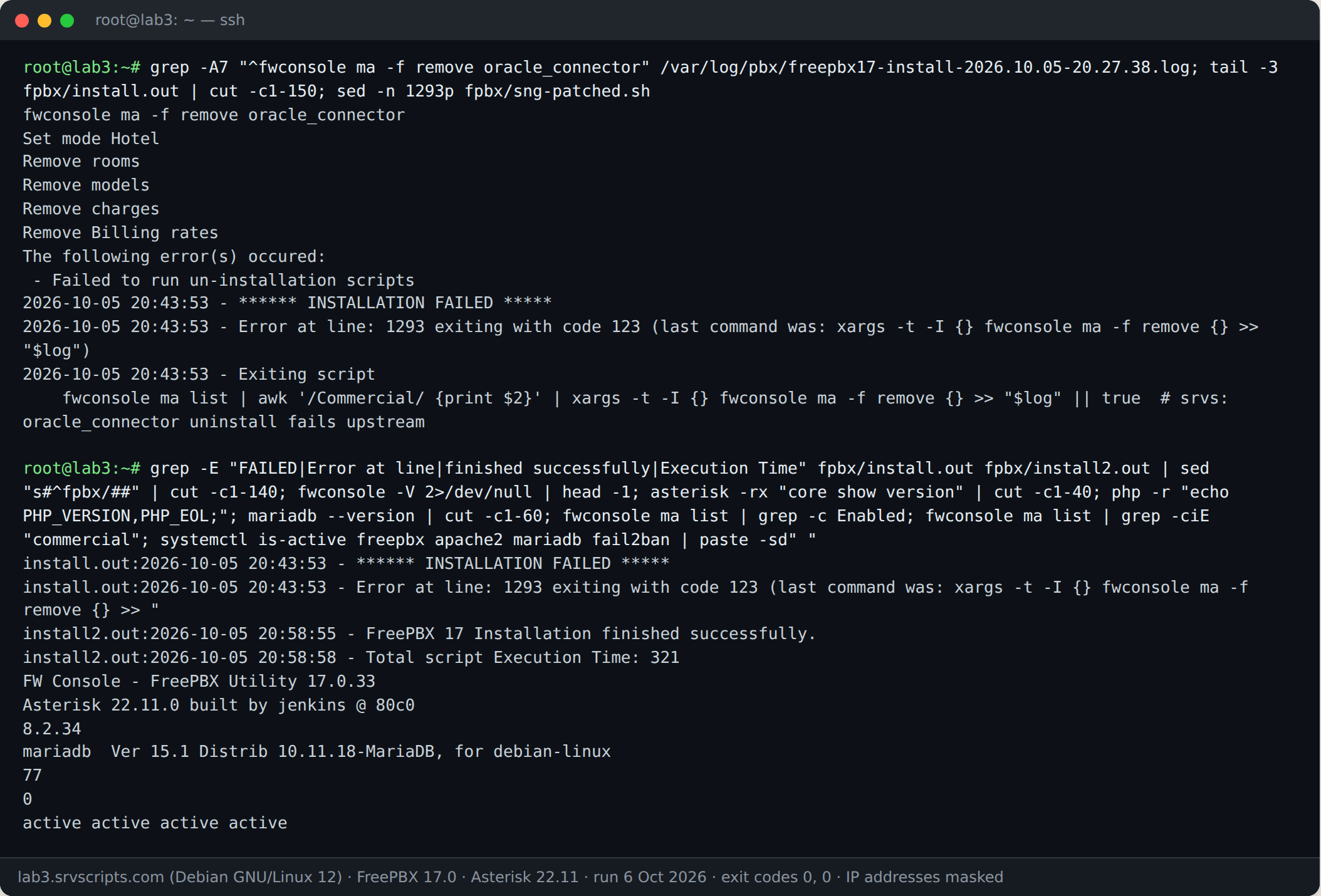
With --opensourceonly, the installer removes every commercial module in one pipeline. On our server the hotel module oracle_connector failed its uninstall script (“Failed to run un-installation scripts”), xargs returned 123, and the installer stopped with INSTALLATION FAILED … Error at line 1293. FreePBX was installed at that point, but the steps after it (installing local modules, upgrades, Apache settings, enabling the freepbx service) had not run.
The fix is to let that one pipeline fail and run the installer again. It skips packages that are already installed, so the second run took 5 minutes:
cp sng_freepbx_debian_install.sh sng-patched.sh
# make the commercial-module removal non-fatal (the line number may differ in newer versions)
sed -i '/awk .\/Commercial\/ {print \$2}. | xargs/ s/>> "\$log"$/>> "$log" || true/' sng-patched.sh
grep -n "xargs -t -I {} fwconsole ma -f remove" sng-patched.sh
bash sng-patched.sh --opensourceonly --skipversion
The grep line must now end in || true; if it does not, edit that line by hand. The second run finished with “FreePBX 17 Installation finished successfully” and no commercial modules left:
Secure the first admin login
A new FreePBX asks the first person who opens the web interface to create the administrator account. On a public IP that can be anyone, so do it straight away from your own browser at http://SERVER/admin/, or block port 80 and 443 to everyone but your IP first. Use a long random password. After that, switch the GUI to HTTPS with a real certificate (Admin → Certificate Management) and keep it reachable only from your office or VPN.
Firewall: there is no Sangoma firewall now
The Sangoma firewall depends on the commercial System Admin module, so the open-source install removes it. What is left is fail2ban and an iptables INPUT policy of ACCEPT: SIP (5060/udp), RTP and the web interface are open to the whole internet. (MariaDB listened on 127.0.0.1 only, which is good.) Allow SSH, SIP and RTP only from the addresses that need them; our SIP ports and firewall guide has the rules for iptables, nftables and UFW. Keep port 22 open for your own IP before you change the policy.
Fix fail2ban: the SIP jail reads an empty log
FreePBX’s asterisk-iptables jail watches /var/log/asterisk/fail2ban. The commercial System Admin module creates that Asterisk log channel; when --opensourceonly removes the module, the channel disappears. In our test the file stopped growing at the end of the install: 24 “No matching endpoint” failures were in the full log, none in the fail2ban log, and the jail had banned nobody. Add the channel back in the custom logger file, which FreePBX does not overwrite:
echo "fail2ban => notice,security" >> /etc/asterisk/logger_logfiles_custom.conf
asterisk -rx "logger reload"
asterisk -rx "logger show channels"        # /var/log/asterisk/fail2ban must be listed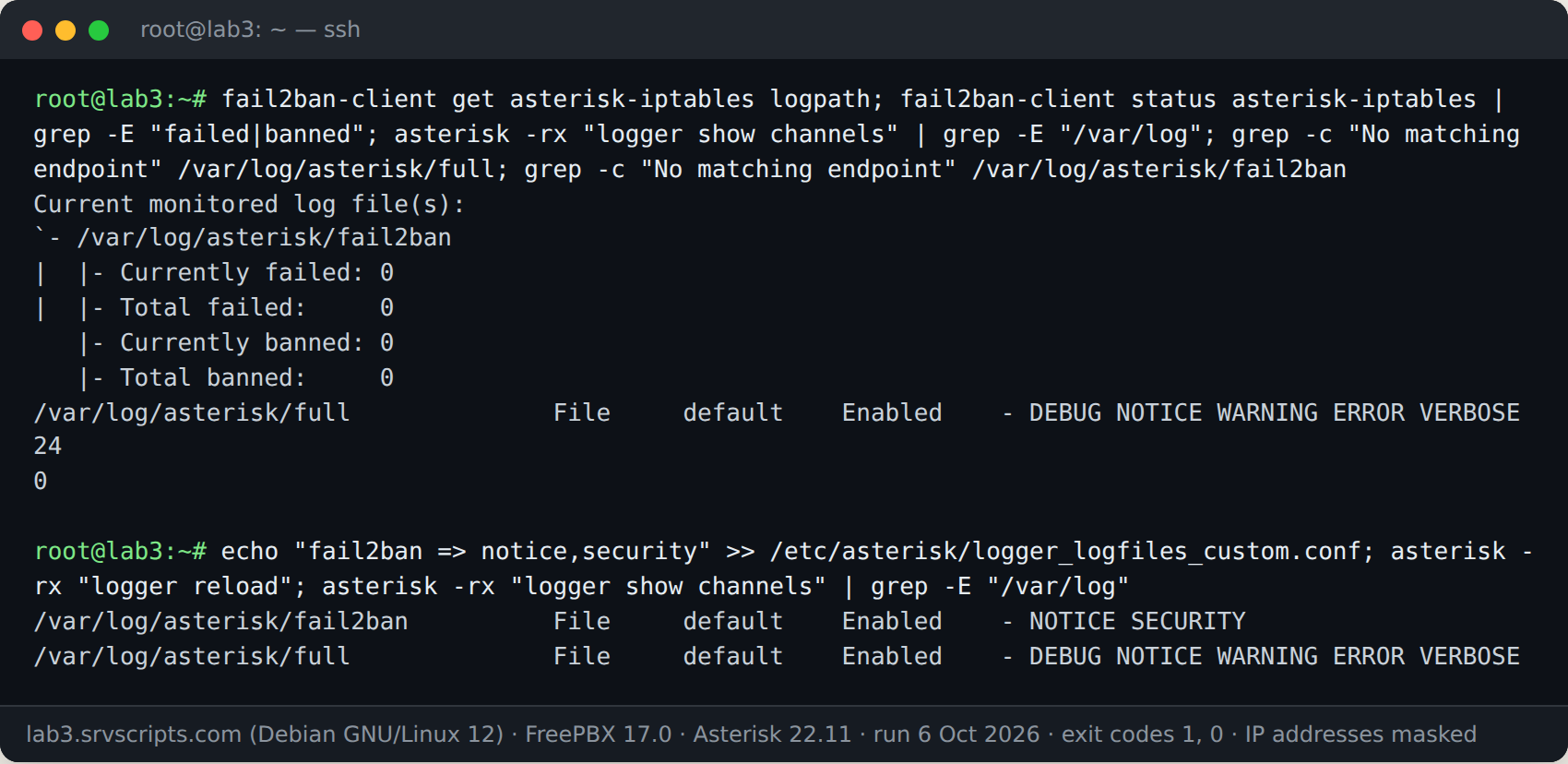
Then test it from another server you control, never from the address you manage the PBX from (the jail blocks all ports for the banned address, SSH included). We sent REGISTER requests for a non-existent extension with a wrong password from our second lab server. The address was banned on its first answered challenge and every later packet was refused:
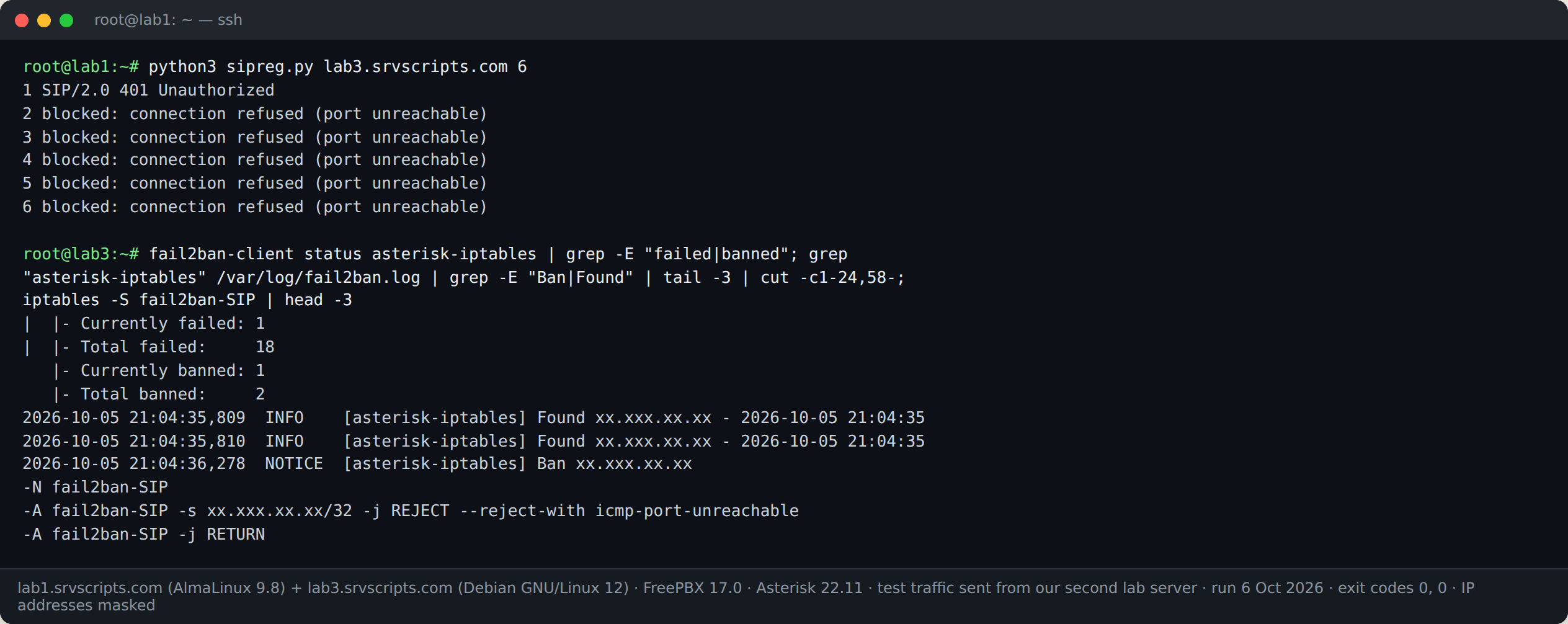
Remove a test ban with fail2ban-client set asterisk-iptables unbanip ADDRESS, and add your SIP provider and office addresses to ignoreip in /etc/fail2ban/jail.local. More on testing filters in fail2ban for Asterisk and FreePBX.
NAT settings
If the PBX or the phones are behind NAT, set the external address and local networks in Settings → Asterisk SIP Settings. FreePBX writes them to /etc/asterisk/pjsip.transports.conf with allow_reload=no, so they only take effect after fwconsole restart. The PJSIP NAT guide and the PJSIP NAT settings generator cover the values.
Check the installation
fwconsole -V
asterisk -rx "core show version"
fwconsole ma list | grep -c Enabled
systemctl is-active freepbx apache2 mariadb fail2ban
fail2ban-client status
See also: Upgrade FreePBX 16 to 17: Backup, Restore and Migration Checklist · FreePBX Responsive Firewall vs Intrusion Detection (FreePBX 17) · Asterisk and FreePBX Toll Fraud Prevention: 10-Point Checklist · 3CX vs FreePBX: Licensing, Hosting, Features and Lock-in (2026)
Frequently asked questions
Can I install FreePBX 17 on Debian 13 or Ubuntu?
The official installer supports Debian 12 only. Use Debian 12 for production even if a newer release seems to work.
Do I need –opensourceonly?
No. Without it you get the commercial modules, including System Admin and the Sangoma firewall, some of which need a paid licence. With it you get a smaller open-source PBX and have to provide the firewall and fail2ban logging yourself, as shown above.
Is it safe to run the installer twice?
In our test, yes: the second run skipped packages that were already installed and finished the missing steps. Take a snapshot of the VPS first in case a newer installer version behaves differently.
Why did my install fail with exit code 123?
That is xargs reporting that one of the commands it ran failed. In the commercial-module removal step it means a module refused to uninstall; the log shows which one.