You set up a mail server, WordPress site or app on a DigitalOcean Droplet, and nothing arrives. There is no bounce and no error in the inbox, just messages stuck in the queue and “Connection timed out” in the log. That is DigitalOcean’s SMTP block, not a broken mail server. This guide shows how to confirm it and the two ways around it that work on a Droplet: an authenticated relay on an alternative port, or an email API over HTTPS. It includes the exact settings for Exim on cPanel and DirectAdmin, Postfix and WordPress.
Applies to a DigitalOcean Droplet (Basic 512 MB, Ubuntu 24.04.5) on 15 Oct 2026: SMTP block, relay ports, inbound 25, PTR
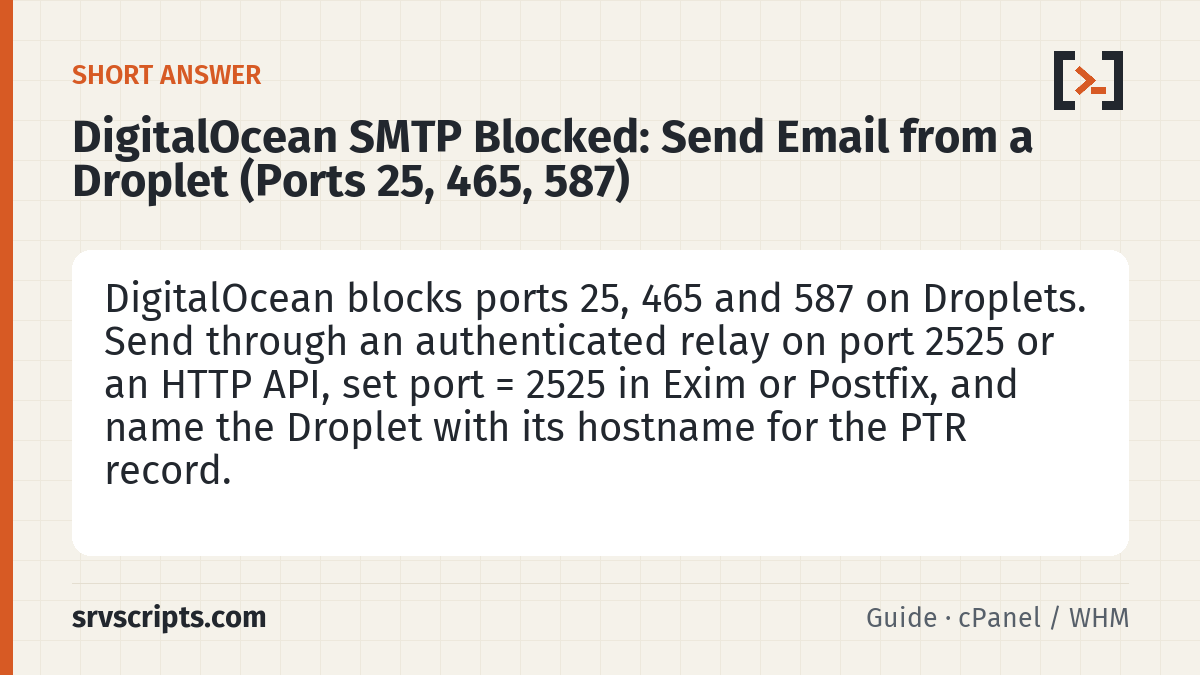
Short answer: DigitalOcean blocks SMTP ports 25, 465 and 587 on all Droplets by default, including traffic sent through a Reserved IP, and its support page offers no unblock route. Mail sent directly or to a relay on those ports times out. Send through an authenticated relay on port 2525 instead (MailBaby, SMTP2GO and Mailgun accept it) or through the relay’s HTTP API. For cPanel or DirectAdmin, set the Exim smarthost transport to port = 2525; for Postfix use relayhost = [relay.example.net]:2525; in a WordPress SMTP plugin set port 2525 with TLS. Name the Droplet with its full hostname so DigitalOcean creates the PTR record.
Table of Contents
Confirm it is the SMTP block
DigitalOcean’s own page, Why is SMTP blocked? (last verified 13 July 2026), says ports 25, 465 and 587 are blocked on Droplets “by default”, that this also covers traffic through a Reserved IP, and recommends a third-party email service instead of running your own mail server. The typical symptoms are:
- Exim:
Connection timed outfor remote hosts, followed byretry time not reachedon later attempts (see Exim retry time not reached). - Postfix:
connect to gmail-smtp-in.l.google.com[...]:25: Connection timed outin/var/log/mail.log. - WordPress, Ghost, Discourse and other apps: the SMTP test hangs and then fails, even with correct credentials.
Test from the Droplet itself. The first command should fail and the second should connect if the block is the problem:
# Blocked port: times out after 5 seconds on a Droplet
timeout 5 bash -c '</dev/tcp/gmail-smtp-in.l.google.com/25' && echo open || echo blocked

# Alternative port on a relay: should print open
timeout 5 bash -c '</dev/tcp/relay.mailbaby.net/2525' && echo open || echo blocked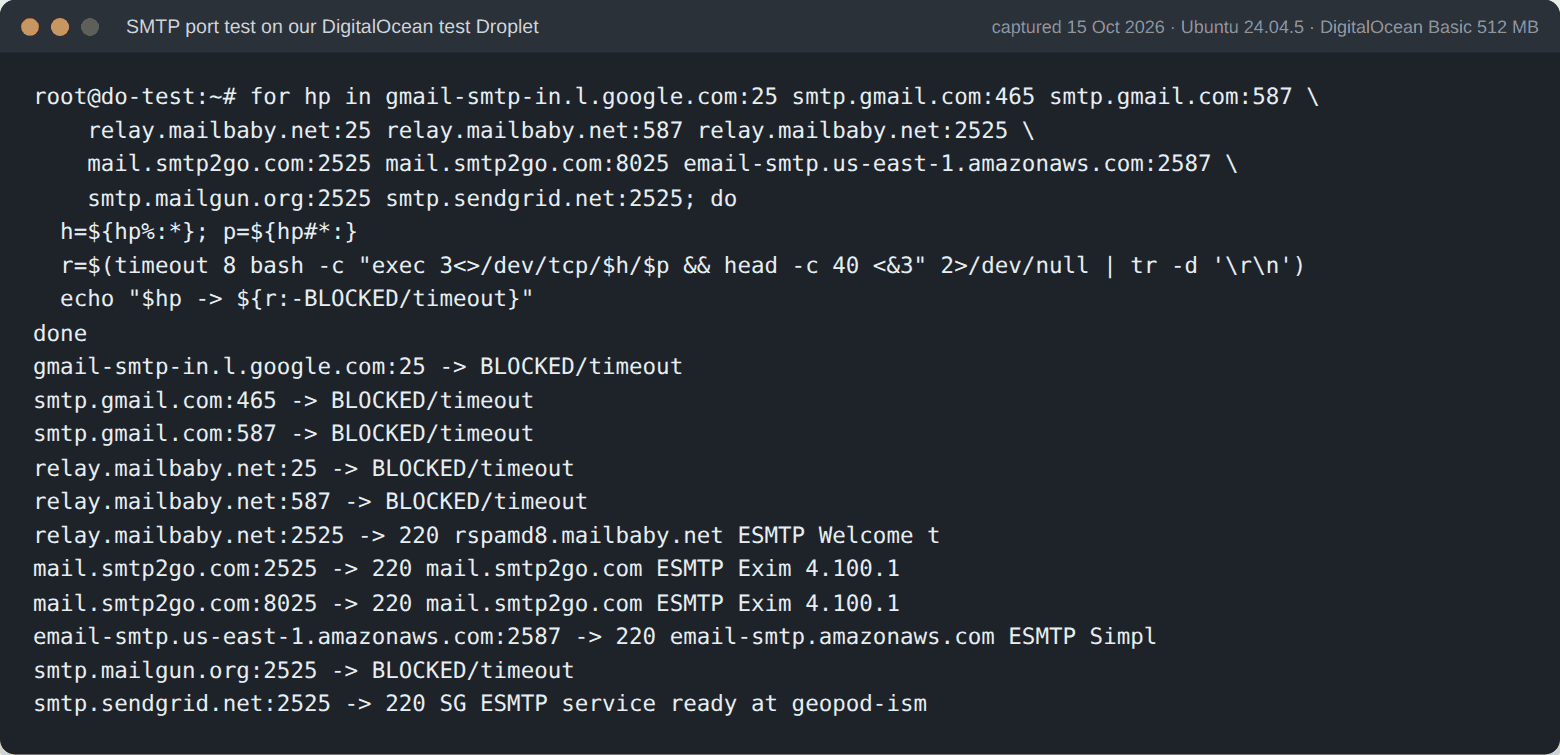
Which ports are blocked and which work
| Port | Used for | On a Droplet |
|---|---|---|
| 25 | Server-to-server delivery, and some relays | Blocked |
| 465 | SMTP submission with implicit TLS | Blocked |
| 587 | SMTP submission with STARTTLS | Blocked |
| 2525 | Unofficial alternative submission port offered by many relays | Open (tested on a Droplet) |
| 443 | Email provider HTTP APIs | Open |
| 25 inbound | Other servers delivering mail to you | Not blocked (tested): a Droplet can receive mail |
Port 2525 is not a standard, so check that your provider accepts it. We tested these from a DigitalOcean Droplet on 15 October 2026 by connecting and reading the SMTP greeting:
| Relay | Host | Ports that answered | Notes |
|---|---|---|---|
| MailBaby | relay.mailbaby.net | 2525 (25 and 587 blocked) | Offered STARTTLS and AUTH LOGIN PLAIN; swaks reached TLS 1.3 |
| SMTP2GO | mail.smtp2go.com | 2525, 8025 | Greeting received on both |
| Amazon SES | email-smtp.<region>.amazonaws.com | 2587 | SES’s own alternative port; greeting received |
| SendGrid | smtp.sendgrid.net | 2525 | Greeting received |
| Mailgun | smtp.mailgun.org | 2525 (connection only) | The connection opened but no greeting arrived within 20 seconds in our test; Ghost’s documentation uses this port for Droplets |
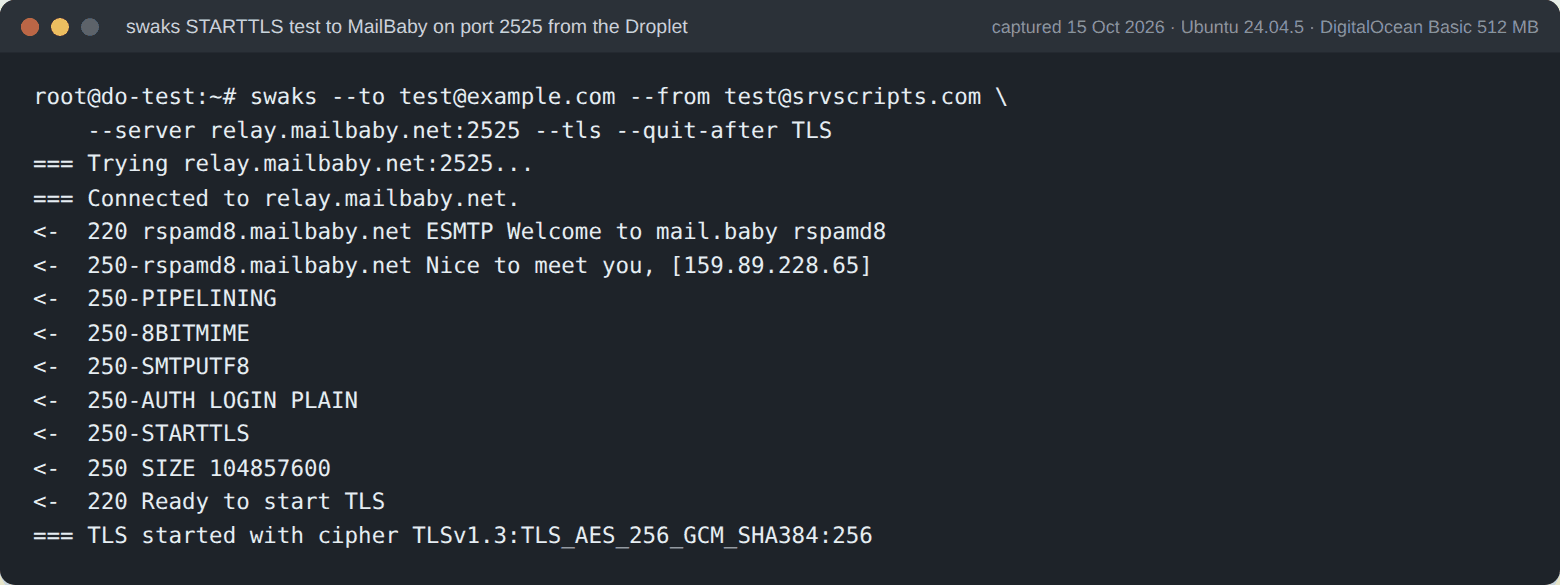
Option 1: an authenticated relay on port 2525
A relay (smarthost) takes mail from your server over an authenticated, encrypted connection and delivers it from its own reputation-managed IPs. On a Droplet it is the only way a full mail server can send. It is also usually better for deliverability than sending from a fresh cloud IP. Only the port changes from a normal relay setup.
cPanel and WHM (Exim)
Follow MailBaby on cPanel and WHM (the same Exim structure works for any relay) and set the port in the transport you add under WHM > Exim Configuration Manager > Advanced Editor, in the TRANSPORTSTART box:
smarthost_smtp:
  driver = smtp
  port = 2525
  hosts_require_auth = *
  hosts_require_tls = *
DirectAdmin (Exim)
Follow DirectAdmin Exim relay through MailBaby and use port = 2525 in the transport in /etc/exim.transports.pre.conf. That file survives da build exim_conf. Then check the configuration and restart:
exim -bV | head -3
systemctl restart exim
Postfix
Our Postfix smarthost guide has the full SASL setup. The DigitalOcean-specific part is the port in /etc/postfix/main.cf and in the password map key:
relayhost = [relay.mailbaby.net]:2525
smtp_sasl_auth_enable = yes
smtp_sasl_password_maps = hash:/etc/postfix/sasl_passwd
smtp_sasl_security_options = noanonymous
smtp_tls_security_level = encrypt

# /etc/postfix/sasl_passwd (then: postmap /etc/postfix/sasl_passwd; chmod 600 the file)
[relay.mailbaby.net]:2525 USERNAME:PASSWORD
WordPress and other apps
In an SMTP plugin (WP Mail SMTP, FluentSMTP, Post SMTP) choose “Other SMTP”, enter the relay host, port 2525, encryption TLS (STARTTLS, not SSL) and your relay credentials. WordPress SMTP plugin with MailBaby walks through it. For Node, Python or PHP apps it is the same: host, port 2525, STARTTLS required.
Option 2: send through an HTTP API
If the Droplet only sends application mail (password resets, notifications), an email provider’s HTTP API over port 443 avoids SMTP completely. Most providers offer one, and their WordPress plugins can use it directly. MailBaby has one too: see MailBaby REST API. APIs are also faster for apps, because there is no SMTP conversation per message.
DNS: PTR, SPF and DKIM
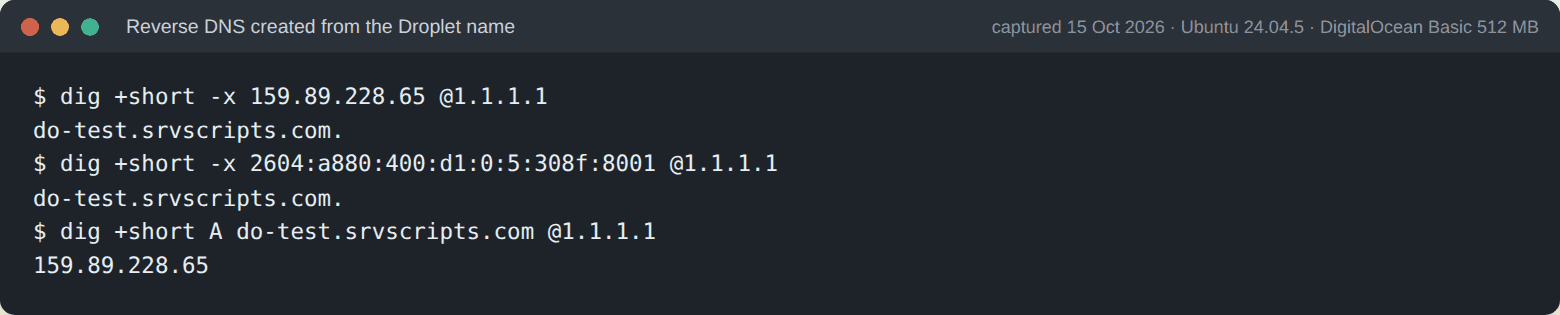
- PTR (reverse DNS). DigitalOcean creates PTR records automatically from the Droplet name, which must be a valid fully qualified domain name, for example
server1.example.com. You cannot add a PTR by hand in the control panel (DigitalOcean DNS records). Rename the Droplet to its hostname and check it with the reverse DNS lookup. With a relay, recipients see the relay’s IPs, but the PTR still matters for your server’s HELO name and any direct connections. - SPF. Add the relay to your domain’s SPF record, for example
include:spf-c.mailbaby.netfor MailBaby (see MailBaby SPF record), and keep the total under 10 lookups (SPF too many DNS lookups). Check it with the SPF record checker. - DKIM. Keep signing on your server (cPanel and DirectAdmin do this by default) so DKIM aligns with your From domain. See DKIM signing through a relay.
Test that mail flows
Send a test through the relay from the Droplet with swaks. It prompts for the password, so it never ends up in your shell history:
apt install swaks    # or: dnf install swaks
swaks --to you@gmail.com --from you@example.com \
  --server relay.mailbaby.net:2525 --tls \
  --auth LOGIN --auth-user YOUR_RELAY_USER
Then send a message from the real application to the free email deliverability test, which reports SPF, DKIM, DMARC and blocklist results, and read the received headers with the email header analyzer. If messages are still stuck in the Exim queue, Exim queue stuck covers flushing and the retry database.
Planning a full cPanel or DirectAdmin server rather than a single app? Best VPS for a cPanel or DirectAdmin server compares providers on port 25, PTR control and pricing.
How this guide was tested: on 15 October 2026 we created a DigitalOcean Droplet (Basic plan, 512 MB, Ubuntu 24.04.5) named do-test.srvscripts.com. Outbound connections to port 25 (Gmail’s MX), 465 and 587 timed out, inbound port 25 was reachable, the relay ports in the table above answered, swaks completed STARTTLS with MailBaby on 2525, and DigitalOcean created PTR records from the Droplet name for both the IPv4 and the IPv6 address. We did not send production mail through a relay from the Droplet (no relay account on the test machine). The Exim and Postfix relay configurations come from our MailBaby guides, each of which states its own testing.
DigitalOcean SMTP block at a glance
Frequently asked questions
Does DigitalOcean block SMTP?
Yes. DigitalOcean blocks SMTP ports 25, 465 and 587 on all Droplets by default, including traffic through a Reserved IP. Connections to those ports time out, so mail sits in the queue instead of bouncing.
Can I get port 25 unblocked on DigitalOcean?
DigitalOcean’s support page does not describe an unblock process and recommends a third-party email service instead. Plan on sending through a relay on port 2525 or an HTTP API.
Is port 2525 blocked on DigitalOcean?
Port 2525 is not on DigitalOcean’s list of blocked SMTP ports. In our test on a Droplet, MailBaby, SMTP2GO and SendGrid answered on it (MailBaby offered STARTTLS and authentication), and Amazon SES answered on its own alternative port 2587.
Can I run a mail server on a DigitalOcean Droplet?
You can: inbound port 25 is not blocked (we tested it), so the Droplet can receive mail and run the mailboxes. Outbound mail must go through an authenticated relay on an alternative port or an API, because direct delivery on port 25 is blocked.
How do I set a PTR record on DigitalOcean?
Name the Droplet with a fully qualified domain name such as server1.example.com. DigitalOcean creates the PTR record from the Droplet name automatically; there is no manual PTR setting in the control panel.
Reading a lot of our guides? Go ad-free with srvScripts Pro for $6 a month. It also pays for new guides. Cancel any time.