Since 1.706 DirectAdmin issues and renews TLS certificates itself through an embedded ACME client. That is convenient until you need something to happen every time a certificate changes — copy the new certificate to HAProxy, push it to a separate mail gateway, reload a reverse proxy, or send a notification. DirectAdmin 1.712 added a hook for exactly this: domain_tls_cert_save_post.sh. It runs once, right after a domain’s certificate is saved, on both the first issuance and every later renewal.
In short: create /usr/local/directadmin/scripts/custom/domain_tls_cert_save_post.sh, make it executable, and read the certificate details from the environment variables DirectAdmin exports (domain, username, cert_id, cert_file_path, chain_file_path, key_file_path, dns_names). The script runs as root after the certificate is written.
Table of Contents
Where the script goes
Custom hooks live in the scripts/custom/ directory so a DirectAdmin or CustomBuild update never overwrites them. If a domain_tls_cert_save_post.sh already exists, do not clobber it — back it up and merge your logic in, since more than one task may need to run on a certificate save. Create it only when it is absent, owned by root and executable:
HOOK=/usr/local/directadmin/scripts/custom/domain_tls_cert_save_post.sh
if [ -e "$HOOK" ]; then
    cp -p "$HOOK" "$HOOK.bak.$(date +%s)"   # keep the existing hook, then merge into it
else
    install -m 755 -o root -g root /dev/null "$HOOK"
fi
What DirectAdmin passes to the script
DirectAdmin does not pass positional arguments. Everything arrives as environment variables. These are the ones the hook receives when a certificate is saved:
| Variable | What it holds |
|---|---|
domain | The domain whose certificate was saved, e.g. example.com |
username | The DirectAdmin user that owns the domain |
cert_id | The certificate id (usually the same as the domain) |
cert_file_path | Path to the certificate, relative to /usr/local/directadmin/ |
chain_file_path | Path to the CA chain (cacert), relative to /usr/local/directadmin/ |
key_file_path | Path to the private key, relative to /usr/local/directadmin/ |
dns_names | Space-separated list of every name on the certificate (the SAN set), e.g. example.com www.example.com mail.example.com |
A note on those paths: on the builds we tested (DirectAdmin 1.713) the three *_file_path variables arrive relative to the install root (for example data/users/USER/domains/example.com.cert), so you prefix them with /usr/local/directadmin/ to get an absolute path. The official DirectAdmin documentation instead describes them as full (absolute) paths. To be correct on both, treat a value that already starts with / as absolute and only prefix a relative one — the example below does exactly that.
A working example: copy the certificate to HAProxy
HAProxy wants the full chain and the private key in one PEM file. The hook below builds that file, checks the private key matches the certificate before touching anything live, swaps it in with a backup, and reloads HAProxy only if the configuration still parses — rolling back if it does not. Treat it as an illustrative pattern: we verified the hook fires with these variables on DirectAdmin 1.713 (shown below), but adapt the HAProxy paths to your own setup and test on a spare domain before relying on it.
#!/bin/sh
# domain_tls_cert_save_post.sh - publish a DA cert to HAProxy.
# Illustrative pattern: adapt the HAProxy paths and test on a spare domain first.
umask 077
DA=/usr/local/directadmin
OUT=/etc/haproxy/certs
[ -n "$domain" ] || exit 0
[ -d "$OUT" ] || exit 0

# On 1.713 the *_file_path values arrive relative to $DA; the docs call them full
# paths. Handle both: an absolute value is used as-is, a relative one is resolved.
abspath() { case "$1" in /*) printf '%s' "$1" ;; *) printf '%s/%s' "$DA" "$1" ;; esac; }
cert=$(abspath "$cert_file_path")
chain=$(abspath "$chain_file_path")
key=$(abspath "$key_file_path")
[ -r "$cert" ] && [ -r "$key" ] || exit 0

# One PEM per certificate id (a domain can carry more than one certificate).
dest="$OUT/${cert_id:-$domain}.pem"
tmp=$(mktemp "$OUT/.${cert_id:-$domain}.XXXXXX") || exit 0
trap 'rm -f "$tmp"' EXIT

# Build the candidate. mktemp + umask 077 make it mode 0600.
cat "$cert" "$chain" "$key" > "$tmp" || exit 0

# Verify the private key matches the leaf certificate before touching anything live.
cpub=$(openssl x509 -in "$tmp" -noout -pubkey 2>/dev/null)
kpub=$(openssl pkey  -in "$key" -pubout 2>/dev/null)
[ -n "$cpub" ] && [ "$cpub" = "$kpub" ] || { logger -t cert-hook "key/cert mismatch for ${cert_id:-$domain}"; exit 0; }

# Nothing to do if the deployed file is already identical.
cmp -s "$tmp" "$dest" && exit 0

# Back up the current file (if any), then swap the candidate in with an atomic rename.
if [ -f "$dest" ]; then cp -p "$dest" "$dest.bak" || exit 0; fi
mv -f "$tmp" "$dest" || { [ -f "$dest.bak" ] && mv -f "$dest.bak" "$dest"; exit 0; }
trap - EXIT   # candidate is now in place

if /usr/sbin/haproxy -c -f /etc/haproxy/haproxy.cfg >/dev/null 2>&1; then
    if systemctl reload haproxy; then
        rm -f "$dest.bak"
    else
        logger -t cert-hook "haproxy reload failed for ${cert_id:-$domain}; new cert left in place"
    fi
else
    logger -t cert-hook "haproxy config invalid after ${cert_id:-$domain}; rolling back"
    if [ -f "$dest.bak" ]; then mv -f "$dest.bak" "$dest"; else rm -f "$dest"; fi
fi
exit 0
Swap the body for whatever you need: rsync the three files to another server, restart a proxy, or post to a monitoring webhook. The pattern is the same — read the paths from the environment, act, exit 0.
Trigger it to test
First, the prerequisites the example assumes: the target directory exists (mkdir -p /etc/haproxy/certs), HAProxy is configured to load certificates from it (a bind line with ssl crt /etc/haproxy/certs), and openssl is available for the key-matching check.
Test the logic before wiring it to a real renewal. Point the PEM output at a scratch directory and build it by hand from a domain that already has a certificate — this proves the paths resolve and the file is valid without touching HAProxy:
# Dry-run the hook's core without touching HAProxy. The output PEM contains a PRIVATE KEY,
# so build it under a locked-down temp dir and remove it afterwards.
umask 077
DA=/usr/local/directadmin
dir=$(mktemp -d) && trap 'rm -rf "$dir"' EXIT || exit 1
cert_file_path=data/users/USER/domains/example.com.cert
chain_file_path=data/users/USER/domains/example.com.cacert
key_file_path=data/users/USER/domains/example.com.key
cat "$DA/$cert_file_path" "$DA/$chain_file_path" "$DA/$key_file_path" > "$dir/test.pem"
# confirm the key matches the certificate, then inspect the cert
cpub=$(openssl x509 -in "$dir/test.pem" -noout -pubkey)
kpub=$(openssl pkey -in "$DA/$key_file_path" -pubout)
[ "$cpub" = "$kpub" ] && echo "key matches cert" || echo "KEY/CERT MISMATCH"
openssl x509 -in "$dir/test.pem" -noout -issuer -subject -dates
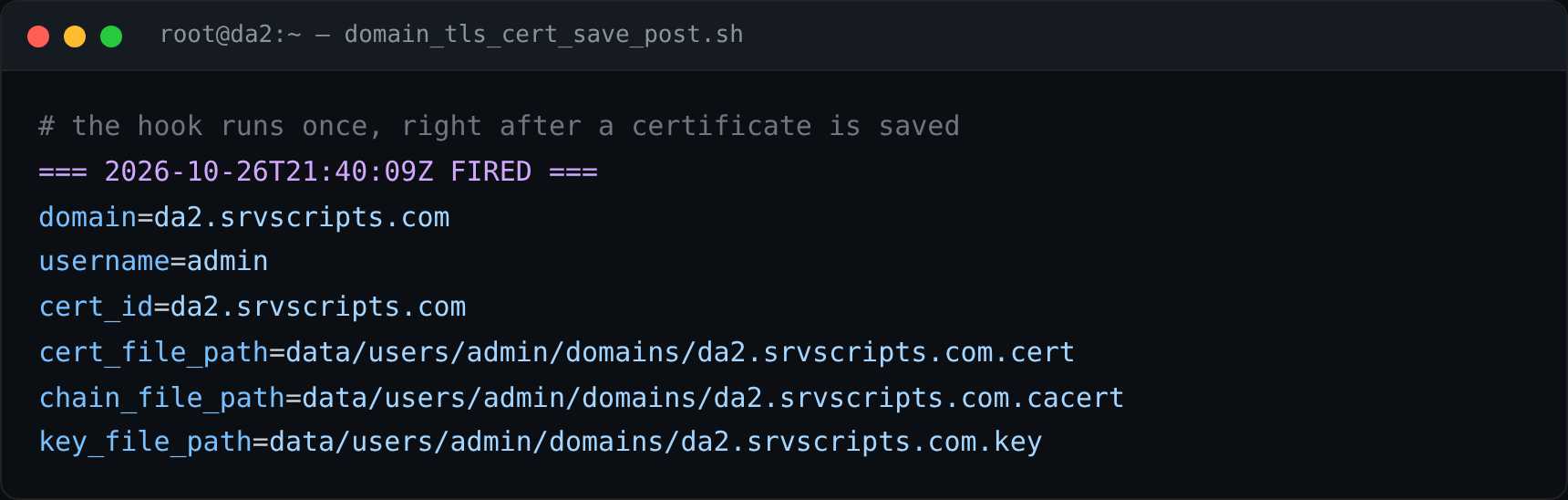
To see it fire for real, trigger an actual certificate save on a spare or test domain — for example add a throwaway subdomain and let DirectAdmin issue its certificate. Do not delete a production certificate to force a re-issue: that risks downtime and can hit Let’s Encrypt rate limits. While testing, drop a temporary logging body into the hook so you can see each invocation:
# temporary logging body
echo "$(date -u) fired for $domain ($username)" >> /root/cert-hook.log
env | grep -E 'domain|user|cert|key|chain|dns' >> /root/cert-hook.log
Then watch /root/cert-hook.log after the next issuance. A plain renewal that finds the certificate still valid is a no-op and will not fire the hook — only an actual save does.
Things to watch
- The script runs as root. Keep it short, quote your variables, and never
evalanything derived from the domain name. - Always
exit 0on the paths you can tolerate failing, so a hiccup in your copy step never blocks DirectAdmin’s own work. - It fires per domain, so a renewal batch calls it once for each certificate saved. Make the work idempotent (the
cmpcheck above does this). - Keep it fast. DirectAdmin runs it inline with the certificate task.
Frequently asked questions
Which DirectAdmin version added this hook?
DirectAdmin 1.712. We tested it on DirectAdmin 1.713 (AlmaLinux 9) and confirmed the variables it exports: domain, username, cert_id, cert_file_path, chain_file_path, key_file_path and dns_names. On 1.713 the *_file_path values are relative to /usr/local/directadmin/, though the official docs describe them as full paths – handle both.
Does it run for wildcard or multi-name certificates?
Yes. It fires once per certificate cert_id after the certificate, with all its names, is saved, so a single call covers the whole SAN set.
Will a DirectAdmin update remove my script?
No. Anything under scripts/custom/ is preserved across DirectAdmin and CustomBuild updates.
Tested on DirectAdmin 1.713, AlmaLinux 9.8.