If you have just created a domain on a recent DirectAdmin and gone looking for its private_html directory, you will not find one. This is not a bug and nothing is broken. It is the end of a two-step change: in 1.695 DirectAdmin’s default web-server templates switched the HTTPS document root to public_html (before that release, private_html was the root used for connections over TLS), and in 1.711 DirectAdmin stopped creating the private_html directory and its migration symlink for new domains. The result: new domains have only public_html, and both HTTP and HTTPS serve from it.
In short: by design. DirectAdmin moved HTTPS to public_html in 1.695 and stopped creating private_html for new domains in 1.711, so HTTP and HTTPS now share one document root. Existing private_html directories are left on disk, but since 1.695 they are no longer what serves HTTPS. You only need to act if a script writes to private_html, or if a site actually relied on serving different content over HTTPS.
Table of Contents
What changed, and why
Years ago private_html let you serve different content over HTTPS than over HTTP. In practice almost nobody wanted that — it caused mixed-content confusion — so most panels and admins symlinked private_html to public_html so the two were identical. DirectAdmin has now finished that journey in two steps: 1.695 updated the web-server templates to use public_html as the document root for HTTPS as well as HTTP (a breaking change for any domain whose public_html and private_html were not already merged), and 1.711 stopped creating the directory and its migration symlink for new domains. The result is one document root, with no symlink to reason about.
Check what your domains have
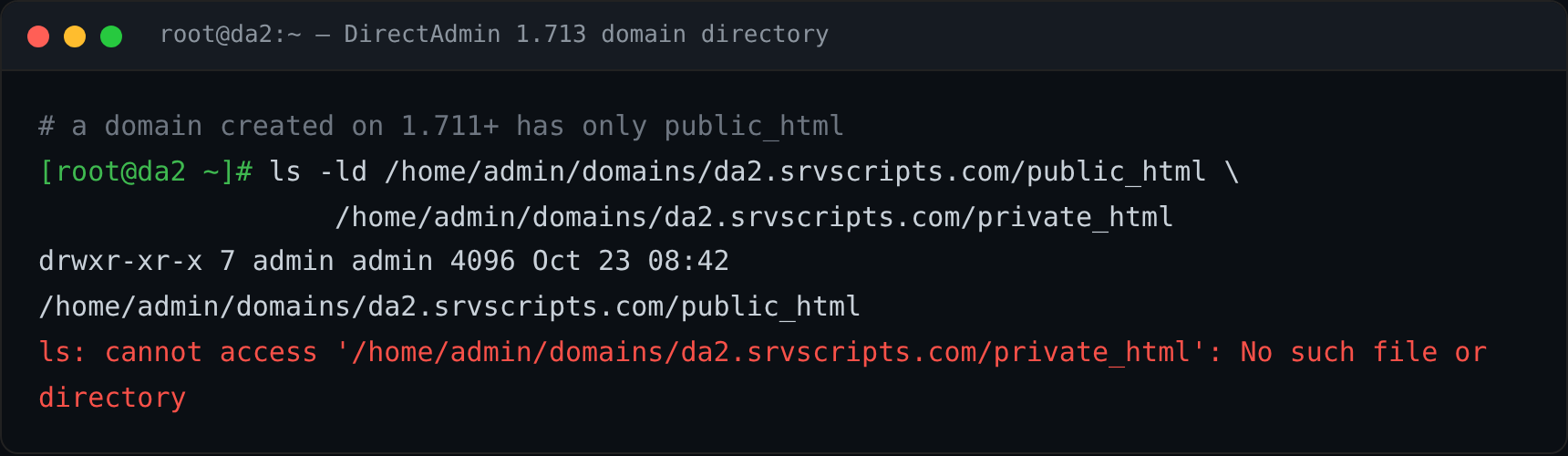
From the command line, look at a domain’s directory. A domain created on 1.711 or later has a real public_html and no private_html at all:
ls -ld /home/USER/domains/example.com/public_html \
       /home/USER/domains/example.com/private_html 2>&1
Three outcomes, each normal:
- No
private_html(thelsreports “No such file or directory”): a domain created on 1.711+. Nothing to do. private_htmlis a symlink topublic_html: an older domain. It keeps working; you can leave it.private_htmlis a real directory with its own files: an older domain that actually used a separate HTTPS root. This is the only case that needs a decision — see below.
What to do
For almost everyone the answer is “nothing”. Act only in these cases:
- A deploy script that writes to
private_html: point it atpublic_htmlinstead. On a new domain the old path does not exist, so the deploy would otherwise fail or create a stray directory the web server never reads. - A real
private_htmlwith its own content: decide which document root you want to keep. First back up bothpublic_htmlandprivate_htmland compare the two trees (for examplediff -r) so you know exactly what differs. If the HTTPS content is the one to keep, copy it intopublic_htmlpreserving ownership and permissions (for examplecp -a private_html/. public_html/), resolving any files that would overwrite existingpublic_htmlcontent rather than clobbering them. Because content that was previously HTTPS-only becomes reachable over HTTP as well, review your redirects and any access controls before exposing it. Confirm the site over both HTTP and HTTPS, and keep the originals until you are sure before removing anything. - Backups or migration tooling that assumes the directory exists: make the path check optional so a restore onto a new-style domain does not error.
Does this affect existing sites?
For most domains nothing changes, with one real exception. The 1.711 change only affects how new domains are created — existing private_html directories and symlinks are left on disk exactly as they are. The 1.695 template change, though, applies whenever a domain’s web-server config is rebuilt: after it, HTTPS is served from public_html, so a domain that used a real, separate private_html for HTTPS will start serving public_html over HTTPS once its config is regenerated. A symlinked private_html already pointed at public_html, so nothing changes there. There is no config flag to bring back a separate HTTPS root; the single-document-root model is the default and the direction forward.
Frequently asked questions
Which version removed private_html?
Two versions matter: 1.695 moved the HTTPS document root to public_html, and 1.711 stopped creating the private_html directory for new domains. We confirmed on DirectAdmin 1.713 (AlmaLinux 9) that a freshly created domain has only public_html and no private_html, with no config flag overriding it.
My HTTPS site is blank now. Is this why?
Possibly. If you deployed into private_html, that content is no longer served over HTTPS since 1.695 – consolidate it into public_html. But a blank HTTPS page has other common causes too (the TLS virtual-host config, a redirect loop, file permissions, or an application error), so check the web-server and site error logs before assuming this is the cause.
Can I recreate private_html manually?
You can create the directory, but DirectAdmin will not serve HTTPS from it on the new model: both protocols read public_html. Keep a single document root.
Tested on DirectAdmin 1.713, AlmaLinux 9.8.