Short answer: A DirectAdmin backup is one compressed tar file per account (user.CREATOR.NAME.tar.zst on current versions). Website files sit under domains/ inside it and each database is a plain SQL dump under backup/. To bring back one file or one database you do not need to restore the whole account: list the archive with tar --zstd -tf, extract the one path, copy it back with the right owner, or feed the SQL dump to mysql using the credentials from da my-cnf.
Applies to DirectAdmin 1.712 on AlmaLinux 9.8 with MariaDB
We ran every command below on our DirectAdmin test server on 6 October 2026 (DirectAdmin 1.712, AlmaLinux 9.8, MariaDB, three WordPress sites). We broke a site on purpose, restored it from the backup and checked the result; the screenshots are the real terminal output with IP addresses masked.
Table of Contents
How DirectAdmin names and packs backups
Current DirectAdmin versions compress backups with zstd, so the files end in .tar.zst; older backups and servers set to gzip end in .tar.gz. The name tells you who made the backup and whose it is:
| File name | What it is |
|---|---|
user.admin.bob.tar.zst | User bob, created by the reseller or admin admin |
reseller.admin.res1.tar.zst | Reseller account res1 |
admin.root.admin.tar.zst | The admin account itself (what our test produced) |
Inside, the layout we found on DirectAdmin 1.712 is:
domains/DOMAIN/public_html/…: the website files, at the top level of the archivebackup/USER_DBNAME.sql: one dump per database, for examplebackup/admin_wp3.sql. Each table starts withDROP TABLE IF EXISTS, and there is noCREATE DATABASEorUSEline, so you choose the target database when you importimap/DOMAIN/MAILBOX/Maildir/…: the mailboxes, also at the top levelbackup/home.tar.zst: the rest of the home directory (dotfiles,.phplogs)backup/*.conf,backup/user.conf,backup/.shadow,backup/login_keys/and similar: account settings, password hashes and API login keys. Treat backup files as secret and keep them readable by root and the owner only.
Make a fresh backup from the command line
If you are about to change something, take a backup first. As root, da admin-backup runs the same job as Admin Level → Admin Backup/Transfer and writes the file straight away:
mkdir -p /home/admin/admin_backups/manual
chown admin:admin /home/admin/admin_backups/manual
da admin-backup --destination=/home/admin/admin_backups/manual --user=bob
--user can be repeated for several accounts. On our one-vCPU test server a 132 MB admin account with three WordPress sites took under 7 seconds.
Restore one file or folder
First find the exact path inside the archive, then extract only that path into a scratch directory and copy it into place with the account owner:
B=/home/admin/admin_backups/manual/user.admin.bob.tar.zst
mkdir /root/restore && cd /root/restore
tar --zstd -tf "$B" | grep "example.com/public_html/wp-config.php"
tar --zstd -xf "$B" domains/example.com/public_html/wp-config.php
install -o bob -g bob -m 644 domains/example.com/public_html/wp-config.php \
    /home/bob/domains/example.com/public_html/wp-config.php
cd / && rm -rf /root/restore
For a whole folder, extract the folder path instead and copy it with rsync -a, then chown -R bob:bob the result. Extracting into a scratch directory, rather than with -C /, means a typo cannot overwrite live files. Use the permissions the file had (wp-config.php is often 600 or 640); 644 is right for ordinary WordPress core files.
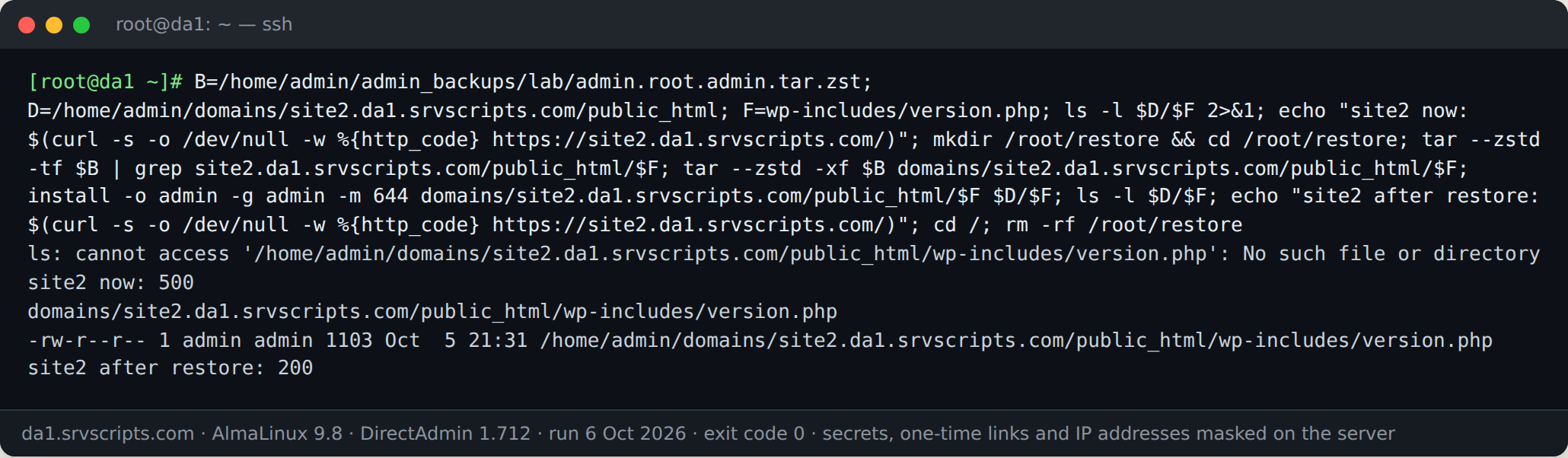
In our test we deleted wp-includes/version.php from a WordPress site, which made the site return HTTP 500, then restored that one file from the backup. The site returned 200 again straight away:
Restore one database
Extract the dump and import it into the existing database. da my-cnf prints a MySQL client configuration with DirectAdmin’s own database login; passing it on a file descriptor means the password never appears on the command line or in a file:
B=/home/admin/admin_backups/manual/user.admin.bob.tar.zst
mkdir -p /root/restore && cd /root/restore
tar --zstd -xf "$B" backup/bob_wp.sql
mysql --defaults-extra-file=/dev/fd/3 bob_wp < backup/bob_wp.sql 3< <(da my-cnf)
mysql --defaults-extra-file=/dev/fd/3 -e "SELECT COUNT(*) FROM bob_wp.wp_posts" 3< <(da my-cnf)
cd / && rm -rf /root/restore
Because each table is dropped and recreated, the import replaces the tables that are in the dump and leaves any extra tables alone. If you need an exact copy of the old database, empty it first or import into a new, empty database and switch the site over. Restore files and database from the same backup run, or a WordPress site can end up with plugins whose tables do not match.
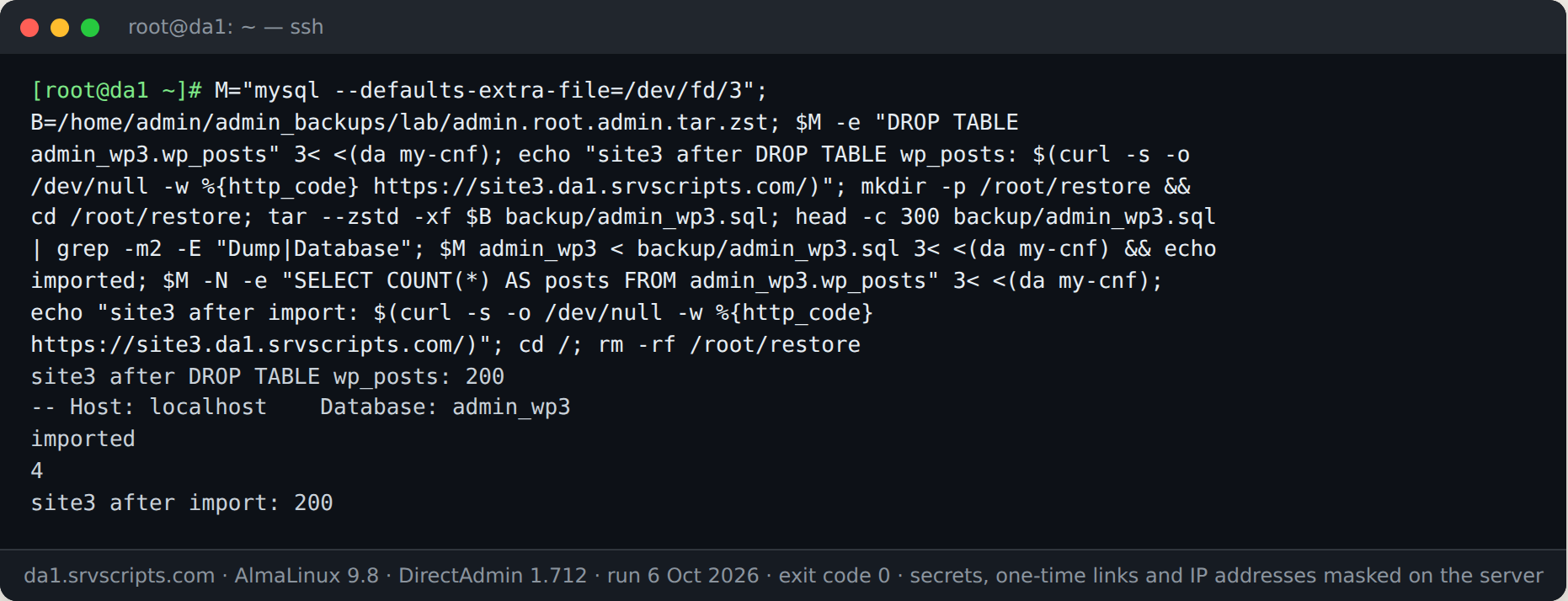
Our test dropped the wp_posts table of a WordPress site and imported the dump from the backup; the table came back with all its rows:
Restore a whole account
For a whole account use Admin Level (or Reseller Level) → Manage Backups → Restore, pick the location and the file, and DirectAdmin recreates the user, domains, mail, databases and settings. If the account still exists, the restore overwrites it, so take a fresh backup of the current state first. We did not run a full-account restore on this server: its licence allows only one account, and we were not going to restore the admin account over itself.
Check the backups before you need them
A restore is only as good as the newest backup that actually opens. Our backup verify script checks that every account has a fresh, non-shrinking archive that decompresses and lists cleanly. On DirectAdmin it reads the account list from /usr/local/directadmin/data/users:
bash backup-verify.sh /home/admin/admin_backups --deep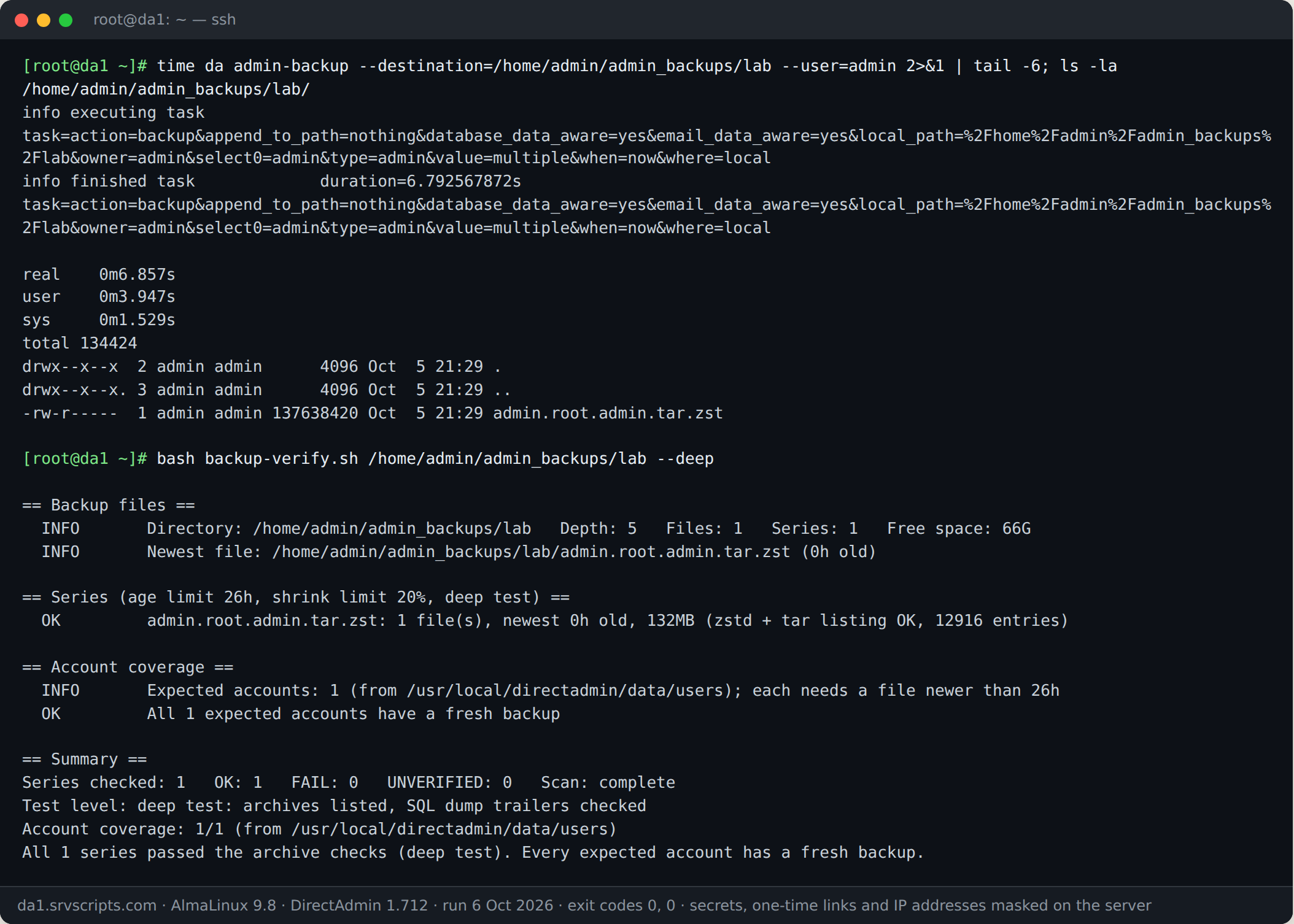
Common problems
- tar: Cannot exec zstd or unrecognized option –zstd: install the
zstdpackage (it was already present on our AlmaLinux 9.8 server). - Not found in archive: the path must match the listing exactly, without a leading
/. Copy it from thetar -tfoutput. - Access denied for the import: run it as root with
da my-cnfas shown, or use the database user and password from the site’s own config. - Site still shows the broken version: clear the page cache (LiteSpeed, nginx or a WordPress cache plugin) and the browser cache.
See also: DirectAdmin CustomBuild Failed: Logs, Lock File, Re-run and Rollback · Migrate DirectAdmin to DirectAdmin: Move All Users to a New Server · Force HTTPS for a Domain in DirectAdmin (Tested on 1.712)
Frequently asked questions
Can I restore a single email account from a DirectAdmin backup?
Yes, the same way as a file. Mailboxes are under imap/DOMAIN/MAILBOX/Maildir/ inside the archive: extract that folder, copy the messages back into the live Maildir with the account owner and the mail group, and Dovecot picks them up.
Do I need to stop the website while I restore a file?
No, for single files. For a database import, a short maintenance window avoids visitors writing to the tables while they are being replaced.
Where does DirectAdmin store admin backups by default?
Wherever the backup job points; /home/admin/admin_backups is the usual local path. Scheduled jobs are listed in Admin Level → Admin Backup/Transfer.
Why is my backup .tar.zst and not .tar.gz?
Current DirectAdmin versions use zstd compression by default because it is faster. tar –zstd reads it; older archives still open with tar -xzf.
Maintenance record
This guide changes servers, data or security settings, so we re-check it against current versions on a fixed schedule. Take a backup or snapshot before you start.
- Maintained by
- srvScripts editorial team
- Supported versions
- DirectAdmin 1.712 on AlmaLinux 9.8 with MariaDB
- Last full review
- Next review