AutoSSL runs every night and on most servers nobody reads what it says. The log for a busy server is thousands of lines, and the few that matter, the AutoSSL DCV failures, are buried between “Analyzing” lines. Then a certificate quietly expires because the customer moved DNS to another host six months ago, or a security plugin started redirecting /.well-known/ to the login page, and the first report is a browser warning on a checkout page.
Table of Contents
This script reads the latest AutoSSL run, pulls out only the problem lines, and sorts the failing domains by cause. It then checks the certificates actually installed in Apache, because a domain can pass DCV today and still be running on a certificate that expires on Friday.
What the AutoSSL DCV failures report checks
- The newest run under
/var/cpanel/logs/autossl/(or the last N runs with--runs), from the plain-texttxtlog or thejsonlog when that is all there is. - Every WARN or ERROR line that names a domain, classified by cause (see below).
- The owning account for each domain, from
/etc/userdomains(withwww.,mail.and the other service subdomains mapped back to the parent). - Every certificate in
/var/cpanel/ssl/apache_tls/*/combinedthat expires within--daysdays or has already expired, with the issuer, so a self-signed or third-party certificate stands out.
The causes, in the order the script checks them:
- CAA — a CAA record does not authorize the provider’s certificate authority.
- RATE-LIMIT — the provider refused because of its rate limits.
- DNS — the domain resolves to an IP that is not on this server, or does not resolve at all.
- HTTP-BLOCKED — the validation file under
/.well-known/came back as a redirect, 403 or 404: usually an.htaccessrule, a forced HTTPS or www redirect, or a WAF. - OTHER — anything else, with the log line for context.
Usage
curl -fsSL https://srvscripts.com/get/autossl-failure-report/ -o autossl-failure-report.sh
bash autossl-failure-report.sh                  # latest run, certificates expiring in < 14 days
bash autossl-failure-report.sh --runs=3         # merge the last three runs
bash autossl-failure-report.sh --days=30        # longer expiry window
Sample output
== AutoSSL DCV failures ==
Log: 2026-09-30T02:09:51Z

CAUSE         DOMAIN                             ACCOUNT        LOG LINE
CAA           shopsite.io                        shopsite       ERROR: The certificate authority rejected the request for "shopsite.io": urn:ietf:params:acme:error:caa :: CAA
DNS           www.acme.org                       acmeco         ERROR: Local HTTP DCV error (www.acme.org): The domain "www.acme.org" resolved to an IP address "198.51.100.7"
HTTP-BLOCKED  acme-shop.net                      acmeco         WARN: Local HTTP DCV error (acme-shop.net): The system queried for a temporary file at "http://acme-shop.net/.

FAIL 3 domain(s) failing DCV

== Apache certificates expiring within 14 days ==
DAYS    VHOST                                  ISSUER                     EXPIRES
EXPIRED blogger.example                        Let's Encrypt              Sep 27 19:25:00 2026 GMT
4       acmeco.com                             Sectigo Limited            Oct  5 19:24:33 2026 GMT
Three different fixes. shopsite.io needs its CAA record to include the AutoSSL provider’s CA. www.acme.org points to another server, so either the DNS gets corrected or the alias is removed from the account. acme-shop.net answers the validation request with a redirect, which is almost always a rewrite rule in .htaccess that needs an exception for /.well-known/. The expired blogger.example certificate belongs to a suspended account, which is expected; acmeco.com renews in four days only if its DCV passes tonight.
Tested on a real server
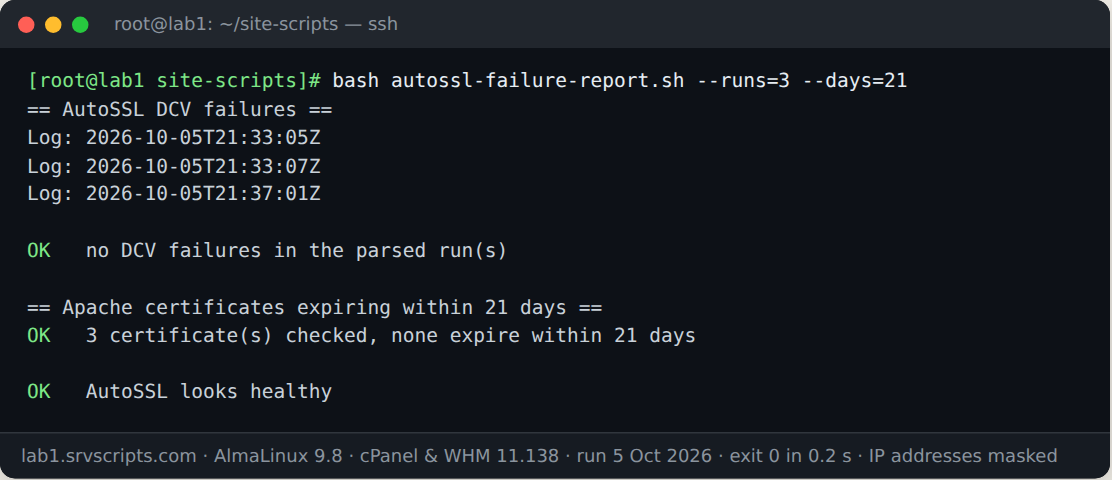
We ran this script on our lab server on 5 October 2026: AlmaLinux 9.8 with cPanel & WHM 11.138, MariaDB 10.11 and three WordPress test accounts. The screenshot is the real terminal output; only IP addresses are masked.
Options
--runs=N— parse the last N AutoSSL runs (default 1, the latest). For each domain the most specific cause wins.--days=N— certificate expiry window in days (default 14).--no-color— plain output even on a terminal.-h,--help— usage.
Running it from cron
Exit code 1 means at least one DCV failure or one certificate inside the expiry window. Schedule it an hour or two after AutoSSL’s nightly run:
15 6 * * * root bash /root/autossl-failure-report.sh --no-color > /root/autossl-report.txt || mail -s "AutoSSL problems on $(hostname)" admin@example.com < /root/autossl-report.txtNotes
Read-only: the script reads log files and certificates and never triggers an AutoSSL run. The cause is inferred from the wording of cPanel’s log messages, so a new message format may land in OTHER until the patterns catch up; the log line is always printed so nothing is hidden. Mail subdomains that do not resolve are a common, harmless source of DNS entries.
For certificates on other services and remote hosts, the SSL expiry check connects to each endpoint instead of reading files. The official Let’s Encrypt rate limits and CAA pages explain the two provider-side causes.
AutoSSL DCV failures at a glance
Official documentation: Let’s Encrypt documentation, cPanel & WHM documentation, Linux man pages.
Related guides: cPanel SSL/TLS Interface (v136+): Easy Install and Renew · WP Toolkit CVE-2026-87900: what is affected and how to patch to 6.11.3 · KernelCare Setup on cPanel and DirectAdmin: Reliable Patching.
The script
#!/usr/bin/env bash
# AutoSSL DCV Failures Report (v1.0.0) - from srvScripts.com
# Source, docs and updates: https://srvscripts.com/scripts/autossl-failure-report/
# Copyright (c) 2026 srvScripts.com. MIT licence: if you copy, share or adapt this script, keep this notice and credit srvScripts.com.
# autossl-failure-report.sh — which domains AutoSSL cannot secure, why, and which certificates expire soon
# https://srvscripts.com/scripts/autossl-failure-report/   License: MIT
#
# Read-only. Parses the latest AutoSSL run log(s) in /var/cpanel/logs/autossl/,
# groups failing domains by cause (DNS not pointing here, CAA, rate limit, HTTP
# validation blocked by .htaccess/redirects, other) and lists installed Apache
# certificates that expire within N days.
#   bash autossl-failure-report.sh               # latest run, certs expiring < 14 days
#   bash autossl-failure-report.sh --runs=3 --days=21
# Exit codes: 0 = OK, 1 = failures or expiring certificates, 2 = usage/dependency error.
#
# Testing only: SRVS_ROOT=/some/dir prefixes every cPanel path the script reads
# so the log and certificate parsing can be exercised against a fixture tree.
set -uo pipefail
export LC_ALL=C

R=${SRVS_ROOT:-}
RUNS=1; DAYS=14; COLOR=1

usage() {
  cat <<'EOF'
Usage: autossl-failure-report.sh [options]

Lists domains that failed AutoSSL domain control validation (DCV), grouped by
cause, and installed certificates that expire soon. Read-only. Run as root.

Options:
  --runs=N      parse the last N AutoSSL runs (default 1 = latest only)
  --days=N      warn about certificates expiring within N days (default 14)
  --no-color    plain output even on a terminal
  -h, --help    this help

Exit codes: 0 = OK, 1 = failures or expiring certificates, 2 = usage/dependency error.
EOF
}

for arg in "$@"; do
  case $arg in
    --runs=*)   RUNS=${arg#*=} ;;
    --days=*)   DAYS=${arg#*=} ;;
    --no-color) COLOR=0 ;;
    -h|--help)  usage; exit 0 ;;
    *) echo "Unknown option: $arg (see --help)" >&2; exit 2 ;;
  esac
done
[[ $RUNS =~ ^[0-9]+$ && $DAYS =~ ^[0-9]+$ ]] && (( RUNS > 0 )) || { echo "--runs and --days take whole numbers (--runs >= 1)" >&2; exit 2; }

[[ -d $R/usr/local/cpanel ]] || { echo "cPanel not found ($R/usr/local/cpanel is missing). This script is for cPanel/WHM servers." >&2; exit 2; }
if [[ -z $R && $EUID -ne 0 ]]; then echo "Run as root." >&2; exit 2; fi

if (( COLOR )) && [[ -t 1 ]]; then
  C_OK=$'\e[32m'; C_WARN=$'\e[33m'; C_FAIL=$'\e[31m'; C_OFF=$'\e[0m'
else
  C_OK=; C_WARN=; C_FAIL=; C_OFF=
fi
hr() { printf '\n== %s ==\n' "$*"; }
st() { # st STATUS message
  local c=
  case $1 in OK) c=$C_OK ;; WARN) c=$C_WARN ;; FAIL) c=$C_FAIL ;; esac
  printf '%s%-4s%s %s\n' "$c" "$1" "$C_OFF" "$2"
}

problems=0
LOGDIR=$R/var/cpanel/logs/autossl

# log_text DIR — print the run's messages as plain text. Prefers the "txt" log;
# falls back to the "json" log (one JSON object per line, text in "contents").
log_text() {
  if [[ -r $1/txt ]]; then
    cat "$1/txt"
  elif [[ -r $1/json ]]; then
    awk '
      function field(name,   i, s, out, c) {
        i = index($0, "\"" name "\":\""); if (!i) return ""
        s = substr($0, i + length(name) + 4); out = ""
        while (length(s)) {
          c = substr(s, 1, 1)
          if (c == "\\") { out = out substr(s, 1, 2); s = substr(s, 3); continue }
          if (c == "\"") break
          out = out c; s = substr(s, 2)
        }
        return out
      }
      { t = field("type"); m = field("contents"); if (m != "") print (t != "" ? toupper(t) ": " : "") m }' "$1/json"
  fi
}

# ---------------------------------------------------------------- AutoSSL runs
hr "AutoSSL DCV failures"
runs=()   # one directory per run; newest by modification time last
if [[ -d $LOGDIR ]]; then
  while IFS= read -r d; do runs+=("$d"); done < <(find "$LOGDIR" -mindepth 1 -maxdepth 1 -type d -printf '%T@ %p\n' | sort -n | tail -n "$RUNS" | cut -d' ' -f2-)
fi
if (( ${#runs[@]} == 0 )); then
  echo "skipped: no AutoSSL logs in $LOGDIR (AutoSSL disabled or never run?)"
else
  for d in "${runs[@]}"; do echo "Log: ${d##*/}"; done
  echo
  # Normalise cPanel's curly quotes (raw UTF-8 or \u escapes) to plain quotes,
  # keep problem lines, pull out the domain and classify the cause.
  report=$(for d in "${runs[@]}"; do log_text "$d"; done |
    sed -e 's/\xe2\x80\x9c/"/g; s/\xe2\x80\x9d/"/g; s/\xe2\x80\x99/'"'"'/g' \
        -e 's/\\u201[cd]/"/g; s/\\u2019/'"'"'/g; s/\\"/"/g' |
    awk -v udfile="$R/etc/userdomains" '
      BEGIN {
        while ((getline l < udfile) > 0) { split(l, a, /: */); owner[a[1]] = a[2] }
        pri["CAA"] = 5; pri["RATE-LIMIT"] = 4; pri["DNS"] = 3; pri["HTTP-BLOCKED"] = 2; pri["OTHER"] = 1
      }
      function grab(re, trim) { if (match(line, re)) return substr(line, RSTART + trim, RLENGTH - 2 * trim); return "" }
      {
        line = tolower($0)
        # Problem lines only: informational lines also mention DCV and CAA.
        if (line !~ /error|warn|fail|ratelimit|rate limit|too many|does not resolve|prevents issuance/) next
        if (line ~ /(^|[ :])(ok|info|success)[ :]/ && line !~ /error|warn|fail/) next
        dom = grab("\\([a-z0-9*][a-z0-9.-]*\\.[a-z][a-z0-9-]+\\)", 1)
        if (dom == "") dom = grab("\"[a-z0-9*][a-z0-9.-]*\\.[a-z][a-z0-9-]+\"", 1)
        if (dom == "") next
        if (line ~ /caa/) c = "CAA"
        else if (line ~ /ratelimit|rate limit|too many (certificates|requests|failed|new orders)/) c = "RATE-LIMIT"
        else if (line ~ /does not exist on this server|does not resolve|resolved to|nxdomain|servfail|no ipv4|no a record/) c = "DNS"
        else if (line ~ /htaccess|redirect|forbidden|40[34]|30[1278]|well-known|pki-validation|acme-challenge/) c = "HTTP-BLOCKED"
        else if (line ~ /dns/) c = "DNS"
        else c = "OTHER"
        if (dom in cat && pri[cat[dom]] > pri[c]) next
        cat[dom] = c
        msg = $0; sub(/^[ \t]*/, "", msg)
        why[dom] = substr(msg, 1, 110)
      }
      END {
        for (d in cat) {
          b = d; sub(/^(www|mail|webmail|cpanel|webdisk|cpcalendars|cpcontacts|autodiscover|autoconfig|whm)\./, "", b)
          printf "%s\t%s\t%s\t%s\n", cat[d], d, (d in owner) ? owner[d] : ((b in owner) ? owner[b] : "-"), why[d]
        }
      }' | sort)
  if [[ -z $report ]]; then
    st OK "no DCV failures in the parsed run(s)"
  else
    printf '%-13s %-34s %-14s %s\n' CAUSE DOMAIN ACCOUNT "LOG LINE"
    awk -F'\t' '{ printf "%-13s %-34s %-14s %s\n", $1, $2, $3, $4 }' <<<"$report"
    echo
    n=$(wc -l <<<"$report"); problems=$((problems + n))
    st FAIL "$n domain(s) failing DCV"
    awk -F'\t' '{ c[$1]++ } END { for (k in c) printf "  %-13s %d\n", k, c[k] }' <<<"$report" | sort
    echo
    echo "What each cause usually means:"
    echo "  DNS           domain resolves somewhere else (moved, Cloudflare proxy, stale alias); fix DNS or remove it"
    echo "  HTTP-BLOCKED  .htaccess rewrite, forced redirect or WAF answers /.well-known/ instead of the file"
    echo "  CAA           a CAA record does not allow the AutoSSL provider's CA to issue"
    echo "  RATE-LIMIT    provider rate limit hit; wait, do not keep re-running AutoSSL"
  fi
fi

# ---------------------------------------------------------------- expiring certificates
hr "Apache certificates expiring within $DAYS days"
if ! command -v openssl >/dev/null 2>&1; then
  echo "skipped: openssl not installed"
else
  now=$(date +%s); checked=0; rows=""
  for f in "$R"/var/cpanel/ssl/apache_tls/*/combined; do
    [[ -r $f ]] || continue
    checked=$((checked + 1))
    vhost=${f%/combined}; vhost=${vhost##*/}
    # "combined" holds key + certificate + CA chain; take the first certificate only.
    cert=$(awk '/-----BEGIN CERTIFICATE-----/ {p = 1} p {print} /-----END CERTIFICATE-----/ {exit}' "$f")
    [[ -n $cert ]] || { rows+="$(printf '%s\t%s\t%s\t%s' "?" "$vhost" "?" "no certificate found in combined file")"$'\n'; continue; }
    info=$(openssl x509 -noout -enddate -issuer -subject <<<"$cert" 2>/dev/null) || continue
    end=$(sed -n 's/^notAfter=//p' <<<"$info")
    endts=$(date -d "$end" +%s 2>/dev/null) || continue
    left=$(( (endts - now) / 86400 )); (( endts < now )) && left=$(( -((now - endts) / 86400) - 1 ))
    (( left < DAYS )) || continue
    iss=$(sed -nE 's/^issuer=(.*[ ,\/])?O *= *([^,\/]+).*/\2/p' <<<"$info"); iss=${iss:-unknown}
    [[ $(sed -n 's/^issuer=//p' <<<"$info") == "$(sed -n 's/^subject=//p' <<<"$info")" ]] && iss="self-signed"
    rows+="$(printf '%s\t%s\t%s\t%s' "$left" "$vhost" "$iss" "$end")"$'\n'
  done
  if [[ -z $rows ]]; then
    st OK "$checked certificate(s) checked, none expire within $DAYS days"
  else
    printf '%-7s %-38s %-26s %s\n' DAYS VHOST ISSUER EXPIRES
    printf '%s' "$rows" | sort -t$'\t' -k1,1n | awk -F'\t' '{ printf "%-7s %-38s %-26s %s\n", ($1 == "?" ? "?" : ($1 < 0 ? "EXPIRED" : $1)), $2, substr($3, 1, 26), $4 }'
    n=$(printf '%s' "$rows" | grep -c .)
    problems=$((problems + n))
    st WARN "$n of $checked certificate(s) expire within $DAYS days or are unreadable"
  fi
fi

echo
if (( problems > 0 )); then st FAIL "$problems problem(s) found"; exit 1; fi
st OK "AutoSSL looks healthy"
exit 0
3142b94ee02f661677a792fc0a6f1518d1b30fb52bac9957b55014442ccf0ca1curl -fsSL -o autossl-failure-report.sh https://scr.srvscripts.com/autossl-failure-report/autossl-failure-report.sh && curl -fsSL https://scr.srvscripts.com/autossl-failure-report/autossl-failure-report.sh.sha256 | sha256sum -cInvoke-WebRequest -Uri 'https://scr.srvscripts.com/autossl-failure-report/autossl-failure-report.sh' -OutFile 'autossl-failure-report.sh'; if ((Get-FileHash 'autossl-failure-report.sh' -Algorithm SHA256).Hash -eq '3142B94EE02F661677A792FC0A6F1518D1B30FB52BAC9957B55014442CCF0CA1') { 'OK: the file is intact' } else { 'MISMATCH: do not run this file' }curl and sha256sum are not the Linux tools, so use the PowerShell line there.Also on GitHub: github.com/srvscripts/scripts
Frequently asked questions
Why is a domain listed as DNS when it loads fine in my browser?
It loads from somewhere else. AutoSSL validates from this server’s point of view, so a domain behind a proxy or pointing at another host fails DCV even though the site works.
Should I re-run AutoSSL after a rate-limit failure?
No. Wait for the limit window to pass; repeated runs keep hitting the same limit. Fix DNS and HTTP causes first so the next run does not waste attempts.
Does it read the WHM AutoSSL problem list?
No, it reads the run logs directly, which hold the same messages and work on every cPanel version that has AutoSSL.