Call recordings fill a PBX disk faster than anything else. FreePBX writes 16-bit WAV by default, about 1 MB per minute, and older systems use GSM files that customers, managers and CRMs cannot play. This script converts finished Asterisk recordings to small mono MP3 files from cron, safely: it skips calls still being recorded, never converts a file twice, decodes every MP3 back and checks its length before touching the original, and can update the FreePBX call log so the web player keeps working.
Version 1.1.0 (7 October 2026): An external review found that version 1.0.0 could delete an original recording even when the call log update had failed, and accepted any non-empty MP3 as verified. Now the original is deleted only after every step worked, including a full read-back of the MP3 and a call log update that changed at least one row; on any failure the original is kept and the run exits 1.
Table of Contents
What it does
- Searches
/var/spool/asterisk/monitor(or--dir) recursively for.wav,.WAV(WAV49),.wav49and.gsmfiles, plus.ulaw,.alaw,.sln,.sln16,.g722and.g729when you list them in--ext. - Skips files modified in the last two minutes (
--older-than), so a call that is still recording is left alone. Files changed in the last 60 seconds, held open (checked withfuserwhen it is installed) or changed during conversion are always skipped and counted as “still recording”. It also skips any file that already has an.mp3next to it. - Converts with
ffmpegif it is installed, otherwise withsoxpiped intolame. Output is mono MP3 at 32 kbps by default (about 240 KB per minute). - Writes to a
.mp3.partfile first, then decodes every frame of the new MP3 and of the original (withffprobe, orsoxin sox mode). Both lengths must be over zero and within 1 second or 2% of each other, so zero-length, truncated or undecodable output is rejected. It then copies the owner, permissions and timestamp from the original and renames the file. - With
--delete-original, deletes the original only when encoding, read-back, the owner/permission/time copy, the rename and (with--update-cdr) a call log update that changed at least one row all worked. If any step fails it printsERROR: <file>: <reason>; original kept, removes the MP3 so the next run tries that file again, and the run exits 1. The one exception: if the call log already names the MP3, both files are kept and the error says so. - With
--update-cdr, changes therecordingfilecolumn inasteriskcdrdb.cdrfrom the old name to the.mp3name, and checks that at least one row changed. - Without
ffprobeorsoxthe MP3 cannot be read back. The script then only converts: it prints a WARN, keeps every original and leaves the call log alone, even with--delete-originaland--update-cdr. - Takes a lock, so a slow run is never overlapped by the next cron start, and runs the encoders with
niceso calls are not affected.
Install and first run
curl -fsSL https://srvscripts.com/get/asterisk-recordings-to-mp3/ -o /usr/local/bin/asterisk-recordings-to-mp3.sh
chmod 755 /usr/local/bin/asterisk-recordings-to-mp3.sh

# encoder: ffmpeg (Debian 12 / FreePBX 17, Ubuntu)  or  sox + lame
apt install ffmpeg            # or: apt install sox lame

# see what it would do, change nothing
asterisk-recordings-to-mp3.sh --dry-run

# convert everything older than 2 minutes, keep the originals
asterisk-recordings-to-mp3.sh
On AlmaLinux and Rocky Linux, ffmpeg comes from RPM Fusion; sox is usually in the base repositories and lame in EPEL or RPM Fusion. The ffmpeg package also gives you ffprobe for the read-back check. In sox mode the read-back needs a sox built with MP3 support; without it every file fails safely and its original is kept. The first run converts the whole backlog, so on a busy PBX start it at a quiet time, or limit it with --days 7.
Sample output
2026-10-03 05:21:21 converting with ffmpeg at 32 kbps in /var/spool/asterisk/monitor
ok  2026/10/02/out-101-20261002-1.wav -> out-101-20261002-1.mp3 (62 KB -> 16 KB)
ok  2026/10/02/in-102-20261002-7.WAV -> in-102-20261002-7.mp3 (6 KB -> 16 KB)
ok  2026/10/02/q-200-20261002-3.gsm -> q-200-20261002-3.mp3 (6 KB -> 16 KB)
2026-10-03 05:21:22 done: 3 converted, 0 already had an MP3, 0 still recording, 0 failed in 1 s, 74 KB -> 48 KB
This sample is shown in the output format of 1.1.0, which adds the “still recording” count to the summary line. A file that fails is reported on its own line, for example ERROR: 2026/10/07/test-nocdr.wav: call log update matched 0 rows; original kept, and the run exits 1.
GSM and WAV49 files are already tiny (13 kbps), so their MP3 is a little larger; the gain is that every phone, browser and CRM can play it. PCM WAV recordings shrink by about 75%.
Options
| Option | Default | What it does |
|---|---|---|
--dir DIR | /var/spool/asterisk/monitor | Folder to search, including subfolders |
--older-than MIN | 2 | Skip files modified in the last MIN minutes. Files changed in the last 60 seconds or held open are always skipped |
--days N | 0 (all) | Only files modified in the last N days |
--bitrate KBPS | 32 | 16, 24, 32, 48 or 64 |
--ext LIST | wav,WAV,wav49,gsm | Extensions to convert, case-sensitive |
--delete-original | off | Delete each original only after its MP3 is read back and every other step worked. Needs ffprobe or sox; without them originals are kept |
--update-cdr | off | Point FreePBX call log rows at the MP3. A file whose update fails or matches no row keeps its original and is tried again next run |
--cdr-db NAME | asteriskcdrdb | CDR database name |
--encoder NAME | auto | ffmpeg, sox or auto |
--dry-run | off | List what would be converted |
-q | off | Print only the summary and errors |
Exit codes: 0 when everything converted or there was nothing to do, 1 when some files failed (each one is printed as an ERROR line and keeps its original), 2 for a usage error, a missing encoder, another run still active, or a call log that cannot be read with --update-cdr. In that last case the script stops before it changes anything. The lock file is /run/lock/asterisk-recordings-to-mp3.lock; set RECORDINGS_MP3_LOCK to use another path.
Run it every 10 minutes from cron
# /etc/cron.d/recordings-mp3
*/10 * * * * root /usr/local/bin/asterisk-recordings-to-mp3.sh -q --older-than 5 --delete-original --update-cdr >>/var/log/recordings-mp3.log 2>&1
Run it without --delete-original for a few days first, play some MP3s from the call log, then add the option. Rotate the log with a small /etc/logrotate.d/recordings-mp3 entry. A file that failed needs no action to be retried: it keeps its original and has no .mp3, so the next cron run picks it up. Check the log for ERROR lines that repeat on every run.
FreePBX call log and web player
FreePBX finds a recording through the recordingfile column of asteriskcdrdb.cdr. If you delete the WAV and leave the column alone, the CDR Reports and UCP players show the call but cannot play it. --update-cdr runs one UPDATE … SET recordingfile=REPLACE(…) per file, matched on the file name, using the mysql client with the credentials in /root/.my.cnf (FreePBX sets this up) or MYSQL_ARGS, and reads back how many rows changed. If no row changed, the original is kept. Plain Asterisk without FreePBX does not need it.
A recording with no matching call log row therefore never converts under --update-cdr. That includes recordings the CDR does not reference, and names with _ or %, which the LIKE match treats as wildcards. Such a file fails and is encoded again on every run until you handle it by hand or run the script without --update-cdr. Empty (0-second) recordings are also reported on every run.
Version 1.0.0 was tested on a real FreePBX 17 server (Debian 12, Asterisk 22.11) on 6 October 2026: we made three calls that Asterisk recorded with MixMonitor in wav, gsm and WAV (wav49) format, each with its call-log row. The script converted all three, kept the asterisk owner, deleted the originals only after checking each MP3, and pointed the call log at the new files. The 7.7-second WAV shrank from 117 KB to 30 KB; the GSM files grew from 12 KB to 30 KB, because GSM is already smaller than 32 kbps MP3.
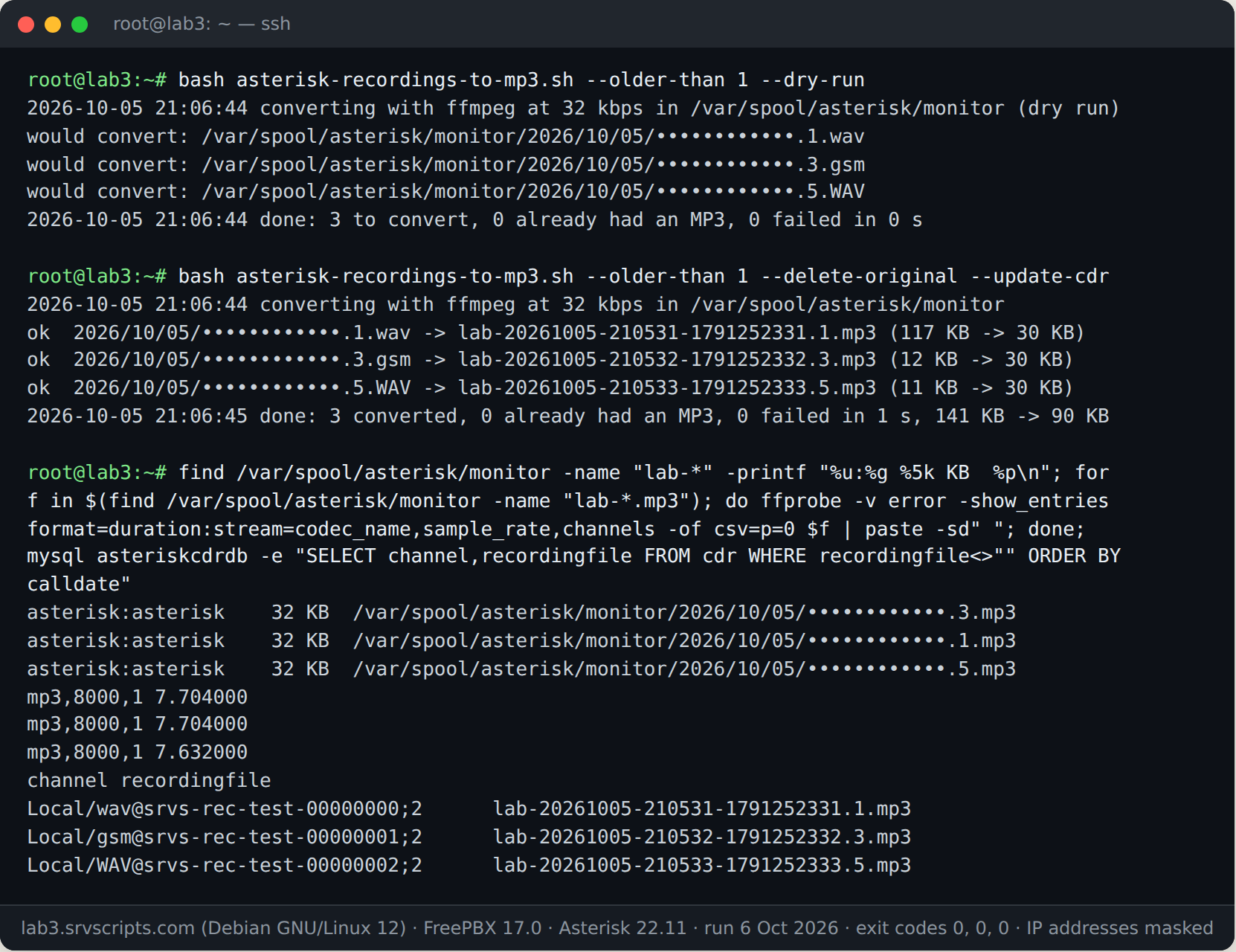
Version 1.1.0 was tested on the same server on 7 October 2026. A 20-second wav and a 15-second gsm test recording, each with a call log row, were converted with --delete-original --update-cdr; the call log now pointed at the .mp3 files, and the MP3s read back as 20.16 s and 15.19 s. A third wav with no call log row failed with ERROR: 2026/10/07/test-nocdr.wav: call log update matched 0 rows; original kept, and the run exited 1. The summary line was done: 2 converted, 0 already had an MP3, 0 still recording, 1 failed in 2 s, 649 KB -> 138 KB. With wrong database credentials the script stopped before any change with ERROR: cannot read asteriskcdrdb.cdr (set MYSQL_ARGS or /root/.my.cnf) and exit code 2.
Notes
- Asterisk cannot record to MP3 directly: its MP3 format module only reads MP3, for music on hold. Converting after the call is the standard approach.
- Uppercase
.WAVis GSM-compressed WAV49 and lowercase.wavis PCM; the script treats extensions case-sensitively for that reason. soxcannot decode G.729 or G.722 files; use--encoder ffmpegfor those.- Run the script as root, or as the owner of the recordings. If the owner, mode or timestamp cannot be copied (for example as a non-root user on files owned by
asterisk), each file now fails and keeps its original instead of being converted with the wrong owner. - The open-file check needs
fuser(package psmisc) and root to see Asterisk’s file handles. Without it, the 60-second and changed-during-conversion checks still apply. - If the call log update errors after the database already points at the MP3, both files are kept and later runs skip that file. Clean it up by hand.
- For one-off files on your own computer, the call recording converter does the same in the browser.
Asterisk recordings to MP3 at a glance
Official documentation: Asterisk MixMonitor, FFmpeg MP3 (libmp3lame) options, SoX manual.
Related: Call recording converter · Convert Asterisk recordings to MP3 · Install Asterisk 22 on Debian 13.
The script
#!/usr/bin/env bash
# Asterisk Recordings to MP3: Bulk Convert FreePBX Call Recordings (v1.1.0) - from srvScripts.com
# Source, docs and updates: https://srvscripts.com/scripts/asterisk-recordings-to-mp3/
# Copyright (c) 2026 srvScripts.com. MIT licence: if you copy, share or adapt this script, keep this notice and credit srvScripts.com.
# asterisk-recordings-to-mp3.sh — convert Asterisk / FreePBX / Issabel call recordings to MP3 from cron
# https://srvscripts.com/scripts/asterisk-recordings-to-mp3/   License: MIT
#
# Finds finished recordings (.wav, .WAV/wav49, .gsm, .ulaw, .alaw, .sln...) under the monitor folder, converts
# each one to mono MP3 with ffmpeg (or sox + lame), copies the owner and timestamp, decodes the MP3 back to check
# its length matches the original and, only if asked, points the FreePBX call log (asteriskcdrdb.cdr.recordingfile)
# at the new file and deletes the original. Files still being written (modified in the last --older-than minutes,
# always at least 60 seconds, or held open) are skipped. Safe to run every few minutes: a lock stops two runs
# overlapping and finished files are never converted twice.
# The original is deleted only when encoding, read-back, owner/time copy, rename and (with --update-cdr) the call
# log update of at least one row all succeeded. On any failure the original is kept, the MP3 is removed (so the
# next run retries the file), an ERROR line is printed and the run exits 1. Without ffprobe or sox the MP3 cannot
# be read back, so the script only converts: originals are kept and the call log is left alone.
#   bash asterisk-recordings-to-mp3.sh --dry-run
#   bash asterisk-recordings-to-mp3.sh --older-than 5 --delete-original --update-cdr
#   */10 * * * * root /usr/local/bin/asterisk-recordings-to-mp3.sh --delete-original --update-cdr >>/var/log/recordings-mp3.log 2>&1
# Exit codes: 0 all converted (or nothing to do), 1 some files failed, 2 usage error, no encoder, or another run active.
# Version 1.1.0 (2026-10-07): originals are kept unless every step succeeded, including the call log update (1.0.0
#   deleted them after a failed UPDATE); MP3s are decoded and must match the original's length (zero-length or
#   truncated output is rejected); owner/time/rename failures count as errors; open recordings are skipped.
# Version 1.0.0: first release.
set -uo pipefail
export LC_ALL=C

DIR=/var/spool/asterisk/monitor; OLDER=2; BITRATE=32; EXTS="wav,WAV,wav49,gsm"; DELETE=0; CDR=0
DRY=0; DAYS=0; ENCODER=auto; QUIET=0; LOCK=${RECORDINGS_MP3_LOCK:-/run/lock/asterisk-recordings-to-mp3.lock}; CDRDB=asteriskcdrdb

usage() {
  cat <<'EOF'
Usage: asterisk-recordings-to-mp3.sh [options]
  --dir DIR            recordings folder (default /var/spool/asterisk/monitor), searched recursively
  --older-than MIN     skip files modified in the last MIN minutes, still recording (default 2;
                       files changed in the last 60 seconds or held open are always skipped)
  --days N             only files modified in the last N days (default 0 = all)
  --bitrate KBPS       MP3 bit rate: 16, 24, 32, 48 or 64 (default 32)
  --ext LIST           extensions to convert, comma separated (default wav,WAV,wav49,gsm;
                       also: ulaw,alaw,sln,sln16,g722,g729 with ffmpeg)
  --delete-original    delete each original after its MP3 is verified (default: keep both;
                       needs ffprobe or sox to read the MP3 back, otherwise originals are kept)
  --update-cdr         FreePBX: change recordingfile in asteriskcdrdb.cdr to the .mp3 name; a file
                       whose update fails or matches no row keeps its original and is retried next run
  --cdr-db NAME        CDR database name (default asteriskcdrdb)
  --encoder NAME       auto | ffmpeg | sox (default auto: ffmpeg if installed, else sox + lame)
  --dry-run            only list what would be converted
  -q, --quiet          print only the summary and errors
  -h, --help           this help
Environment: MYSQL_ARGS extra arguments for the mysql client (FreePBX root can use /root/.my.cnf)
             RECORDINGS_MP3_LOCK lock file (default /run/lock/asterisk-recordings-to-mp3.lock)
EOF
}
die() { echo "ERROR: $*" >&2; exit 2; }
log() { [ "$QUIET" = 1 ] || echo "$*"; }

while [ $# -gt 0 ]; do
  case "$1" in
    --dir) DIR="${2:-}"; shift 2 ;;
    --older-than) OLDER="${2:-}"; shift 2 ;;
    --days) DAYS="${2:-}"; shift 2 ;;
    --bitrate) BITRATE="${2:-}"; shift 2 ;;
    --ext) EXTS="${2:-}"; shift 2 ;;
    --delete-original) DELETE=1; shift ;;
    --update-cdr) CDR=1; shift ;;
    --cdr-db) CDRDB="${2:-}"; shift 2 ;;
    --encoder) ENCODER="${2:-}"; shift 2 ;;
    --dry-run) DRY=1; shift ;;
    -q|--quiet) QUIET=1; shift ;;
    -h|--help) usage; exit 0 ;;
    *) usage >&2; exit 2 ;;
  esac
done

[[ "$OLDER" =~ ^[0-9]+$ ]] || die "--older-than needs a number of minutes"
[[ "$DAYS" =~ ^[0-9]+$ ]] || die "--days needs a number"
case "$BITRATE" in 16|24|32|48|64) ;; *) die "--bitrate must be 16, 24, 32, 48 or 64" ;; esac
[[ "$CDRDB" =~ ^[A-Za-z0-9_]+$ ]] || die "--cdr-db: letters, digits and _ only"
[ -d "$DIR" ] || die "folder not found: $DIR"

have() { command -v "$1" >/dev/null 2>&1; }
if [ "$ENCODER" = auto ]; then
  if have ffmpeg; then ENCODER=ffmpeg; elif have sox && have lame; then ENCODER=sox; else ENCODER=none; fi
fi
case "$ENCODER" in
  ffmpeg) have ffmpeg || die "ffmpeg not found" ;;
  sox) { have sox && have lame; } || die "sox and lame are both needed (dnf install sox lame / apt install sox lame)" ;;
  *) die "no encoder: install ffmpeg, or sox and lame (on EL: dnf install epel-release, then dnf install sox lame)" ;;
esac
# Reading the MP3 back needs ffprobe (ffmpeg package) or sox. Without one nothing is verified: convert only.
if have ffprobe; then PROBE=ffprobe; elif have sox; then PROBE=sox; else PROBE=none; fi
if [ "$PROBE" = none ] && [ "$DRY" = 0 ] && { [ "$DELETE" = 1 ] || [ "$CDR" = 1 ]; }; then
  echo "WARN: no ffprobe or sox to read the MP3s back: converting only, originals are kept and the call log is not changed" >&2
  DELETE=0; CDR=0
fi
if [ "$CDR" = 1 ] && [ "$DRY" = 0 ]; then
  MYSQL=$(command -v mysql || command -v mariadb) || die "--update-cdr needs the mysql or mariadb client"
  # shellcheck disable=SC2086
  "$MYSQL" ${MYSQL_ARGS:-} -N -B -e "SELECT 1 FROM \`$CDRDB\`.cdr LIMIT 1" >/dev/null 2>&1 || die "cannot read $CDRDB.cdr (set MYSQL_ARGS or /root/.my.cnf)"
fi

# One run at a time.
if [ "$DRY" = 0 ]; then
  mkdir -p "$(dirname "$LOCK")" 2>/dev/null
  exec 9>"$LOCK" || die "cannot open lock file $LOCK"
  flock -n 9 || { echo "Another run is still active, exiting." >&2; exit 2; }
fi

# Input options for headerless formats.
ff_in() {
  case "${1,,}" in
    gsm) echo "-f gsm -ar 8000 -ac 1" ;;
    ulaw|ul|mu|pcmu) echo "-f mulaw -ar 8000 -ac 1" ;;
    alaw|al|pcma) echo "-f alaw -ar 8000 -ac 1" ;;
    sln|slin|raw) echo "-f s16le -ar 8000 -ac 1" ;;
    sln12) echo "-f s16le -ar 12000 -ac 1" ;; sln16) echo "-f s16le -ar 16000 -ac 1" ;;
    sln24) echo "-f s16le -ar 24000 -ac 1" ;; sln32) echo "-f s16le -ar 32000 -ac 1" ;;
    sln48) echo "-f s16le -ar 48000 -ac 1" ;;
    g722) echo "-f g722" ;; g729) echo "-f g729" ;;
    mp3) echo "-f mp3" ;; # read-back of our own .mp3.part
    *) echo "" ;;
  esac
}
sox_in() {
  case "${1,,}" in
    gsm) echo "-t gsm -r 8000 -c 1" ;;
    ulaw|ul|mu|pcmu) echo "-t ul -r 8000 -c 1" ;;
    alaw|al|pcma) echo "-t al -r 8000 -c 1" ;;
    sln|slin|raw) echo "-t raw -e signed -b 16 -r 8000 -c 1" ;;
    sln16) echo "-t raw -e signed -b 16 -r 16000 -c 1" ;;
    sln48) echo "-t raw -e signed -b 16 -r 48000 -c 1" ;;
    wav|wav49) echo "-t wav" ;;
    mp3) echo "-t mp3" ;;
    g722|g729) echo "UNSUPPORTED" ;;
    *) echo "" ;;
  esac
}
convert() { # $1 input  $2 output.part  $3 extension
  local in="$1" out="$2" ext="$3" opts
  if [ "$ENCODER" = ffmpeg ]; then
    opts=$(ff_in "$ext")
    # shellcheck disable=SC2086
    nice -n 15 ffmpeg -nostdin -hide_banner -loglevel error -y $opts -i "$in" -vn -ac 1 -c:a libmp3lame -b:a "${BITRATE}k" -f mp3 "$out"
  else
    opts=$(sox_in "$ext")
    [ "$opts" = UNSUPPORTED ] && { echo "sox cannot decode .$ext, use --encoder ffmpeg" >&2; return 1; }
    # shellcheck disable=SC2086
    nice -n 15 sox -q $opts "$in" -t wav -c 1 -b 16 - 2>/dev/null | nice -n 15 lame --quiet -m m -b "$BITRATE" - "$out"
  fi
}
duration() { # $1 file  $2 extension: seconds of audio found by decoding every frame, nothing if unreadable
  local opts
  if [ "$PROBE" = ffprobe ]; then # header durations are not trusted: a truncated MP3 keeps its full-length Xing header
    opts=$(ff_in "$2")
    # shellcheck disable=SC2086
    nice -n 15 ffprobe -v error $opts -select_streams a:0 -show_entries stream=sample_rate:frame=nb_samples -of default=nw=1 "$1" 2>&1 \
      | awk -F= '$1=="nb_samples" {n+=$2; next} $1=="sample_rate" {r=$2; next} {bad=1} END {if (!bad && r>0) printf "%.2f\n", n/r}'
  else
    opts=$(sox_in "$2"); [ "$opts" = UNSUPPORTED ] && return 1
    # shellcheck disable=SC2086
    nice -n 15 sox $opts "$1" -n stat 2>&1 | awk '/^sox FAIL/ {bad=1} /^Length \(seconds\)/ {d=$3} END {if (!bad && d!="") print d}'
  fi
}
verify() { # $1 mp3  $2 original  $3 extension: both decode to the same positive length (within 1 s or 2%)
  local a b
  [ -s "$1" ] || { why="empty MP3"; return 1; }
  b=$(duration "$1" mp3); a=$(duration "$2" "$3")
  awk -v a="${a:-0}" -v b="${b:-0}" 'BEGIN {t=a*0.02; if (t<1) t=1; d=a-b; if (d<0) d=-d; exit !(a>0 && b>0 && d<=t)}' \
    || { why="MP3 reads back as ${b:-unreadable}${b:+ s}, the original as ${a:-unreadable}${a:+ s}"; return 1; }
}
sql_escape() { printf "%s" "$1" | sed "s/\\\\/\\\\\\\\/g; s/'/\\\\'/g"; }
cdr_sql() { # shellcheck disable=SC2086
  "$MYSQL" ${MYSQL_ARGS:-} -N -B -e "$1"; }

# Build the find expression from the extension list (case-sensitive: Asterisk's .WAV is WAV49, .wav is PCM).
NAMES=(); IFS=',' read -r -a EXT_LIST <<<"$EXTS"
for e in "${EXT_LIST[@]}"; do
  e="${e#.}"; [[ "$e" =~ ^[A-Za-z0-9]+$ ]] || die "bad extension: $e"
  [ "${e,,}" = mp3 ] && die "mp3 cannot be a source extension"
  [ ${#NAMES[@]} -gt 0 ] && NAMES+=(-o); NAMES+=(-name "*.$e")
done
FIND=(find "$DIR" -type f \( "${NAMES[@]}" \) -mmin "+$OLDER")
[ "$DAYS" -gt 0 ] && FIND+=(-mtime "-$DAYS")

ok=0; skip=0; busy=0; fail=0; before=0; after=0; start=$(date +%s)
log "$(date '+%F %T') converting with $ENCODER at ${BITRATE} kbps in $DIR$([ "$DRY" = 1 ] && echo ' (dry run)')"
while IFS= read -r -d '' f; do
  ext="${f##*.}"; base="${f%.*}"; mp3="$base.mp3"
  if [ -e "$mp3" ]; then skip=$((skip+1)); continue; fi
  # Still being written: changed in the last minute (whatever --older-than says) or held open by Asterisk.
  m0=$(stat -c %Y:%s "$f" 2>/dev/null) || continue
  if [ $(( $(date +%s) - ${m0%%:*} )) -lt 60 ] || { have fuser && fuser -s "$f" 2>/dev/null; }; then
    log "skip (still recording): ${f#"$DIR"/}"; busy=$((busy+1)); continue
  fi
  if [ "$DRY" = 1 ]; then log "would convert: $f"; ok=$((ok+1)); continue; fi
  part="$base.mp3.part"; why=""
  if ! convert "$f" "$part" "$ext"; then why="encoder failed"
  elif [ "$(stat -c %Y:%s "$f" 2>/dev/null)" != "$m0" ]; then
    rm -f -- "$part"; log "skip (changed while converting): ${f#"$DIR"/}"; busy=$((busy+1)); continue
  elif [ "$PROBE" != none ]; then verify "$part" "$f" "$ext"
  elif [ ! -s "$part" ]; then why="empty MP3"
  fi
  if [ -z "$why" ]; then
    { chown --reference="$f" "$part" && chmod --reference="$f" "$part" && touch -r "$f" "$part"; } || why="cannot copy owner, mode or time"
  fi
  if [ -z "$why" ]; then mv -f -- "$part" "$mp3" || why="cannot rename ${part##*/}"; fi
  if [ -z "$why" ] && [ "$CDR" = 1 ]; then
    old=$(sql_escape "${f##*/}"); new=$(sql_escape "${mp3##*/}")
    rows=$(cdr_sql "UPDATE \`$CDRDB\`.cdr SET recordingfile=REPLACE(recordingfile,'$old','$new') WHERE recordingfile LIKE '%$old'; SELECT ROW_COUNT()") || rows=""
    if ! [[ "$rows" =~ ^[0-9]+$ ]] || [ "$rows" -lt 1 ]; then
      why="call log update failed"; [[ "$rows" =~ ^[0-9]+$ ]] && why="call log update matched $rows rows"
      # Keep the MP3 only if the call log already names it (playback must work); otherwise remove it so the next run retries.
      if [[ "$(cdr_sql "SELECT COUNT(*) FROM \`$CDRDB\`.cdr WHERE recordingfile LIKE '%$new'")" =~ ^[1-9] ]]; then
        why="$why, but the call log already names ${mp3##*/} (kept both files, check by hand)"
      else rm -f -- "$mp3"; fi
    fi
  fi
  if [ -n "$why" ]; then
    rm -f -- "$part"; echo "ERROR: ${f#"$DIR"/}: $why; original kept" >&2; fail=$((fail+1)); continue
  fi
  sz_in=$(stat -c %s "$f"); sz_out=$(stat -c %s "$mp3"); before=$((before+sz_in)); after=$((after+sz_out))
  if [ "$DELETE" = 1 ] && ! rm -f -- "$f"; then
    echo "ERROR: ${f#"$DIR"/}: converted but the original could not be deleted" >&2; fail=$((fail+1)); continue
  fi
  log "ok  ${f#"$DIR"/} -> ${mp3##*/} ($((sz_in/1024)) KB -> $((sz_out/1024)) KB)$([ "$PROBE" = none ] && echo ', not verified')"
  ok=$((ok+1))
done < <("${FIND[@]}" -print0 2>/dev/null)

hs() { if [ "$1" -ge 1048576 ]; then echo "$(( $1 / 1048576 )) MB"; else echo "$(( $1 / 1024 )) KB"; fi; }
saved=""; [ "$after" -gt 0 ] && saved=", $(hs "$before") -> $(hs "$after")"
echo "$(date '+%F %T') done: $ok $([ "$DRY" = 1 ] && echo 'to convert' || echo converted), $skip already had an MP3, $busy still recording, $fail failed in $(( $(date +%s) - start )) s$saved"
[ "$fail" -eq 0 ] || exit 1
exit 0
ba1f009e6ceed2d1e77d789a6a718b20079ad48a847a9e4e95e536c25bb29c5acurl -fsSL -o asterisk-recordings-to-mp3.sh https://scr.srvscripts.com/asterisk-recordings-to-mp3/asterisk-recordings-to-mp3.sh && curl -fsSL https://scr.srvscripts.com/asterisk-recordings-to-mp3/asterisk-recordings-to-mp3.sh.sha256 | sha256sum -cInvoke-WebRequest -Uri 'https://scr.srvscripts.com/asterisk-recordings-to-mp3/asterisk-recordings-to-mp3.sh' -OutFile 'asterisk-recordings-to-mp3.sh'; if ((Get-FileHash 'asterisk-recordings-to-mp3.sh' -Algorithm SHA256).Hash -eq 'BA1F009E6CEED2D1E77D789A6A718B20079AD48A847A9E4E95E536C25BB29C5A') { 'OK: the file is intact' } else { 'MISMATCH: do not run this file' }curl and sha256sum are not the Linux tools, so use the PowerShell line there.Also on GitHub: github.com/srvscripts/scripts
Frequently asked questions
Will it convert a call that is still being recorded?
No. Files modified in the last two minutes are skipped by default (--older-than), and MixMonitor keeps writing to the file until the call ends. Files changed in the last 60 seconds, held open or changed during conversion are always skipped. Raise the value if you record very long calls with long silences.
Is it safe to delete the originals?
The script deletes an original only with --delete-original, and only after the MP3 is fully decoded with a length that matches the original, the owner and timestamp are copied, the file is renamed and, with --update-cdr, the call log update changed at least one row. If any step fails, the original is kept and the run exits 1. Without ffprobe or sox nothing is deleted. Run it without that option for a few days first.
Does FreePBX still play the recordings after conversion?
Yes, if you use --update-cdr, which points each call log row at the new MP3. Browsers play MP3 natively in CDR Reports and UCP. A recording with no matching call log row keeps its original and is reported as an error.
Which bit rate should I use?
32 kbps mono is clear for phone audio and about 240 KB per minute. 16 kbps halves that and is still easy to understand; use 48 kbps or more only for wideband (G.722 or Opus) calls.