ASR and ACD are the two numbers every SIP provider and VoIP engineer looks at first: how many calls were answered, and how long the answered calls lasted. This ASR and ACD calculator reads a call detail record (CDR) export from FreePBX or Asterisk, or a carrier’s CSV, and works them out per trunk, per hour and per destination prefix, together with the rates that point at problems: failed calls, very short calls and calls answered for 0 seconds.
Short answer: open your CDR export below. ASR (answer-seizure ratio) is answered calls divided by all attempts; NER (network effectiveness ratio) also counts busy and unanswered calls as delivered, so it shows problems in the network rather than with the people called; ACD (average call duration) is the average billed time of answered calls. Everything runs in your browser and nothing is uploaded.
Loading the tool… It runs in your browser and needs JavaScript.
Table of Contents
What the ASR and ACD calculator works out
| Figure | How it is calculated | What it tells you |
|---|---|---|
| ASR | Answered ÷ attempts | The headline answer rate. It mixes network problems with people who are busy or do not pick up. |
| NER | (Answered + busy + no answer) ÷ attempts | Calls the network delivered to the far end. A low NER with a normal ASR pattern points at the trunk, carrier or route. |
| ACD | Billed seconds of answered calls ÷ answered calls | Very low ACD on one route often means bad audio or a wrong destination: people hang up quickly. |
| Short calls | Answered calls under 6 seconds (adjustable) | Callers hanging up and redialling, wrong numbers, one-way audio. |
| 0 s answered | Answered calls with 0 billed seconds | Answer supervision problems, fax tones, robocall filters that answer and drop. |
| Time to answer | Duration − billsec of answered calls | Ringing plus setup time. Asterisk does not record post-dial delay (PDD) separately; carrier CSVs with a PDD column are averaged too. |
Calls are grouped by linkedid when the export has it, so a call that rang three phones in a ring group counts once, as answered if any leg was answered. Untick the option to count every CDR row.
How to export your CDR
- FreePBX: Reports → CDR Reports, search the period you want and use the CSV download. Or on the server:
mysql --batch asteriskcdrdb -e "SELECT * FROM cdr WHERE calldate >= NOW() - INTERVAL 7 DAY" > cdr.tsv(tab-separated output works too). - Plain Asterisk with cdr_csv:
/var/log/asterisk/cdr-csv/Master.csv. It has no header row; the calculator recognises the standard column order. - SIP provider or carrier: any CSV with a header row. Columns named like start time, called number, status or SIP code, billable or talk time, duration, trunk or route, and PDD are found automatically; change the guesses in “Columns used” if needed. A status column wins when it says answered, busy, no answer or failed; otherwise the code column decides: a SIP response from 200 to 299 is answered even with 0 billed seconds, 486 and 600 busy, 408, 480 and 487 no answer, other 3xx to 6xx failed. Columns named like hangup_cause or q850 are read as Q.850 causes (17 busy, 18 and 19 no answer, 16 normal clearing says nothing about the answer).
Exports larger than about 0.5 MB are analysed in the background (a Web Worker), so the page stays usable while it works, and a Cancel button stops the analysis at once. If a browser cannot start a Web Worker, the analysis runs in the page itself, and the page can pause until it is done. A new file, a paste, the example or Clear replaces whatever is still being read or analysed. Limits per analysis: 50 MB of text and 1,000,000 rows; the per-trunk table shows the 50 busiest trunks, while the totals always count every call. We measured a 200,000-row (18 MB) export in Chromium on a Linux server with a phone-sized screen and the page slowed down 4 times: in most runs the longest pause of the page was 0.1 to 0.3 seconds, and once, on a freshly started test page, 0.9 seconds (the previous version froze it for 6.4 seconds); the result came after 3 to 4 seconds, and Cancel answered within about 0.45 seconds, on our test page and on the live site. That slowdown does not apply to the background analysis itself, and it is not a real phone: on an older phone expect the analysis to take longer. A check on a real phone is still to be done. The separator (comma, semicolon or tab) is worked out from the header line, ignoring commas inside quotes; set it under Separator if the guess is wrong. Rows that cannot be read (too few columns, a broken quote, a duration that is not a number or longer than 115 days) are skipped and counted, so you can see that something was left out.
The destination table uses 4-digit prefixes. In trunk and channel names and in column names, anything that looks like a number of 5 or more digits, also written with spaces, brackets or dashes (such as PJSIP/12125550123-0001 or +1 (212) 555-0123), is shortened to its last 2 digits, in the tables and in the summary. This works on patterns, so it is not anonymisation: a trunk or route can still be named after a person or a customer. Read the summary before you share it.
Reading the results
- Many FAILED calls on one trunk: check the trunk registration and the provider’s channel or calls-per-second limit, and look up the SIP response codes in the Asterisk log. Our SIP response codes guide explains each one.
- Many BUSY or NO ANSWER: usually the people you call, not your system. NER stays high.
- High short-call or 0-second rate: test a few calls on that route for audio. Our one-way audio guide and call drop decision tree cover the usual causes.
- One hour of the day much worse: congestion at busy hour. Compare the peak concurrent calls with your channel count using the Erlang calculator.
- Answered calls that never reached the carrier: if a “trunk” in the table is a Local channel or empty, the PBX answered the call itself (an IVR, voicemail or an announcement). See why a 200 OK is not proof the carrier got the call.
Try it with a sample CDR
Download asr-acd-sample-cdr.csv, open it above and compare the result with the totals below. It is a small synthetic FreePBX-style export (fictional 555-01xx numbers, two made-up trunks) with 20 data rows: 16 ordinary outbound calls, a failover call with two legs, one internal call and two broken rows. We worked out the totals by hand from the rules on this page, again with a short Python script that does not use the calculator’s code (expected_independent.py), and then ran the calculator. All three agree.
| Figure | Expected | How it comes about |
|---|---|---|
| Rows read | 18 of 20 | Row 12 (duration "abc") and row 13 (3 columns) are skipped and reported |
| Calls | 17 | The two legs with the same linkedid (carrier-a FAILED, then carrier-b ANSWERED 80 s) are one call, answered on carrier-b |
| Answered / busy / no answer / failed | 10 / 2 / 2 / 3 | Including the internal call 1001 to 1003, which is not excluded |
| ASR | 58.8% | 10 ÷ 17 |
| NER | 82.4% | (10 + 2 + 2) ÷ 17 |
| ACD | 1:01 | 614 billed seconds ÷ 10 answered calls |
| Short / 0 s answered | 1 / 1 (10% each) | One answered call of 4 s, one of 0 s |
| Average time to answer | 7.2 s | Duration minus billsec of the answered calls |
| Per trunk | carrier-a: 8 calls, ASR 62.5%, ACD 0:48; carrier-b: 8 calls, ASR 50%, ACD 1:25 | PJSIP/1003 shows the internal call |
| Per hour | 10:00: 9 calls, ASR 66.7%; 11:00: 8 calls, ASR 50% | The failover call keeps the time of its first leg |
With "Group call legs by linkedid" unticked the same file gives 18 calls, 10 answered, 4 failed and ASR 55.6%. Internal calls count like any other call, so remove them from the export first if you want carrier figures only.
Building this file found a bug: the calculator cut trunk names at the first dash, so carrier-a and carrier-b were merged into one trunk "PJSIP/carrier". Since 18 October 2026 only the channel’s own suffix (such as -0000000a) is removed, and the sample file is one of the calculator’s tests. The zip has the CSV, the recount script, the expected results and a README.
How we tested it
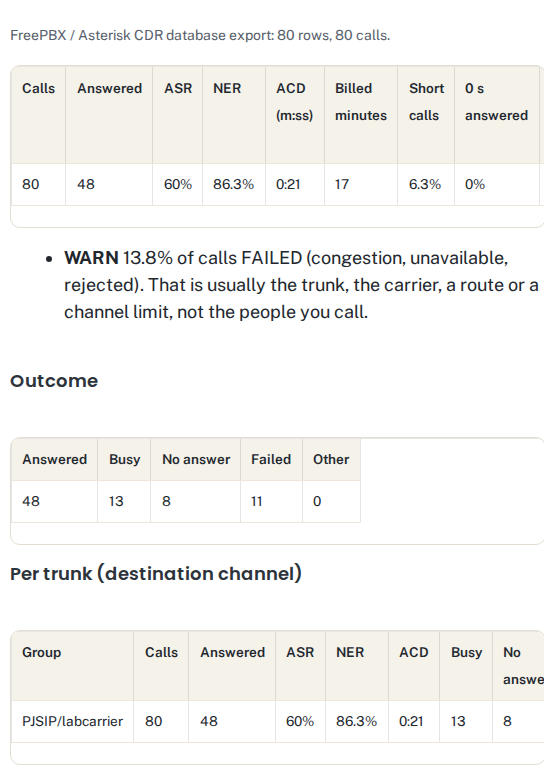
We exported the CDR of 80 test calls from our FreePBX 17 lab server (Asterisk 22.11) on 17 October 2026. The calls went from a SIPp “phone” to a SIPp test carrier set to answer about 60% of calls, reply busy (486) to about 15%, service unavailable (503) to about 10% and ring without answer (480) to the rest. The calculator’s results match a direct SQL count of the same table: 48 answered, 13 busy, 8 no answer, 11 failed, ASR 60%, NER 86.3%, ACD 0:21.
Automated tests cover the FreePBX export, the same data rewritten as a header-less Master.csv, a semicolon-separated carrier CSV with SIP codes and PDD in milliseconds, quoted fields with commas, call-leg grouping, short and 0-second calls, a file without the needed columns and manual column mapping. After an independent review we added 8 more: call IDs and trunk names such as __proto__ or constructor (the first version stopped with an error on these), a phone number inside a channel name (the first version showed it in full), a broken quote, a semicolon file whose first field contains commas, durations that are not numbers and an empty result. A second review found that a SIP 200 with 0 billed seconds was counted as not answered when there was no status column, that numbers written with spaces or brackets were not shortened, and that a 400-digit duration gave “Infinity”; 6 more tests cover these. Unix timestamps in the time column (seconds or milliseconds) are grouped by hour in UTC; a third review found that the new limit on seconds had stopped that, and a test covers it now. Three more cover the background analysis, the row limit and the 50-trunk table, and eight more check what happens when inputs overlap: a second file chosen while the first is still being read, Clear or a paste during a read, a read error, an oversized file, and Cancel or a new paste while the background analysis runs. Two more were added on 18 October 2026 for the sample CDR above and for trunk names that contain a dash. All 38 run before every change to the tool goes live. Lab traffic is synthetic, so the short-call rate of our full lab history (21.8%, mostly 5-second load tests) is not a real-world benchmark.
Background on the measures: ASR and NER are defined in ITU-T E.425 (internal automatic observations); FreePBX documents CDR reports and the CSV export in its CDR user guide.
Frequently asked questions
What is a good ASR for VoIP?
It depends on the traffic. Calls to mobile phones and call-centre campaigns answer far less often than office-to-office calls. Compare a route with its own history and with your other trunks: a sudden drop matters more than the absolute number.
What is the difference between ASR and NER?
ASR counts only answered calls as successful. NER also counts busy and unanswered calls, because the network delivered them. If ASR falls but NER stays high, people are not picking up; if NER falls, look at your trunk or carrier.
How is ACD calculated?
Total billed seconds of answered calls divided by the number of answered calls. Unanswered calls are not included.
Does Asterisk record post-dial delay (PDD)?
No. The CDR has duration (from the start of the call) and billsec (from answer). Duration minus billsec gives the time to answer, which includes ringing. Some carriers include PDD in their own CSV; the calculator averages it when it finds the column.
Is my CDR data uploaded?
No. The file is read and analysed in your browser. Nothing is sent to srvScripts or anyone else.