DirectAdmin 1.711 (released 2026-09-22) ships as a single Go-based binary with the Evolution skin, and the installer has been streamlined to match. On a supported operating system the whole process is one script, an optional browser session on port 2222 and a CustomBuild run that compiles the web stack. What still catches people out is the preparation: DirectAdmin wants a genuinely empty server, a resolvable hostname and enough memory to build PHP without swapping itself to death.
Table of Contents
Short answer: Start from a minimal AlmaLinux 9/10 or Debian 13 image with at least 4 GB of RAM and 4 GB of swap, set a fully qualified hostname, update and reboot, then run bash <(curl -fsSL https://download.directadmin.com/setup.sh) as root. With no arguments it opens a web installer on port 2222 where you enter the license key and pick the stack; passing the key as the first argument runs the same install non-interactively with CustomBuild defaults. Afterwards, set the update channel and TLS with da config-set, install CSF through CustomBuild, and verify with da version and a test domain.
Supported platforms and sizing
Modern licenses install on AlmaLinux 9 and 10 (RHEL 10-family support arrived in 1.677), Debian 12 and 13, and Ubuntu 22.04, 24.04 and, since 1.703, 26.04. Both amd64 and arm64 images are supported. The vendor minimum is 4 GB of RAM plus 4 GB of swap; on a 2 GB VPS the PHP build will fail or take hours, so treat the minimum as real.
Two platform-specific points matter before you pick an OS. AlmaLinux 10 has no rspamd packages in CustomBuild yet, so a fresh install there defaults to SpamAssassin; if Rspamd is a requirement, choose AlmaLinux 9 or Debian 13. AlmaLinux 10 also had CSF compile problems in late 2025 that have since been worked around, but check the current CSF fork notes before relying on it. Debian 13 is fully supported for modern licenses and is a sensible default for new deployments.
Prepare the server
Start from a minimal OS image with nothing else installed. Any pre-existing Apache, MariaDB, Exim, Postfix or Sendmail package will block the installer or leave a half-configured service behind. Set a fully qualified hostname that is not one of the domains you will host, and make sure it resolves in public DNS:
hostnamectl set-hostname srv1.example-host.net
dnf -y update && reboot        # AlmaLinux
apt update && apt -y full-upgrade && reboot   # Debian
On AlmaLinux, DirectAdmin runs with SELinux disabled; the installer handles this, but a reboot after it is required so that the kernel picks up the change. Confirm swap exists with swapon --show, and create a swapfile if the image did not provide one.
If the server sits behind NAT or a cloud provider that assigns a private address to the interface, note the public IP now. The installer detects the interface address and you may need to correct the server IP in Admin Level → IP Management afterwards.
Web installer or command line
Both routes run the same setup.sh script. Fetch and launch it as root:
bash <(curl -fsSL https://download.directadmin.com/setup.sh)Run without arguments, the script starts a temporary web installer on port 2222 and prints a URL and one-time token. Open it in a browser, paste the license key, pick the web server, PHP versions and mail options, and let it run. This is the friendlier route for a single server because every CustomBuild choice is presented with a description.
For automation or a headless install, pass the license key directly and the script runs non-interactively with the defaults from the current options.conf template:
bash <(curl -fsSL https://download.directadmin.com/setup.sh) 'your-license-key'The CLI route is what we use for repeatable builds: the options you would otherwise click through can be set in advance with da build set once the base install finishes, and the whole thing can be driven from a provisioning script.
The build stage compiles Apache or LiteSpeed, PHP, MariaDB, Exim, Dovecot and Rspamd or SpamAssassin, and typically takes 20 to 60 minutes depending on CPU. Do not close the terminal; use screen or tmux when working over an unreliable link.
Post-install configuration
When the installer finishes it prints the admin username, password and the login URL on port 2222. Log in, change the admin password and then review the defaults that a production host should set immediately. The important ones live in /usr/local/directadmin/conf/directadmin.conf and are changed with the CLI, which reloads the service automatically on 1.710 and later:
da config-set update_channel stable
da config-get update_channel
On our test install (DirectAdmin 1.712 on AlmaLinux 9.8) the panel came up on plain HTTP with ssl=0. Issue the hostname certificate first and then switch the panel to HTTPS; switching first gives you a self-signed certificate. letsencrypt.sh request_single refuses the hostname ("unable to find domain owner"), so use server_cert:
/usr/local/directadmin/scripts/letsencrypt.sh server_cert
da config-set ssl 1
curl -sI https://$(hostname -f):2222 | head -1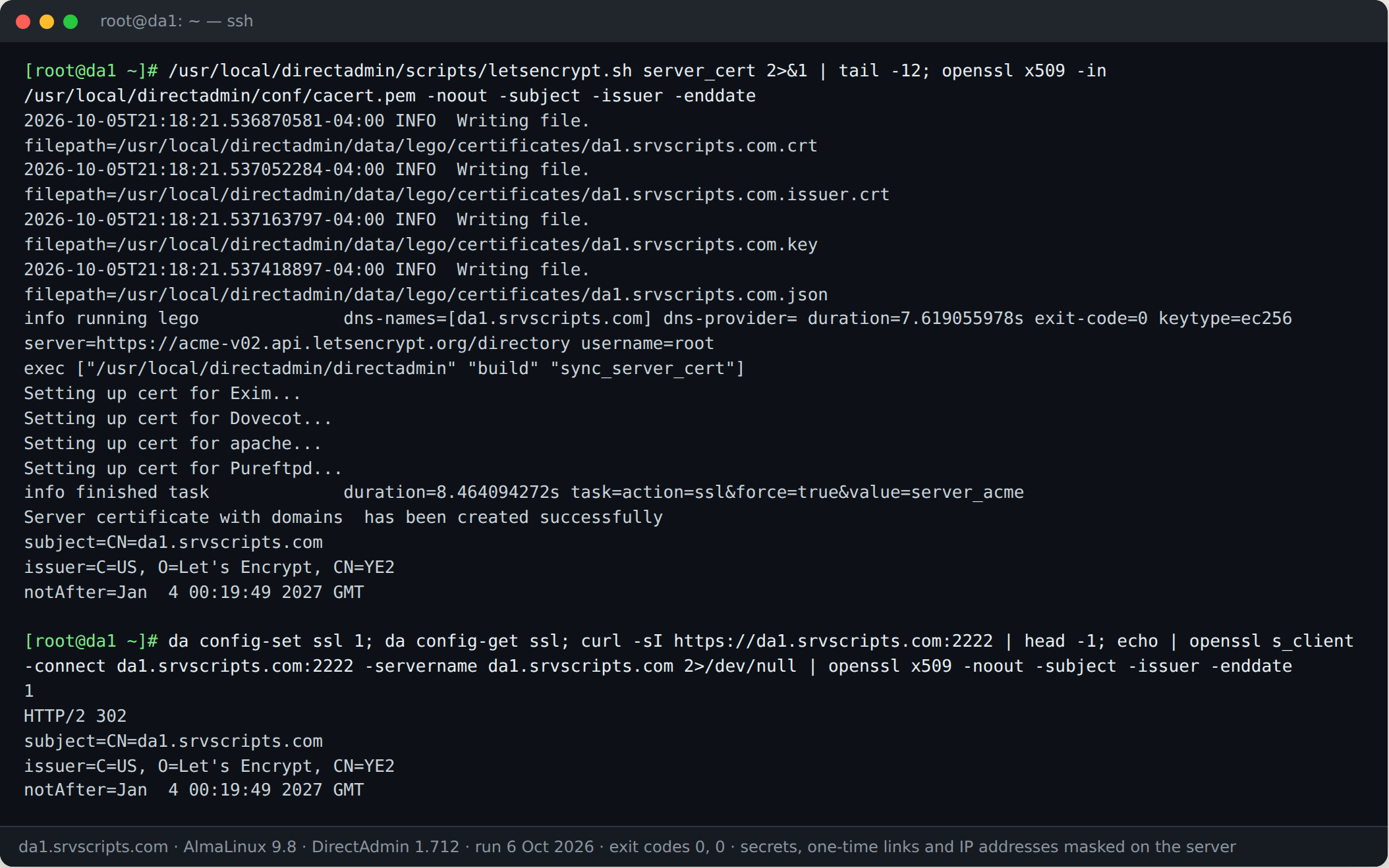
The certificate renews automatically (acme_server_cert_enabled=1); Admin Level → Server TLS Certificate does the same from the web interface. Then confirm the web stack you intended is what CustomBuild built:
cd /usr/local/directadmin/custombuild
./build options | grep -E 'webserver|php1_release|mysql_inst|spamd'
If any value is wrong, change it with ./build set and run the relevant build target, for example ./build set webserver openlitespeed followed by ./build openlitespeed and ./build rewrite_confs. The web-stack choice is covered in more depth in Choosing a web stack in CustomBuild.
Install a firewall before creating the first user. The DirectAdmin fork of CSF installs through CustomBuild:
./build set csf yes
./build csf
Then edit /etc/csf/csf.conf, confirm port 2222 is in TCP_IN, set TESTING = "0" and restart with csf -ra. See Installing and tuning CSF/LFD on DirectAdmin for the full tuning pass.
Common pitfall: the license and the IP
The most frequent first-day failure is a license bound to the wrong IP. Modern licenses are keyed to the license ID rather than a fixed address, but the server must be able to reach the DirectAdmin license servers over HTTPS and the outbound IP must match what the license portal shows. If the panel refuses to start with a license error, check /var/log/directadmin/error.log and run da update to re-fetch the license after correcting the IP in the portal. Servers behind a corporate proxy or with restrictive egress firewalls need an exception for download.directadmin.com and the license endpoint.
Verify
Confirm the version and channel, that the core services are healthy, and that a test domain serves a page:
da version
systemctl status directadmin httpd exim dovecot mariadb --no-pager
tail -n 20 /var/log/directadmin/error.log
Create a test user from Admin Level → Create User, upload an index.html to its public_html and load the domain over both HTTP and HTTPS. Finally, run the audit script from our server security audit to catch open ports, weak SSH settings and missing updates before the server takes real traffic.
Install DirectAdmin at a glance
Official documentation: DirectAdmin documentation, AlmaLinux wiki, Linux man pages.
Related guides: Broken custom Apache/nginx templates after the DOCROOT token change in DirectAdmin 1.710 · KernelCare on cPanel and DirectAdmin servers: setup, verification and rollback · Managing WordPress with DirectAdmin’s WordPress Manager and wp-cli.
Frequently asked questions
Does DirectAdmin support AlmaLinux 10 and Debian 13?
Yes. Modern licenses install on AlmaLinux 9 and 10, Debian 12 and 13, and Ubuntu 22.04, 24.04 and 26.04, on both amd64 and arm64. The one gap to know about is that CustomBuild has no Rspamd packages for AlmaLinux 10 yet, so a fresh install there defaults to SpamAssassin.
How long does a DirectAdmin install take?
The base install is quick, but the CustomBuild stage that compiles Apache or LiteSpeed, PHP, MariaDB, Exim and Dovecot typically takes 20 to 60 minutes depending on CPU. Run it inside screen or tmux so a dropped SSH session does not leave a half-built stack.
Should I use the DirectAdmin web installer or the command line?
Use the web installer on port 2222 for a single server, since every CustomBuild option is presented with a description. Pass the license key to setup.sh on the command line when you need a headless, repeatable build that a provisioning script can drive, then adjust options with da build set afterwards.