Short answer: Install faster-whisper and ffmpeg on the PBX or a separate server and run the script below on a recording. It reads Asterisk’s formats as they are on disk (raw .gsm, GSM-in-WAV, µ-law, A-law, .sln), splits stereo calls into caller and agent, and writes TXT, SRT and JSON. No GPU and no cloud service needed: on 4 CPU cores the standard model transcribes about three times faster than real time and the more accurate one about twice as fast.
We ran everything below on our lab server (AlmaLinux 9.8, 4 vCPU, no GPU) on 6 October 2026 with public test audio: the JFK sample from whisper.cpp (MIT) and a two-speaker call built from LibriSpeech (CC BY 4.0), converted to the formats a PBX writes. If you would rather not run it yourself, our call transcription tool uses the same engine.
Rather not run it yourself? Our call recording transcription tool does all of this for you: upload a GSM, WAV or MP3 file and get a timestamped transcript, with caller and agent split on stereo recordings. It runs on our own server, deletes the audio straight away and is free for short files; Pro covers 5-hour files and 60 hours a month.
Table of Contents
What you need
- Python 3.9 or later and
ffmpeg/ffprobe(from your distribution, RPM Fusion on AlmaLinux, or a static build). - RAM: about 0.75 GB for the
basemodel and 1.4 GB forsmallin our measurements. - Disk: the models download once (about 150 MB for base, 500 MB for small).
- Run it as an unprivileged user that can read the recordings, not as root, when you put it into production.
python3 -m venv /opt/transcribe
/opt/transcribe/bin/pip install faster-whisper
dnf install ffmpeg        # or: apt install ffmpeg
The script
Save it as transcribe-call.py. It decodes the recording to 16 kHz mono with ffmpeg (each channel separately with --split), runs Whisper with voice activity detection so long silences and hold gaps are skipped, and writes the three output files next to the recording.
#!/usr/bin/env python3
"""transcribe-call.py - transcribe a PBX call recording on your own server (faster-whisper, CPU).

Reads what Asterisk/FreePBX/Vicidial write: .wav (PCM, u-law, A-law, GSM-in-WAV), raw .gsm/.ulaw/.alaw/.sln, MP3.
Stereo recordings can be split into caller (left) and agent (right). Writes TXT, SRT and JSON next to the input.

  python3 transcribe-call.py CALL.gsm [--model base|small] [--split] [--lang en] [--threads N]
"""
import argparse, json, os, subprocess, sys, tempfile, time

RAW = {'.gsm': ['-f', 'gsm', '-ar', '8000'], '.ulaw': ['-f', 'mulaw', '-ar', '8000'], '.ul': ['-f', 'mulaw', '-ar', '8000'],
       '.alaw': ['-f', 'alaw', '-ar', '8000'], '.al': ['-f', 'alaw', '-ar', '8000'],
       '.sln': ['-f', 's16le', '-ar', '8000', '-ac', '1'], '.sln16': ['-f', 's16le', '-ar', '16000', '-ac', '1']}

def decode(src, dst, channel=None):
    """Any input -> 16 kHz mono 16-bit WAV (one channel of a stereo file when channel is 0 or 1)."""
    cmd = ['ffmpeg', '-v', 'error', '-y'] + RAW.get(os.path.splitext(src)[1].lower(), []) + ['-i', src]
    if channel is not None:
        cmd += ['-af', 'pan=mono|c0=c%d' % channel]
    subprocess.run(cmd + ['-ac', '1', '-ar', '16000', '-c:a', 'pcm_s16le', dst], check=True)

def channels(src):
    if os.path.splitext(src)[1].lower() in RAW:
        return 1
    out = subprocess.run(['ffprobe', '-v', 'error', '-select_streams', 'a:0', '-show_entries', 'stream=channels',
                          '-of', 'csv=p=0', src], capture_output=True, text=True).stdout.strip()
    return int(out or 1)

def ts(t, sep=','):
    ms = int(round(t * 1000)); h, ms = divmod(ms, 3600000); m, ms = divmod(ms, 60000); s, ms = divmod(ms, 1000)
    return '%02d:%02d:%02d%s%03d' % (h, m, s, sep, ms)

def main():
    ap = argparse.ArgumentParser(description=__doc__.split('\n')[0])
    ap.add_argument('file'); ap.add_argument('--model', default='base'); ap.add_argument('--lang', default=None)
    ap.add_argument('--split', action='store_true', help='stereo: left = Caller, right = Agent')
    ap.add_argument('--threads', type=int, default=os.cpu_count() or 2)
    a = ap.parse_args()
    from faster_whisper import WhisperModel          # pip install faster-whisper
    t0 = time.time()
    model = WhisperModel(a.model, device='cpu', compute_type='int8', cpu_threads=a.threads)
    legs = [(None, '')]
    if a.split:
        if channels(a.file) < 2:
            sys.exit('--split needs a stereo recording; this file is mono (GSM-in-WAV is always mono)')
        legs = [(0, 'Caller'), (1, 'Agent')]
    segs, info = [], None
    with tempfile.TemporaryDirectory() as tmp:
        for ch, who in legs:
            wav = os.path.join(tmp, 'leg%s.wav' % ch)
            decode(a.file, wav, ch)
            it, info = model.transcribe(wav, language=a.lang, beam_size=5, vad_filter=True)
            segs += [{'start': round(s.start, 2), 'end': round(s.end, 2), 'speaker': who, 'text': s.text.strip()} for s in it]
    segs.sort(key=lambda s: s['start'])
    took = time.time() - t0
    base = os.path.splitext(a.file)[0]
    with open(base + '.txt', 'w') as f:
        f.writelines('[%s] %s%s\n' % (ts(s['start'], '.')[3:8], s['speaker'] + ': ' if s['speaker'] else '', s['text']) for s in segs)
    with open(base + '.srt', 'w') as f:
        for i, s in enumerate(segs, 1):
            f.write('%d\n%s --> %s\n%s%s\n\n' % (i, ts(s['start']), ts(s['end']), '[%s] ' % s['speaker'] if s['speaker'] else '', s['text']))
    with open(base + '.json', 'w') as f:
        json.dump({'file': os.path.basename(a.file), 'model': a.model, 'language': info.language,
                   'language_probability': round(info.language_probability, 3), 'duration': round(info.duration, 2),
                   'processing_time': round(took, 1), 'segments': segs}, f, indent=2)
    print(open(base + '.txt').read(), end='')
    print('-- %s: %.1f s of audio, language %s (%.0f%%), model %s, %.1f s on %d CPU threads (%.2fx real time) -> %s.txt/.srt/.json'
          % (os.path.basename(a.file), info.duration, info.language, info.language_probability * 100, a.model, took, a.threads,
             info.duration / took if took else 0, os.path.basename(base)))

if __name__ == '__main__':
    main()
Transcribe a recording
/opt/transcribe/bin/python transcribe-call.py /var/spool/asterisk/monitor/2026/10/06/call.gsm --model base
/opt/transcribe/bin/python transcribe-call.py call-stereo.wav --model small --split
The first run downloads the model. Our results, on a raw Asterisk .gsm file and a 59-second stereo µ-law call:
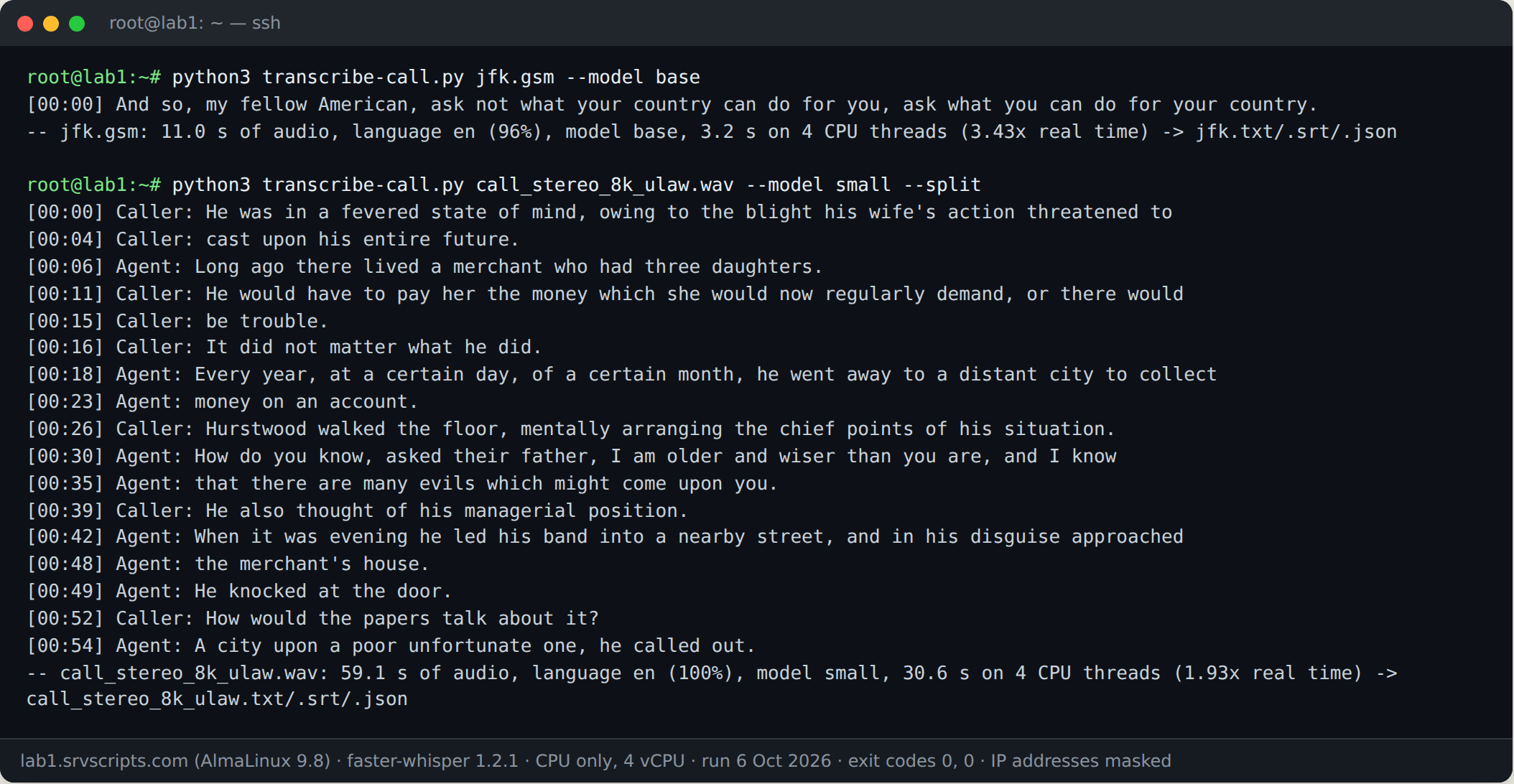
Note the one mistake on the GSM file: “my fellow American” instead of “Americans”. GSM at 13 kbit/s loses detail, and the small base model is the first to suffer. Use --model small for anything you will rely on.
Accuracy and speed
We measured word error rate (lower is better) on 232 seconds of LibriSpeech speech from six speakers, as clean audio and converted to the two most common PBX formats, on a 2 vCPU server:
| Model | Clean | 8 kHz µ-law | 8 kHz GSM | Speed on 2 vCPU | RAM |
|---|---|---|---|---|---|
| base | 4.8% | 5.3% | 7.3% | about 6x real time | 750 MB |
| small | 2.7% | 2.2% | 3.8% | about 2x real time | 1.3 GB |
Real calls score worse than test audio: background noise, cross-talk and accents all add errors, and names, e-mail addresses and numbers are the words most often wrong. The medium and large models are more accurate but slower than real time on a small CPU server; use a GPU for those.
Getting caller and agent on separate channels
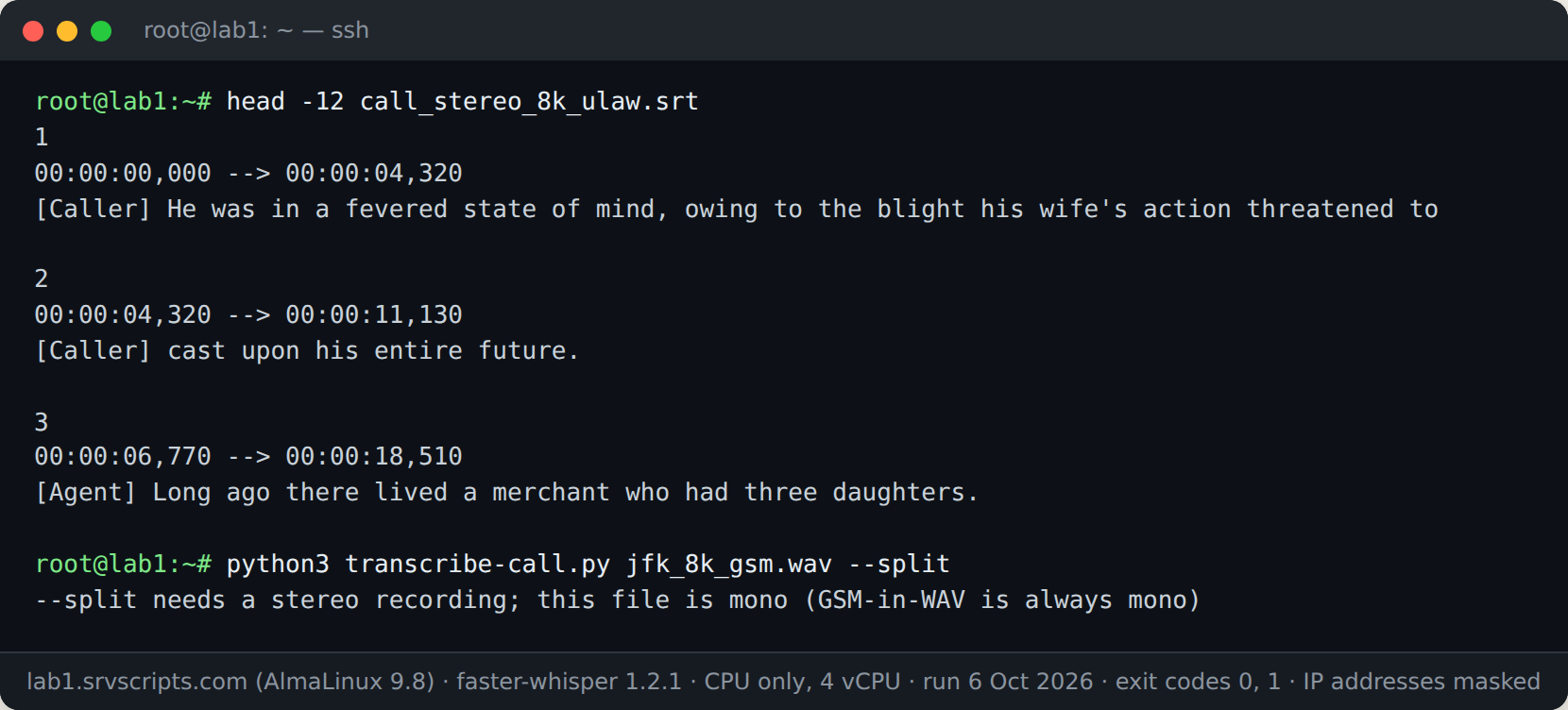
--split needs a stereo recording with one party per channel. Asterisk’s MixMonitor writes mono by default; its r() and t() options also save each direction to its own file, and sox -M joins them into one stereo file. GSM-in-WAV (wav49) is always mono, so record in wav if you want the split. Details and the dialplan line are in our transcription tool page.
Run it automatically after each call
The simplest way is a cron job that picks up finished recordings, the same pattern as our recordings-to-MP3 script: process files older than a few minutes that do not have a .txt yet. Run one transcription at a time, or the CPU is shared and every job gets slower.
# /etc/cron.d/transcribe-calls  (as the asterisk user, one file per run)
*/5 * * * * asterisk f=$(find /var/spool/asterisk/monitor -name "*.wav" -mmin +5 -mmin -1440 | while read r; do [ -e "${r%.*}.txt" ] || { echo "$r"; break; }; done); [ -n "$f" ] && flock -n /tmp/transcribe.lock /opt/transcribe/bin/python /opt/transcribe/transcribe-call.py "$f" --model small >/dev/null 2>&1
Privacy
Transcripts are as sensitive as the recordings. Keep them with the same permissions, delete them on the same schedule, and check that callers are told about recording and transcription where the law requires it. Running the model on your own server means the audio never leaves it; Whisper and faster-whisper are MIT-licensed and work offline once the model is downloaded.
See also: Asterisk Call Recording with MixMonitor: Formats, Stereo, Retention
Frequently asked questions
Does this need a GPU?
No. The base and small models run on CPU with int8 quantisation. A GPU makes the large models practical and is 20 to 50 times faster.
Which languages work?
Whisper recognises about 99 languages and detects the language itself; pass –lang to skip detection. Accuracy is best for English and the major European languages.
Can it tell speakers apart on a mono recording?
Not this script. It labels caller and agent only on stereo recordings with one party per channel. Speaker diarisation on mono audio needs an extra model such as pyannote.