The FreePBX Backup module stores its archives on the PBX itself by default, which does not help when the disk fails or the VPS is deleted. This FreePBX offsite backup script makes a complete, checked backup set and copies it to another server over rsync and SSH, then verifies the copy. It works the same on plain Asterisk and does not depend on any FreePBX module.
Each set contains a RESTORE.txt with the exact restore steps, and the script checks every archive can be read back before it calls the backup good.
Version 1.0.1 (17 October 2026): An independent review found two ways 1.0.0 could report success wrongly: if the verification run after the upload failed (for example the connection dropped), it counted that as “0 differences” and called the copy verified; and if the database server could not be queried, it treated both FreePBX databases as absent and skipped them. 1.0.1 treats both as failures, requires the FreePBX databases on a FreePBX server, requires sqlite3 for a safe astdb copy, and does not prune local sets after a failed off-site copy. If you run 1.0.0 from cron, update.
Table of Contents
What goes into each FreePBX offsite backup set
asterisk.sql.gzandasteriskcdrdb.sql.gz: both FreePBX databases, each dumped in one consistent transaction.astdb.sqlite3: the Asterisk internal database (call forwarding, DND, device states), copied safely withsqlite3 .backupwhile Asterisk runs.files.tar.gz:/etc/asterisk,/etc/freepbx.conf, music on hold, custom sounds, AGI scripts, voicemail and phone provisioning files. Call recordings only with--with-recordings, because they can be large.MANIFEST(versions and sizes),modules.txt(installed FreePBX modules),RESTORE.txtandSHA256SUMS.
Set up the backup server
On the backup server, create a user that only receives backups, and on the PBX a dedicated key:
# on the backup server
useradd -m -d /srv/pbx-backups pbxbackup
# on the PBX
ssh-keygen -t ed25519 -N "" -f /root/.ssh/pbx_backup -C pbx-backup
ssh-copy-id -i /root/.ssh/pbx_backup.pub pbxbackup@203.0.113.20
If the backup account must not be able to delete anything, use --no-remote-prune and let the backup server expire old sets itself.
Run a backup
curl -fsSLO https://scr.srvscripts.com/freepbx-offsite-backup/freepbx-offsite-backup.sh
bash freepbx-offsite-backup.sh --dest pbxbackup@203.0.113.20:/srv/pbx-backups --key /root/.ssh/pbx_backup
bash freepbx-offsite-backup.sh --dest /mnt/nas/pbx --keep 14 --with-recordings
Nightly from cron, with an e-mail only when something fails:
# /etc/cron.d/freepbx-offsite-backup
15 2 * * * root /usr/local/bin/freepbx-offsite-backup.sh --dest pbxbackup@203.0.113.20:/srv/pbx-backups --key /root/.ssh/pbx_backup --quiet --mail ops@example.com
Exit codes: 0 backup made and copy verified, 1 made but the copy or pruning failed, 2 backup failed, 3 bad option. The set is uploaded under a .partial name, compared by checksum and only then renamed, so a half-copied set never looks complete.
Tested on a real server
| Test | Result |
|---|---|
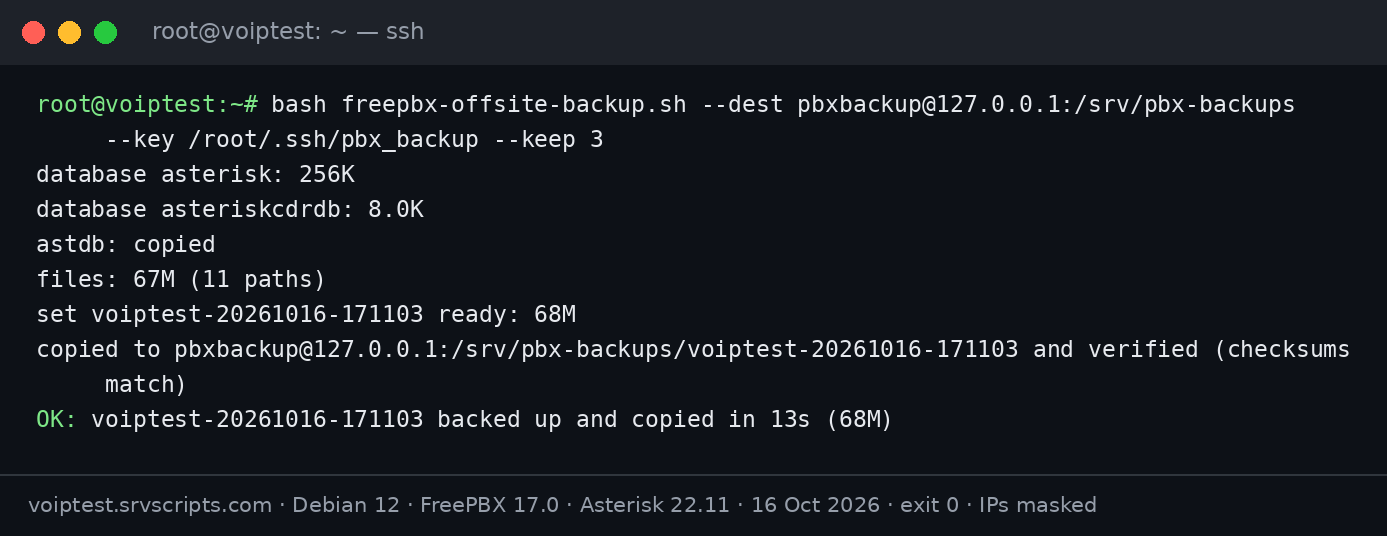
| Backup over rsync/SSH to a separate backup account | 68 MB set made, copied and verified in 13 seconds |
--keep 2 after several runs | Oldest sets removed locally and on the destination; 2 left on each |
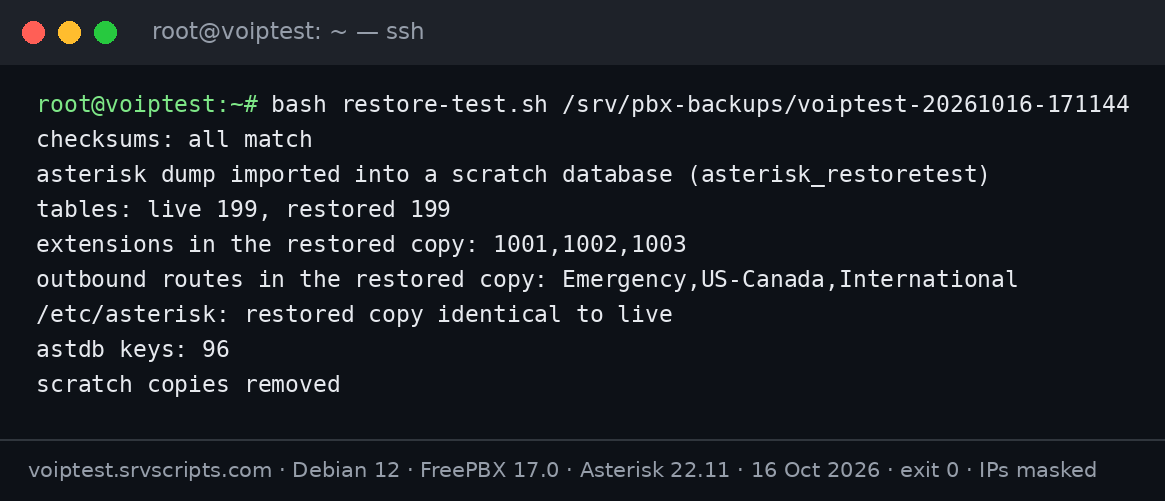
| Test restore of a copied set (checksums, both dumps, files, astdb) | Checksums matched; 199 of 199 tables restored into a scratch database; extensions 1001-1003 and all 3 outbound routes present; restored /etc/asterisk identical to live; 96 astdb keys |
| 1.0.1: the verification run fails after the upload | ERROR “the copy is NOT verified”, exit 1, local sets not pruned |
| 1.0.1: database server not readable (wrong credentials) | ERROR “cannot query the database server”, exit 2, set kept as .partial |
| 1.0.1: sqlite3 not installed | ERROR, exit 2 (no unsafe live copy of astdb) |
We ran these tests on our FreePBX 17 lab server (Debian 12, Asterisk 22.11, 4 vCPU) on 16 and 17 October 2026. The restore test imported the dump into a separate scratch database and extracted the files into a temporary folder, so the running PBX was not touched. That proves the set is complete and readable; it is not yet a full rebuild on a blank server with inbound and outbound test calls, which we plan to document separately. The screenshots are the real terminal output; only IP addresses are masked.
Restore
Restore onto a server with the same FreePBX major version (17 to 17). Keep the old server off the network while you do it, so two PBXs do not register the same trunk:
fwconsole stop
zcat asterisk.sql.gz | mysql asterisk
zcat asteriskcdrdb.sql.gz | mysql asteriskcdrdb
tar -xzpf files.tar.gz -C /
cp astdb.sqlite3 /var/lib/asterisk/astdb.sqlite3
fwconsole chown && fwconsole reload && fwconsole start
Before restoring over an existing PBX, back that PBX up first with the same script, so you can go back. Then compare modules.txt with fwconsole ma list and install any missing modules before the reload. See also FreePBX backup and restore with fwconsole.
Options
| Option | Meaning |
|---|---|
--dest DEST | user@host:/path (rsync over SSH) or a local or NFS folder (required) |
--key FILE | SSH private key for the destination |
--port N | SSH port (default 22) |
--keep N | Sets to keep locally and on the destination (default 7) |
--no-remote-prune | Never delete old sets on the destination |
--work DIR | Local folder for the sets (default /var/backups/freepbx-offsite) |
--with-recordings | Also back up /var/spool/asterisk/monitor |
--bwlimit KBPS | Limit upload bandwidth during office hours |
--name PREFIX | Set name prefix (default: the short host name) |
-q, --mail ADDR | Quiet mode; e-mail a report when something fails |
Notes
- Backups contain SIP passwords, voicemail and call records. Keep the backup server locked down; the local work folder is created as root-only.
- A backup is only proven by a restore. Test one every few months on a spare VPS.
- Keep the FreePBX Backup module too if you use it; this script is an independent second copy.
Related: upgrade FreePBX 16 to 17, install FreePBX 17 on Debian 12, call recording retention cleaner.
rsync options used by the script (--partial, --checksum, --dry-run) are described in the rsync manual.
The script
#!/usr/bin/env bash
# FreePBX Off-Site Backup: Databases, Config, Voicemail and Prompts over rsync/SSH, Verified (v1.0.1) - from srvScripts.com
# Source, docs and updates: https://srvscripts.com/scripts/freepbx-offsite-backup/
# Copyright (c) 2026 srvScripts.com. MIT licence: if you copy, share or adapt this script, keep this notice and credit srvScripts.com.
#
# A backup of a FreePBX/Asterisk server that does not depend on the FreePBX Backup module: it dumps the asterisk and
# asteriskcdrdb databases (one consistent transaction each), copies the Asterisk internal database (astdb) safely
# with sqlite3 .backup, archives /etc/asterisk, the FreePBX settings, custom sounds and music on hold, voicemail and
# phone provisioning files (recordings only with --with-recordings), writes a manifest with versions and SHA-256
# checksums, checks every archive can be read back, then copies the set to another server over rsync/SSH (or to a
# local/NFS folder) and verifies the copy. Old sets are pruned locally and, if allowed, on the destination.
#
#   bash freepbx-offsite-backup.sh --dest backup@203.0.113.20:/srv/pbx-backups --key /root/.ssh/pbx_backup
#   bash freepbx-offsite-backup.sh --dest /mnt/nas/pbx --keep 14 --with-recordings
#   15 2 * * * root /usr/local/bin/freepbx-offsite-backup.sh --dest backup@host:/srv/pbx --key /root/.ssh/pbx_backup --quiet --mail ops@example.com
#
# Restore outline (also written into each set as RESTORE.txt): install the same FreePBX major version, stop it
# (fwconsole stop), import asterisk.sql.gz and asteriskcdrdb.sql.gz, extract files.tar.gz from /, put astdb.sqlite3
# back in /var/lib/asterisk, then fwconsole chown && fwconsole reload && fwconsole start.
# Exit codes: 0 backup made and copy verified, 1 made but the copy or pruning failed, 2 backup failed, 3 bad option.
# Version 1.0.1 (2026-10-17): a failed verification run, a database server that cannot be queried, a missing
#   FreePBX database or a missing sqlite3 are now failures (1.0.0 could report success); no local pruning after a
#   failed copy. Found in an independent review.
# Version 1.0.0 (2026-10-17): first release. Tested on FreePBX 17.0.33 / Asterisk 22.11 (Debian 12): backup to a
#   local folder and over rsync/SSH, verification, pruning, and a test restore of both databases and the files.
set -uo pipefail
export LC_ALL=C
umask 077

DEST=""; KEY=""; PORT=22; KEEP=7; REMOTE_KEEP=1; WORK=/var/backups/freepbx-offsite; RECORDINGS=0; QUIET=0; MAIL_TO=""
NAME_PREFIX=$(hostname -s 2>/dev/null || echo pbx); BWLIMIT=0
read -ra MA <<<"${MYSQL_ARGS:-}"

usage() {
  cat <<'EOF'
Usage: freepbx-offsite-backup.sh --dest DEST [options]
  --dest DEST          user@host:/path (rsync over SSH) or /local/or/nfs/path
  --key FILE           SSH private key for the destination (recommended: a dedicated key)
  --port N             SSH port (default 22)
  --keep N             keep N backup sets locally and on the destination (default 7)
  --no-remote-prune    never delete old sets on the destination (for append-only or restricted accounts)
  --work DIR           local folder for the sets (default /var/backups/freepbx-offsite)
  --with-recordings    also back up /var/spool/asterisk/monitor (can be large)
  --bwlimit KBPS       limit upload bandwidth (rsync --bwlimit)
  --name PREFIX        set name prefix (default: short hostname)
  -q, --quiet          print only errors and the final line
  --mail ADDR          e-mail a report when something fails (needs 'mail')
  -h, --help           this help
Environment: MYSQL_ARGS extra mysql/mysqldump arguments (FreePBX root works without any)
EOF
}
die() { echo "ERROR: $*" >&2; exit 3; }
while [ $# -gt 0 ]; do
  case "$1" in
    --dest) DEST="${2:-}"; shift 2 ;;
    --key) KEY="${2:-}"; [ -r "$KEY" ] || die "--key: cannot read $KEY"; shift 2 ;;
    --port) [[ "${2:-}" =~ ^[0-9]+$ ]] || die "--port needs a number"; PORT=$2; shift 2 ;;
    --keep) [[ "${2:-}" =~ ^[1-9][0-9]*$ ]] || die "--keep needs a number >= 1"; KEEP=$2; shift 2 ;;
    --no-remote-prune) REMOTE_KEEP=0; shift ;;
    --work) WORK="${2:-}"; shift 2 ;;
    --with-recordings) RECORDINGS=1; shift ;;
    --bwlimit) [[ "${2:-}" =~ ^[0-9]+$ ]] || die "--bwlimit needs a number"; BWLIMIT=$2; shift 2 ;;
    --name) NAME_PREFIX="${2:-}"; [[ "$NAME_PREFIX" =~ ^[A-Za-z0-9_.-]+$ ]] || die "--name: letters, digits, . _ - only"; shift 2 ;;
    -q|--quiet) QUIET=1; shift ;;
    --mail) MAIL_TO="${2:-}"; [[ "$MAIL_TO" == *@* ]] || die "--mail needs an address"; shift 2 ;;
    -h|--help) usage; exit 0 ;;
    *) usage >&2; die "unknown option: $1" ;;
  esac
done
[ -n "$DEST" ] || { usage >&2; die "--dest is required"; }
[ "$EUID" -eq 0 ] || die "run as root"
for c in mysqldump tar gzip sha256sum; do command -v "$c" >/dev/null 2>&1 || die "$c is not installed"; done
REMOTE=0; [[ "$DEST" == *:* ]] && REMOTE=1
[ "$REMOTE" = 1 ] && { command -v rsync >/dev/null 2>&1 || die "rsync is not installed (apt/dnf install rsync)"; }

LOG=$(mktemp) || exit 2
log() { echo "$(date '+%F %T') $*" >> "$LOG"; [ "$QUIET" = 1 ] || echo "$*"; }
fail() { echo "$(date '+%F %T') ERROR: $*" >> "$LOG"; echo "ERROR: $*" >&2; }
notify() { [ -n "$MAIL_TO" ] && command -v mail >/dev/null 2>&1 && mail -s "[FreePBX backup] $1 on $(hostname -f 2>/dev/null || hostname)" "$MAIL_TO" < "$LOG"; }

mkdir -p "$WORK" && chmod 700 "$WORK" || { echo "ERROR: cannot create $WORK" >&2; exit 2; }
exec 9>"$WORK/.lock"; flock -n 9 || { echo "ERROR: another backup is running" >&2; exit 2; }
STAMP=$(date +%Y%m%d-%H%M%S); SET="$NAME_PREFIX-$STAMP"; D="$WORK/$SET.partial"
mkdir -p "$D" || { echo "ERROR: cannot create $D" >&2; exit 2; }
start=$(date +%s); err=0

# 1. Databases (FreePBX config + call records), one consistent transaction each.
# A failed query is an error, never "database absent". On FreePBX (/etc/freepbx.conf) both databases are required.
FREEPBX=0; [ -f /etc/freepbx.conf ] && FREEPBX=1
dblist=""; dbq=1
if command -v mysql >/dev/null 2>&1; then
  if dblist=$(mysql "${MA[@]}" -N -B -e "SHOW DATABASES" 2>>"$LOG"); then dbq=0
  else fail "cannot query the database server (mysql exit $?): check that MariaDB/MySQL runs and MYSQL_ARGS"; err=1; fi
elif [ "$FREEPBX" = 1 ]; then fail "mysql client not installed, cannot back up the FreePBX databases"; err=1; fi
for db in asterisk asteriskcdrdb; do
  [ "$dbq" = 0 ] || continue
  if ! grep -qx "$db" <<<"$dblist"; then
    if [ "$FREEPBX" = 1 ]; then fail "database $db is missing on this FreePBX server"; err=1
    else log "database $db: not present (plain Asterisk), skipped"; fi
    continue
  fi
  if mysqldump "${MA[@]}" --single-transaction --quick --routines --events --triggers --hex-blob --default-character-set=utf8mb4 --databases "$db" 2>>"$LOG" | gzip -6 > "$D/$db.sql.gz" \
     && [ "$(zcat "$D/$db.sql.gz" | tail -1 | grep -c 'Dump completed')" = 1 ]; then log "database $db: $(du -h "$D/$db.sql.gz" | cut -f1)"
  else fail "dump of $db failed"; err=1; fi
done

# 2. astdb (call forwarding, DND, follow-me...) copied with sqlite3 so a half-written file is never saved
if [ -f /var/lib/asterisk/astdb.sqlite3 ]; then
  if ! command -v sqlite3 >/dev/null 2>&1; then
    fail "sqlite3 is not installed, so astdb cannot be copied safely while Asterisk runs (apt install sqlite3 / dnf install sqlite)"; err=1
  elif sqlite3 /var/lib/asterisk/astdb.sqlite3 ".backup '$D/astdb.sqlite3'" 2>>"$LOG" \
       && [ "$(sqlite3 "$D/astdb.sqlite3" 'PRAGMA integrity_check' 2>>"$LOG")" = ok ]; then
    log "astdb: copied ($(sqlite3 "$D/astdb.sqlite3" 'SELECT COUNT(*) FROM astdb' 2>/dev/null) keys, integrity ok)"
  else fail "astdb copy failed or did not pass the integrity check"; err=1; fi
fi

# 3. Files
paths=(); for p in /etc/asterisk /etc/freepbx.conf /etc/amportal.conf /etc/odbc.ini /var/lib/asterisk/moh /var/lib/asterisk/sounds/custom \
  /var/lib/asterisk/agi-bin /var/lib/asterisk/bin /var/spool/asterisk/voicemail /tftpboot /var/lib/tftpboot /etc/asterisk/keys; do [ -e "$p" ] && paths+=("${p#/}"); done
[ "$RECORDINGS" = 1 ] && [ -d /var/spool/asterisk/monitor ] && paths+=("var/spool/asterisk/monitor")
if tar -C / -czf "$D/files.tar.gz" --warning=no-file-changed "${paths[@]}" 2>>"$LOG"; rc=$?; [ "$rc" -le 1 ]; then
  log "files: $(du -h "$D/files.tar.gz" | cut -f1) (${#paths[@]} paths$([ "$RECORDINGS" = 1 ] && echo ', with recordings'))"
else fail "tar of the files failed (exit $rc)"; err=1; fi

# 4. Manifest, restore notes, checksums, read-back test
{
  echo "set=$SET"; echo "created=$(date -u '+%F %T UTC')"; echo "host=$(hostname -f 2>/dev/null || hostname)"
  echo "freepbx=$(fwconsole -V 2>/dev/null | grep -oE '[0-9]+(\.[0-9]+)+' | head -1)"
  echo "asterisk=$(asterisk -rx 'core show version' 2>/dev/null | awk '{print $2; exit}')"
  echo "os=$(. /etc/os-release 2>/dev/null; echo "${PRETTY_NAME:-unknown}")"
  echo "paths=${paths[*]}"
} > "$D/MANIFEST.txt"
fwconsole ma list 2>/dev/null | awk -F'|' 'NF>4 && $2 !~ /Module/ {gsub(/ /,"",$2); gsub(/ /,"",$3); gsub(/^ +| +$/,"",$4); print $2, $3, $4}' > "$D/modules.txt" 2>/dev/null
cat > "$D/RESTORE.txt" <<'EOF'
Restore a FreePBX server from this set (srvScripts freepbx-offsite-backup)
1. Install the same FreePBX major version on a fresh server (MANIFEST.txt shows the versions).
2. fwconsole stop
3. zcat asterisk.sql.gz | mysql          (the dump recreates and fills the asterisk database)
   zcat asteriskcdrdb.sql.gz | mysql
4. tar -C / -xzpf files.tar.gz           (restores /etc/asterisk, freepbx.conf, sounds, voicemail ...)
5. cp astdb.sqlite3 /var/lib/asterisk/astdb.sqlite3
6. Reinstall any commercial modules listed in modules.txt, then: fwconsole chown && fwconsole reload && fwconsole start
7. Check: asterisk -rx "pjsip show registrations"; place a test call in and out.
EOF
( cd "$D" && sha256sum ./*.gz ./*.sqlite3 MANIFEST.txt modules.txt RESTORE.txt 2>/dev/null > SHA256SUMS )
for g in "$D"/*.gz; do gzip -t "$g" 2>>"$LOG" || { fail "$(basename "$g") does not read back"; err=1; }; done
tar -tzf "$D/files.tar.gz" >/dev/null 2>>"$LOG" || { fail "files.tar.gz cannot be listed"; err=1; }
if [ "$err" = 1 ]; then fail "backup set incomplete; kept as $D for inspection"; notify FAILED; rm -f "$LOG"; exit 2; fi
mv "$D" "$WORK/$SET" && D="$WORK/$SET"
log "set $SET ready: $(du -sh "$D" | cut -f1)"

# 5. Copy and verify
copy_rc=0
if [ "$REMOTE" = 1 ]; then
  SSH=(ssh -p "$PORT" -o BatchMode=yes -o ConnectTimeout=20); [ -n "$KEY" ] && SSH+=(-i "$KEY" -o IdentitiesOnly=yes)
  RS=(rsync -a --partial --timeout=120 -e "${SSH[*]}"); [ "$BWLIMIT" -gt 0 ] && RS+=(--bwlimit="$BWLIMIT")
  rpath=${DEST#*:}; rpath=${rpath%/}
  if "${RS[@]}" "$D/" "$DEST/$SET.partial/" 2>>"$LOG"; then
    # verification: a checksum dry run must succeed AND find nothing left to send. A failed run is a failure,
    # never "0 differences".
    vout=$("${RS[@]}" --checksum --dry-run --itemize-changes "$D/" "$DEST/$SET.partial/" 2>>"$LOG"); vrc=$?
    diffs=$(grep -v '^\.d' <<<"$vout" | grep -c . || true)
    if [ "$vrc" -ne 0 ]; then fail "verification run failed (rsync exit $vrc); the copy is NOT verified"; copy_rc=1
    elif [ "$diffs" = 0 ]; then
      if "${SSH[@]}" "${DEST%%:*}" "mv '$rpath/$SET.partial' '$rpath/$SET'" 2>>"$LOG"; then log "copied to $DEST/$SET and verified (checksums match)"
      else log "copied to $DEST/$SET.partial and verified (could not rename on the destination; restricted account?)"; fi
    else fail "verification found $diffs file(s) that differ on $DEST"; copy_rc=1; fi
  else fail "rsync to $DEST failed"; copy_rc=1; fi
else
  mkdir -p "$DEST" && cp -a "$D" "$DEST/$SET.partial" && ( cd "$DEST/$SET.partial" && sha256sum -c --quiet SHA256SUMS ) 2>>"$LOG" \
    && mv "$DEST/$SET.partial" "$DEST/$SET" && log "copied to $DEST/$SET and verified (sha256sum -c)" || { fail "copy to $DEST failed"; copy_rc=1; }
fi

# 6. Retention (sets are folders named <prefix>-YYYYmmdd-HHMMSS). After a failed off-site copy nothing is pruned
# locally, so the last good local sets stay available.
prune_local() { local dir=$1; find "$dir" -maxdepth 1 -type d -name "$NAME_PREFIX-[0-9]*-[0-9]*" ! -name '*.partial' -printf '%f\n' | sort | head -n -"$KEEP"; }
if [ "$copy_rc" = 0 ]; then
  for old in $(prune_local "$WORK"); do rm -rf "${WORK:?}/$old" && log "pruned local $old"; done
else log "local pruning skipped because the off-site copy failed"; fi
if [ "$copy_rc" = 0 ] && [ "$REMOTE_KEEP" = 1 ]; then
  if [ "$REMOTE" = 1 ]; then
    if ! "${SSH[@]}" "${DEST%%:*}" "cd '$rpath' && ls -1d $NAME_PREFIX-[0-9]*-[0-9]* 2>/dev/null | grep -v partial | sort | head -n -$KEEP | while read -r o; do rm -rf -- \"\$o\" && echo \"pruned remote \$o\"; done" >> "$LOG" 2>&1; then
      log "note: remote pruning not possible (restricted account?); prune on the destination instead"
    fi
  else for old in $(prune_local "$DEST"); do rm -rf "${DEST:?}/$old" && log "pruned $old on $DEST"; done; fi
fi

secs=$(( $(date +%s) - start ))
if [ "$copy_rc" = 0 ]; then echo "OK: $SET backed up and copied in ${secs}s ($(du -sh "$D" | cut -f1))"; rm -f "$LOG"; exit 0
else echo "WARNING: $SET made locally ($D) but the off-site copy failed"; notify "COPY FAILED"; rm -f "$LOG"; exit 1; fi
6b519fad832317297122f91df1b864a57d2fb42af3b084219ee8f275fbe36378curl -fsSL -o freepbx-offsite-backup.sh https://scr.srvscripts.com/freepbx-offsite-backup/freepbx-offsite-backup.sh && curl -fsSL https://scr.srvscripts.com/freepbx-offsite-backup/freepbx-offsite-backup.sh.sha256 | sha256sum -cInvoke-WebRequest -Uri 'https://scr.srvscripts.com/freepbx-offsite-backup/freepbx-offsite-backup.sh' -OutFile 'freepbx-offsite-backup.sh'; if ((Get-FileHash 'freepbx-offsite-backup.sh' -Algorithm SHA256).Hash -eq '6B519FAD832317297122F91DF1B864A57D2FB42AF3B084219EE8F275FBE36378') { 'OK: the file is intact' } else { 'MISMATCH: do not run this file' }curl and sha256sum are not the Linux tools, so use the PowerShell line there.Also on GitHub: github.com/srvscripts/scripts
Frequently asked questions
Do I still need the FreePBX Backup module?
No, this script works without it. Many admins keep both: the module for quick restores in the GUI, and this script for an independent off-site copy.
Does the backup stop the phones?
No. The databases are dumped in a single transaction and astdb is copied with sqlite3 .backup while Asterisk runs. Calls are not interrupted.
Can I restore to a different server?
Yes, to a server with the same FreePBX major version. Install FreePBX, stop it, import both databases, extract the files and astdb, then run fwconsole chown, reload and start.
How do I know the off-site copy is good?
The script uploads the set under a temporary name, compares it with the local set by checksum, and only then renames it. Each set also contains SHA256SUMS so you can check it later with sha256sum -c.
Are call recordings included?
Only with --with-recordings, because recordings are often many gigabytes. Many sites back them up on a separate, slower schedule.