When a SIP call connects but nobody hears anything, or fails with 488 Not Acceptable Here, the SDP is one of the first places to look: the short block of v=, c=, m= and a= lines that each side sends to describe its audio. This SDP offer/answer comparator lines up the offer (usually in the INVITE) and the answer (usually in the 200 OK or 183) and explains, per media line, which codecs both sides accept, which one the answer prefers, and what is wrong. Which codec is actually sent shows only in the RTP packets (see below).
Short answer: paste both SDP bodies (or the whole SIP messages) below. The SDP offer/answer comparator checks the RFC 3264 rules: same number of media lines, a codec both sides support, valid directions (hold shows up as sendonly or inactive), RTP versus SRTP or DTLS, RFC 4733 DTMF, rtcp-mux, ICE and the media addresses. Everything runs in your browser and nothing is uploaded, and the page loads no analytics or advertising scripts. SDES keys (every inline: key on a line), MIKEY a=key-mgmt data, k= lines and ICE passwords are masked in the summary.
Loading the tool… It runs in your browser and needs JavaScript.
Table of Contents
What the SDP offer/answer comparator checks
- Media lines. The answer must have as many
m=lines as the offer, in the same order; a stream the answerer refuses keeps its line with port 0. - Codecs. The first codec in the answer that the offer also lists is the preferred one, and the comparator lists the other codecs the answer also accepts. RFC 3264 lets either side switch to another accepted codec during the call, so only the RTP packets show what is really sent. No common codec means a 488 or silence. A dynamic payload type renumbered in the answer is flagged, because some phones only decode the number they offered.
- Direction.
sendrecv,sendonly,recvonlyandinactivemust be a valid pair (an offer of sendonly can only be answered with recvonly or inactive). Anything other than sendrecv on both sides means audio flows one way or not at all, which is how hold works. - Encryption.
RTP/AVPagainstRTP/SAVP, a missinga=cryptoline (SDES) ora=fingerprint(DTLS-SRTP), and the DTLSa=setuproles. - DTMF. Whether both sides support
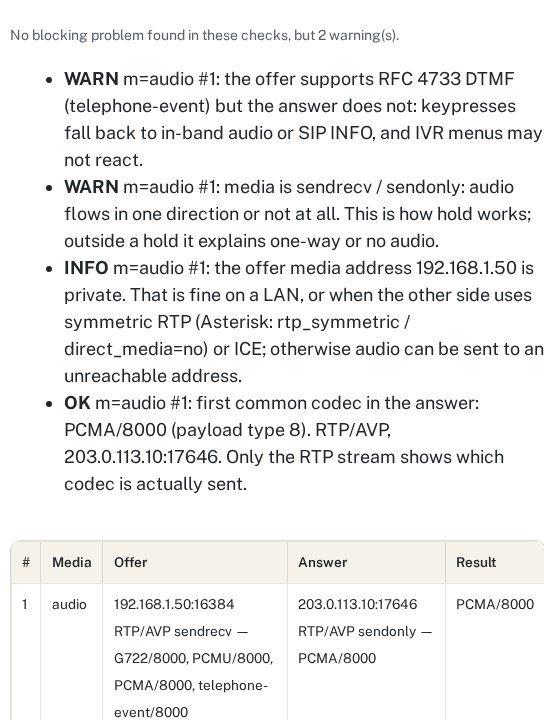
telephone-event(RFC 4733). If only one does, keypresses fall back to in-band audio and IVR menus may not react. - Addresses and transport. Private, loopback or
0.0.0.0media addresses, IPv4 against IPv6, rtcp-mux (without it RTCP uses the next port up) and ICE candidates on only one side. - Broken SDP. Before comparing, it checks what the RFCs require:
v=0first, theo=,s=andt=lines, ac=address for every active stream, ports from 0 to 65535, RTP payload types from 0 to 127, and addresses that are valid IPv4 or IPv6 (8 groups of 1 to 4 hex digits, one::, an optional IPv4 tail) or a host name. A broken SDP is reported as an error instead of being compared.
How to get the SDP
- Asterisk / FreePBX: run
asterisk -rx "pjsip set logger on", place the call, thenpjsip set logger off. The INVITE and the 200 OK with their SDP are in the CLI output and in/var/log/asterisk/full. - sngrep: select the call, open the flow and press Enter on the INVITE and on the 200 OK; copy the message bodies. See troubleshooting SIP with sngrep.
- Browser softphones (WebRTC): chrome://webrtc-internals shows the local and remote descriptions.
- Wireshark or tcpdump: filter on
sipand copy the message body. Our SIP trace analyzer reads a whole trace if you have one.
Common results and what to do
| What the comparator shows | Likely symptom | Where to fix it |
|---|---|---|
| No common codec | 488 Not Acceptable Here, or the call drops when answered | Allow a shared codec (often PCMU or PCMA) on the trunk or the phone |
| Transport differs: RTP/AVP against RTP/SAVP | 488, or connected with no audio | Make both sides agree on SRTP (Asterisk: media_encryption on the endpoint) |
| sendonly / recvonly / inactive | One-way audio, or silence after a transfer | Normal during hold; otherwise check re-INVITEs and music on hold |
| Private media address, no ICE | One-way audio across NAT | Symmetric RTP and correct external addresses; see one-way audio fixes and the PJSIP NAT generator |
| telephone-event only on one side | IVR does not react to keypresses | Enable RFC 4733 DTMF on both ends (Asterisk: dtmf_mode=rfc4733) |
A private address in the SDP is not proof that NAT is broken: on a LAN, with symmetric RTP or with ICE the call still works. The comparator reports it as information, not as an error.
Accepted codecs are not the codec on the wire
The answer lists every codec both sides accept. RFC 3264 says the first one in the answer should be used, not that it must, and either side may switch to another accepted codec at any time. So the comparator reports the first common codec and the other accepted ones, and only a capture of the RTP shows what was sent. We checked this on our FreePBX 17 lab (Asterisk 22.11) on 18 October 2026 with one call from a SIPp test phone to the echo test:
| Codecs | Seen where | |
|---|---|---|
| Offer (INVITE) | PCMU, then PCMA | SDP: m=audio 26000 RTP/AVP 0 8 |
| Answer (200 OK) | PCMU first, PCMA also accepted | SDP: m=audio 14202 RTP/AVP 0 8; the comparator says "first common codec: PCMU" |
| Phone to Asterisk | PCMA, 600 packets | RTP payload type 8 in every packet |
| Asterisk to phone | PCMA, 549 packets | RTP payload type 8; core show channel: ReadFormat and WriteFormat alaw |
The test phone was set to send PCMA, which the answer allowed, and Asterisk followed it in the other direction. No packet carried PCMU. This is one call on one lab server: other devices may stick to the answer’s order. To check your own call, capture it and count the payload types per direction:
tcpdump -i any -n -w call.pcap udp                 # during the call
tshark -r call.pcap -d udp.port==RTP_PORT,rtp -Y rtp -T fields -e ip.src -e ip.dst -e rtp.p_type | sort | uniq -c
asterisk -rx "core show channel CHANNEL"            # ReadFormat / WriteFormat while the call is up
RTP_PORT is a port from one of the m= lines. Payload type 0 is PCMU, 8 PCMA, 9 G.722 and 18 G.729; 96 to 127 are dynamic and mean whatever the a=rtpmap lines say. With SRTP the payload type is still readable, because the RTP header is not encrypted. The capture and the packet counts are in the example pack below.
Example SDP pairs with expected results
Eight offer/answer pairs to paste into the comparator, each with the result it should give. Case 01 is the real lab call above; the others are synthetic, with documentation addresses and invented keys. We wrote the expected result for each case from the RFC rules first, then confirmed that the comparator reports it; the pairs are now part of the tool’s tests.
| Case | What it shows | Expected result |
|---|---|---|
| 01-lab-pcmu-pcma | Real lab capture; RTP of the same call included | OK: PCMU first, PCMA also accepted. The RTP carried PCMA. |
| 02-hold-dtmf-missing | Answer puts the call on hold and drops telephone-event | OK: PCMA. WARN: sendrecv / sendonly. WARN: no DTMF in the answer. |
| 03-no-common-codec | G.729 only against PCMU only | FAIL: no common codec |
| 04-srtp-vs-rtp | SRTP (SDES) offer, plain RTP answer | FAIL: transport differs. FAIL: no a=crypto in the answer. |
| 05-rejected-video | Video refused with port 0, audio accepted | OK: audio. WARN: video rejected (valid). |
| 06-dtmf-payload-renumbered | telephone-event 101 in the offer, 96 in the answer | OK: PCMU. WARN: payload type renumbered. |
| 07-webrtc-dtls-ice | Opus over DTLS-SRTP with ICE and rtcp-mux | OK: opus/48000/2, no FAIL |
| 08-broken-port | Port 99999 in the answer | FAIL: broken SDP, not compared |
Download: sdp-offer-answer-examples.zip (all pairs, the RTP-only capture of case 01 and the expected results), or read expected-results.txt, the lab call’s RTP notes and README.txt first.
How we checked it
We captured a real offer and answer on our FreePBX 17 lab (Asterisk 22.11, 17 October 2026): the SIPp test phone offered PCMU and PCMA, and Asterisk answered with both, ptime 20, sendrecv. The comparator reports PCMU as the first common codec in the answer, with PCMA also accepted, and notes the loopback addresses and the missing telephone-event. Ten fixtures cover the other cases (hold with DTMF missing, no common codec, SRTP against RTP, a rejected video stream, a different number of media lines, an invalid direction pair, a WebRTC offer with DTLS and ICE, masking of SDES keys and ICE passwords, and a renumbered DTMF payload type).
An independent review found two faults in the first version: when an a=crypto line carried two keys, the shareable summary masked only the first, and some broken SDP (only v=0, a port such as abc or 99999) was reported as fine. Both are fixed since 17 October 2026, and eight more fixtures cover them: two keys on one line, FEC keys, MIKEY and k= lines, SDP with only v=0, non-numeric and out-of-range ports, a missing c= address, an invalid IPv4 address and a dynamic payload type without a=rtpmap. A second review then showed that impossible IPv6 addresses (9 groups, a 5-digit group) and payload type 999 were still accepted; since 17 October the address check follows the IPv6 text format and payload types must be 0 to 127, with 18 more fixtures (7 valid and 7 invalid IPv6 forms, payload types 127, 128 and 999, a multicast address). A third review found one more gap: an IPv4 part in front of :: (192.0.2.1::) was accepted; the IPv4 part must now be the last 32 bits, at the end of the address, and three misplaced forms are tested. Each box takes up to 1 MB of text, and an SDP with more than 5,000 lines, more than 64 media lines or more than 128 formats on one media line is refused instead of analysed; real SDPs have tens of lines. Three tests cover these limits. On 18 October, while building the example pairs above, we found that a stream the answer rejects (port 0) still got a warning about a missing a=rtpmap line, which a rejected stream does not need; that is fixed, with two tests, and the eight example pairs are tests too. All 54 run before every change to the tool goes live. They cover the cases we know of, not every SDP a device can send, so check the summary before you share it.
The rules follow RFC 3264 (the offer/answer model), RFC 8866 (SDP), RFC 4733 (DTMF events), RFC 5761 (rtcp-mux) and RFC 5763 (DTLS-SRTP).
Related: SIP trace analyzer, SIP response codes, VoIP codec bandwidth, common VoIP problems.
Frequently asked questions
What is an SDP offer and answer?
SIP itself only sets up the call; the SDP body describes the audio. One side sends an offer (codecs, address, port, direction) and the other replies with an answer that picks from it. RFC 3264 defines the rules.
Why does a call connect but have no audio?
Common causes visible in the SDP are a private media address without symmetric RTP or ICE, a hold direction (sendonly or inactive) left in place, or one side expecting SRTP. Compare the offer and the answer to see which.
What causes 488 Not Acceptable Here?
The answerer could not accept the offered media: usually no common codec, or a transport mismatch such as SRTP required on one side and plain RTP on the other.
Is my SDP uploaded anywhere?
No. The comparator runs entirely in your browser, and the page loads no analytics, advertising or other third-party scripts. SDES keys, MIKEY data, k= keys and ICE passwords are masked in the summary it shows and copies.
Which codec is used when several match?
Normally the first codec listed in the answer that was also in the offer. RFC 3264 says it should be used, not that it must, and either side may switch to another accepted codec during the call. The comparator shows the first common codec and the other accepted ones per media line; a packet capture of the RTP shows what is really sent.