A backup you have never restored is a hope, not a plan. To restore a FreePBX backup to a new server for this guide, we took a working FreePBX 17 lab server with extensions, a SIP trunk, outbound and inbound routes and call records, backed it up, wiped the server back to a blank Debian 12 and restored it. Then we compared the result line by line with the original and made real test calls.
Short answer: Block the web interface to everyone but you, install the same FreePBX version on the new server, copy the backup into a new private folder the asterisk user owns, and run fwconsole backup --restore=FILE from that folder, then fwconsole reload. Extensions, trunks, routes, the admin user and the call records came back. Three things did not: the _custom.conf files, call recordings, and anything a backup run from /root silently skipped. Check the backup log for “returned no data” before you rely on it.
Scope of this test, in brief:
- Tested on: one lab server: Debian 12, FreePBX 17.0.33.2, Asterisk 22.11.0, Backup module 17.0.13, restored onto the same VPS reinstalled blank, with the same versions and the same IP address (details).
- Not in the backup:
_custom.conffiles and call recordings. Copy them separately (how). - Failure checks: "returned no data" for core, cdr or cel in the backup log; a restore that exits 0 but logs "There were errors"; a before/after fingerprint diff (backup checks, comparison).
- Not tested: a new server with a different public IP (checklist only), a different FreePBX version or OS, commercial modules, voicemail and recording restores, audio from real phones.
- Download: the fingerprint script and our lab’s before and after outputs: freepbx-restore-kit.zip (README).
Table of Contents
What we tested
| Step | Result on our lab |
|---|---|
| Source server | Debian 12, FreePBX 17.0.33.2, Asterisk 22.11.0, 77 modules: 3 PJSIP extensions, a custom PJSIP trunk, 3 outbound routes, 1 inbound DID route, 998 CDR rows |
| Backup | FreePBX Backup module 17.0.13, all modules, local storage: a 69.8 MB .tar.gz in 7 seconds |
| New server | The same VPS reinstalled with a blank Debian 12, then the official FreePBX 17 installer (open-source modules only): same versions as the source |
| Restore | fwconsole backup --restore: 3 min 13 s, exit code 0, “There were errors during the restore process” (voicemail, no visible effect) |
| Compared with the original | Extensions, devices, trunk, routes, inbound route, extension settings, admin user and CDR all identical; _custom.conf files and recordings missing |
| Test calls | Outbound through the trunk: answered. Inbound to the DID: rang extension 1001 and answered. |
The server kept its IP address, so we did not need --skipremotenat. We did not test a restore onto a different FreePBX version, commercial modules, or a server with a different public IP (there is an untested checklist for that below).
Before you start: make sure the backup contains everything
This is the step most guides skip, and it is where our first attempt went wrong. We started the backup with fwconsole backup --backup=ID from a folder under /root. FreePBX runs the database dumps as the asterisk user in the current folder, which that user cannot open. The core, CDR and CEL modules were skipped, the command still exited with code 0, and the archive was only 0.2% smaller (69.62 MB against 69.79 MB). That backup had no extensions and no trunks.
cd /tmp                                   # never run fwconsole backup from /root
fwconsole backup --backup=BACKUP-ID 2>&1 | tee /root/backup.log
grep -E "returned no data|provided cwd" /root/backup.log     # anything other than empty modules?
tar -tzf /var/spool/asterisk/backup/FILE.tar.gz | grep -E "modulejson/Core.json|Devices.sql|cdr.sql"
“returned no data” is normal for modules you never configured (on our lab: callback, miscdests, setcid, ttsengines). It is not normal for core, cdr or cel. We saw this with a manual run from a root shell. Scheduled runs start from the asterisk user’s crontab, so they should not hit it, but the same log check costs nothing.
Two things are not in the backup by default, so copy them separately or add them to the job as custom directories:
- Your
_custom.conffiles in /etc/asterisk (pjsip_custom.conf, extensions_custom.conf, logger_logfiles_custom.conf and the others). Our backup contained none of them. - Call recordings in /var/spool/asterisk/monitor. Sangoma’s documentation says to add that folder as a custom directory if you want them.
Our FreePBX off-site backup script copies the whole of /etc/asterisk with the databases, which is how we got the custom files back in this test.
Install the same FreePBX version on the new server
Block the web interface before you start the installer. A fresh FreePBX has no admin user: whoever opens the web interface first creates one. Our new server was in that state for about 8 minutes, from the end of the installer until the restore brought the old admin account back, and a quick restore does not close that window. So close it first: in your provider’s firewall, allow ports 80 and 443 only from your own IP address, for IPv4 and IPv6 (and SSH only from your address too, if you can). Do not count on the FreePBX firewall: the installer with --opensourceonly removes the firewall module. Without a provider firewall, these nftables rules on the new server do the same:
ME=198.51.100.7                     # your own public IPv4 address
nft add table inet fpbx_setup
nft add chain inet fpbx_setup input '{ type filter hook input priority -10 ; policy accept ; }'
nft add rule inet fpbx_setup input iifname lo accept
nft add rule inet fpbx_setup input tcp dport '{ 80, 443 }' ip saddr $ME accept
nft add rule inet fpbx_setup input tcp dport '{ 80, 443 }' drop     # everyone else, all of IPv6 too
nft list table inet fpbx_setup       # check again when the installer has finished
Reach the web interface from your address, or through an SSH tunnel: ssh -L 8080:127.0.0.1:80 root@NEW-SERVER, then open http://127.0.0.1:8080/admin. From another machine, check that the block works: curl -m 5 -sI http://NEW-SERVER/admin/ must time out. Remove the rules (nft delete table inet fpbx_setup) only when you have logged in with your restored admin account and the firewall you keep is in place. We tested these rules on the lab after the restore: a second server got no answer on ports 80 and 443 until its address was allowed, and the local path the tunnel uses kept working. We did not run the installer with the rules in place, so list the table again when it has finished.
Use the same FreePBX major version and the same operating system as the old server: for FreePBX 17 that is Debian 12. Our FreePBX 17 install guide has the full steps. In this test the official installer (sng_freepbx_debian_install.sh, SCRIPTVER 1.15) with --opensourceonly stopped at “Removing commercial modules”, exactly as in our earlier install: line 1293 passes the list of commercial modules to fwconsole ma -f remove, and it exited with code 123 because the oracle_connector module failed to uninstall. FreePBX itself was already installed at that point. We added || true to the end of that one line, so a failed removal no longer stops the script, and ran it again with --skipversion; it finished in under 5 minutes. Afterwards fwconsole ma list showed framework, core and backup enabled and fwconsole reload completed. Only do this for that line and that error: a newer installer may have fixed it, and any other failure needs its own answer (the installer log is in /var/log/pbx/).
fwconsole -V                                    # same framework version as the old server?
asterisk -rx "core show version"
fwconsole ma list | grep -E " backup | core | framework "
Keep the web interface blocked from the start of this section until the restore has brought back your admin account and you have logged in with it.
Restore a FreePBX backup with fwconsole
A backup contains your SIP, manager and database passwords, so it must not be readable by other users of the server, which a copy in /tmp with default permissions usually is. Copy it into a new private folder that only root and the asterisk user can open, and restore from that folder:
D=$(mktemp -d /tmp/fpbx-restore.XXXXXX)        # new folder, mode 700
chown asterisk:asterisk "$D"
install -m 600 -o asterisk -g asterisk /root/freepbx-backup.tar.gz "$D/freepbx-backup.tar.gz"
cd "$D"
fwconsole backup --restore="$D/freepbx-backup.tar.gz" > "$D/restore.log" 2>&1; echo "restore exit code: $?"
tail -5 "$D/restore.log"            # read this before you go on
Go on only when the exit code is 0 and the end of the log shows no error you cannot explain. Then, as a separate step:
fwconsole reloadCheck the exit code and the end of the log before fwconsole reload: the restore can return 0 and still end with “There were errors during the restore process”, as ours did (see below). We ran these commands on the lab twice (with tee instead of the log redirect), with umask 022 and 077 and the backup in a folder under /root: both restores exited 0 and gave the same result, with the folder at mode 700 and the backup at 600, both owned by asterisk. When you no longer need them, delete the folder and the log in it with rm -rf "$D"; the original backup stays where you copied it from.
If the new server has a different public IP or network, add --skipremotenat, set the NAT settings by hand afterwards and work through the checklist for a different IP address below. Our older fwconsole backup and restore reference lists the other restore options.
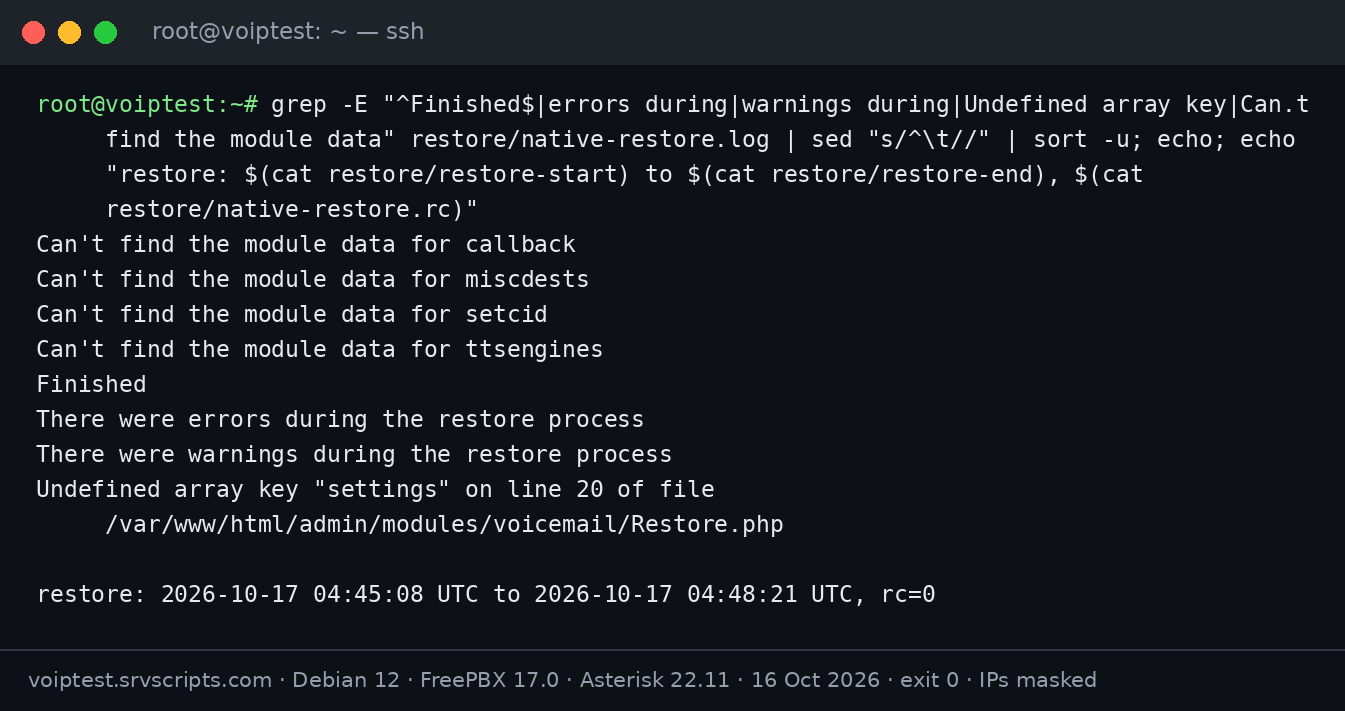
Read the end of the log, not only the exit code. Ours ended with “There were errors during the restore process” and still returned 0. The error came from the voicemail module (Undefined array key "settings") on a system with no voicemail boxes, and we found nothing missing afterwards; on a system with voicemail, check the mailboxes by hand.
Compare the restored server with the original
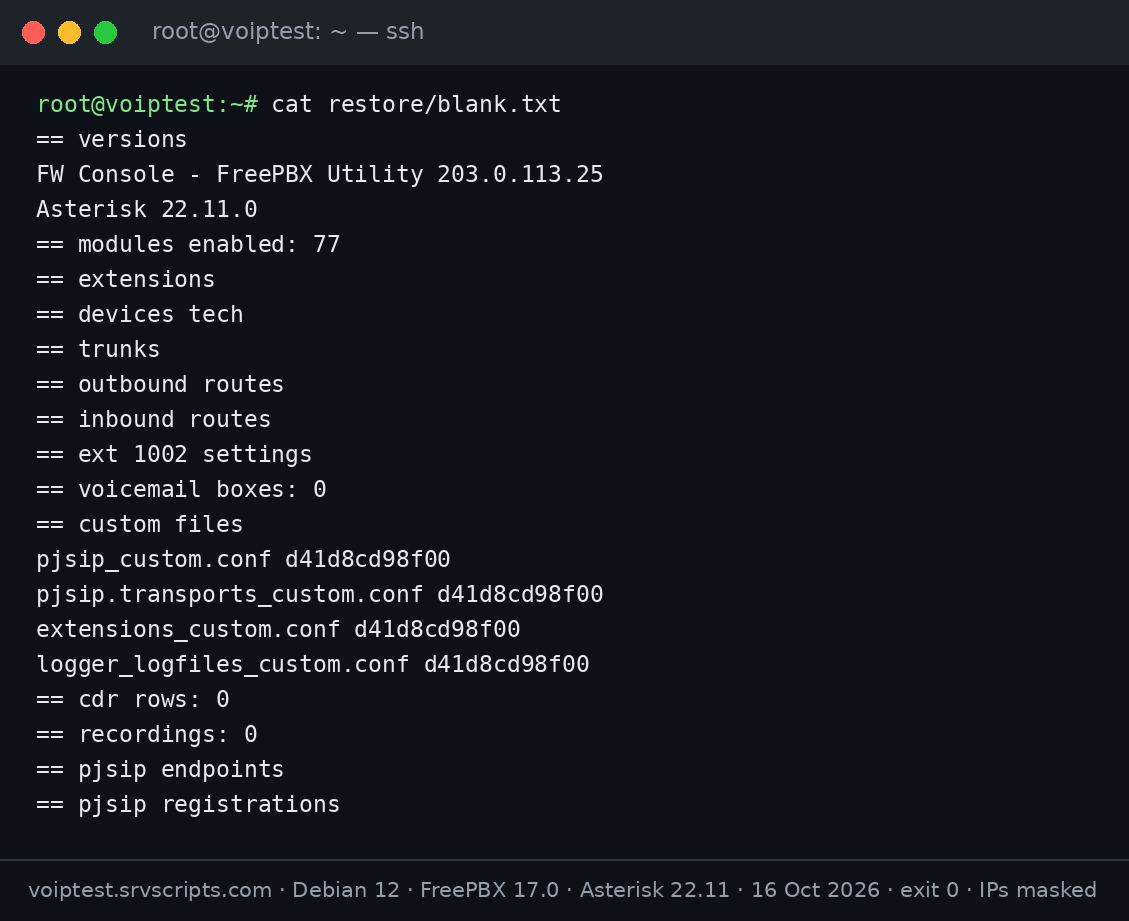
Before the backup we saved a fingerprint of the configuration: versions, extensions, devices, trunks, routes, inbound routes, a few extension settings, the custom files, the CDR count and the PJSIP endpoints. Running the same script after the restore and comparing the two shows exactly what came back:
# on the old server, before the backup: save state.sh in a folder, read it, then
bash ./state.sh > before.txt
# copy before.txt to the new server, for example: scp before.txt root@NEW-SERVER:/root/
# on the new server, after the restore and fwconsole reload, in the folder with state.sh and before.txt
bash ./state.sh > after.txt
diff before.txt after.txt
This is the script we used. It only reads, and it prints no password: SIP settings are limited to a few keywords and the custom files appear as checksums. It does print extension names, trunk dial strings, routes and caller ID settings, so keep its output private or review it before you share it. Change 1002 to one of your extensions. Download: state.sh, or the restore kit with our lab’s outputs before the backup, on the blank server, after the restore and after copying the custom files back.
#!/bin/bash
# state.sh - configuration fingerprint of a FreePBX server (no secrets): compare before backup and after restore
echo "== versions"; fwconsole -V 2>/dev/null | tail -1; asterisk -rx "core show version" | cut -d" " -f1-2
echo "== modules enabled: $(fwconsole ma list 2>/dev/null | grep -c Enabled)"
echo "== extensions"; mysql -N asterisk -e "select extension, name from users order by extension"
echo "== devices tech"; mysql -N asterisk -e "select id, tech from devices order by id"
echo "== trunks"; mysql -N asterisk -e "select trunkid, name, tech, channelid from trunks order by trunkid"
echo "== outbound routes"; mysql -N asterisk -e "select r.name, group_concat(p.match_pattern_pass order by p.match_pattern_pass) from outbound_routes r left join outbound_route_patterns p using(route_id) group by r.route_id order by r.name"
echo "== inbound routes"; mysql -N asterisk -e "select extension, cidnum, description, destination from incoming order by extension"
echo "== ext 1002 settings"; mysql -N asterisk -e "select keyword, data from sip where id=\"1002\" and keyword in (\"context\",\"dtmfmode\",\"max_contacts\",\"direct_media\",\"rtp_symmetric\",\"outbound_concurrency_limit\",\"callerid\") order by keyword"
echo "== voicemail boxes: $(grep -cE "^[0-9]+ =>" /etc/asterisk/voicemail.conf 2>/dev/null)"
echo "== custom files"; for f in pjsip_custom.conf pjsip.transports_custom.conf extensions_custom.conf logger_logfiles_custom.conf; do printf "%s %s\n" "$f" "$(sed "s/password=.*/password=x/" /etc/asterisk/$f 2>/dev/null | md5sum | cut -c1-12)"; done
echo "== cdr rows: $(mysql -N asteriskcdrdb -e "select count(*) from cdr")"
echo "== recordings: $(find /var/spool/asterisk/monitor -type f 2>/dev/null | wc -l)"
echo "== pjsip endpoints"; asterisk -rx "pjsip show endpoints" | awk "\$1==\"Endpoint:\" && \$2 !~ /^</ {print \$2}"
echo "== pjsip registrations"; asterisk -rx "pjsip show registrations" | awk "\$1 ~ /\// {print \$1, \$NF}" | head
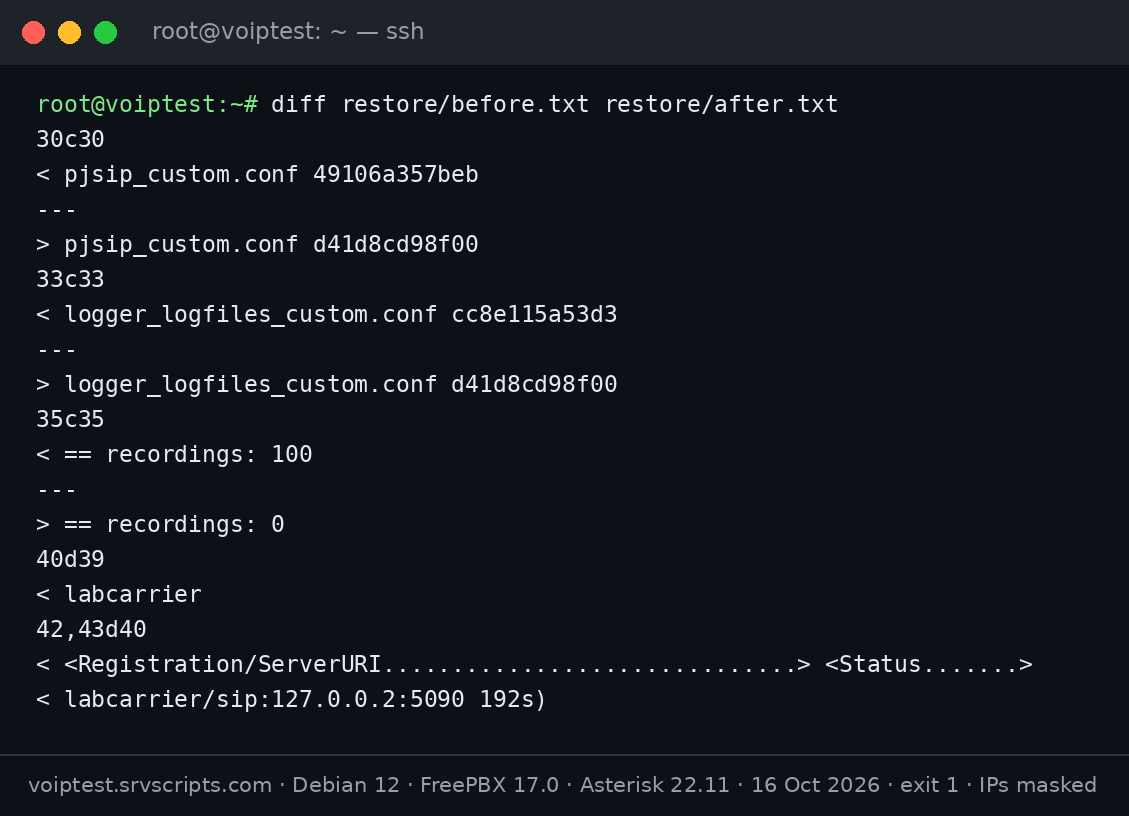
On our lab the only differences were the two _custom.conf files, the 100 test recordings and the trunk, whose PJSIP definition lived in pjsip_custom.conf:
Copy back what the backup left out
We took the two non-empty custom files from the off-site backup set, copied them to /etc/asterisk with the asterisk owner and reloaded. After that the comparison matched the original except for the recordings, which neither backup contained, and the CDR count, which had grown by our test calls:
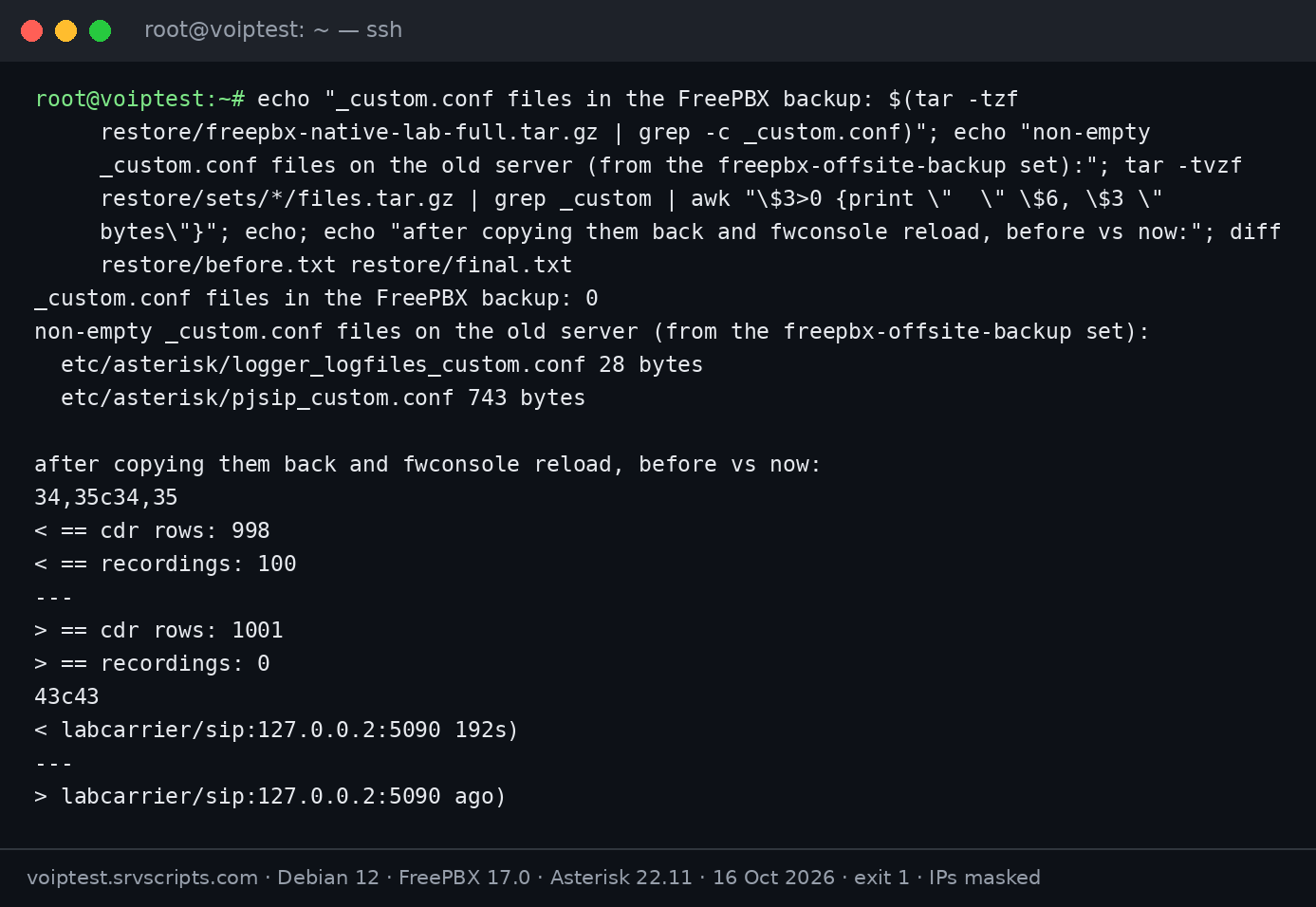
One of the files was logger_logfiles_custom.conf, which writes the security log that fail2ban reads. Without it, the restored server would have looked protected while the SIP jail saw nothing. See fail2ban for Asterisk and FreePBX.
Make test calls in both directions
A restore is finished when calls work. We placed one outbound call from extension 1002 through the trunk and one inbound call to the DID, which the restored inbound route sent to extension 1001. Both were answered. These calls show that signalling and routing came back; both ends ran on the same server, so they prove nothing about NAT, firewalls or audio from real phones:
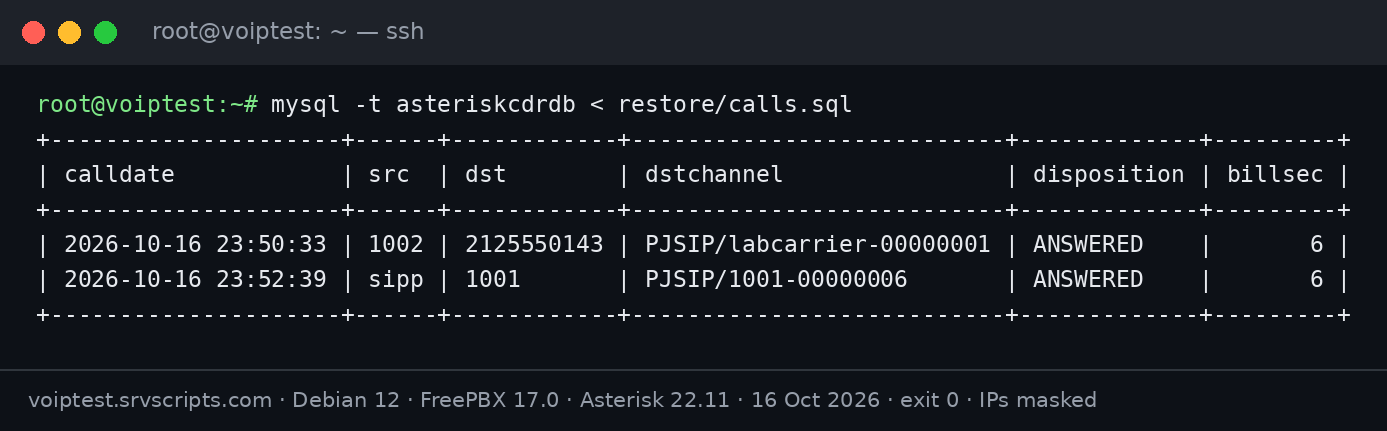
Our first inbound attempt failed with CHANUNAVAIL. The cause was our test phone, which did not answer the PBX’s OPTIONS checks, so Asterisk marked it unavailable. Before you test, check that the phone shows Avail in asterisk -rx "pjsip show contacts", and check the trunk with asterisk -rx "pjsip show registrations". Our PJSIP health check script does both.
Moving to a different IP address (not tested)
Our lab kept its IP address. If yours changes, the restore itself works the same way, but everything that knows the old address has to follow. We have not run this migration ourselves, so treat the list as a checklist, not a tested procedure:
- Write down the old and the new public and private addresses.
- Restore with
--skipremotenat, then set the External Address and Local Networks in the Asterisk SIP settings for the new server. - Search your custom files for the old address:
grep -rn 'OLD.IP' /etc/asterisk/*_custom.conf. - Ask your SIP provider to allow the new address (many trunks authenticate by source IP), and check that every trunk registers.
- Lower the DNS TTL a day before, then move the A, AAAA and SRV records of the PBX name.
- Phones: the SIP server and the provisioning URL in each phone or in your provisioning template.
- TLS: the certificate host name and the chain the new server sends; our SIP TLS certificate check shows both.
- Firewall: SIP and RTP ports for the new address at the provider and on the server, and the fail2ban allow list.
- Order of the switch, decided before you start: keep the new PBX’s trunks disabled while you test it, so two servers never register the same account; then disable the old PBX’s trunks, enable the new ones and test. Rollback is the same in reverse. Keep the old PBX for a few days before you delete it.
- Acceptance: for each trunk, one inbound and one outbound call from a real phone outside your network, longer than 30 seconds, with audio both ways; then voicemail and a transfer.
Restore checklist
- Back up from
/tmpor let the schedule run it; grep the log for “returned no data” and “provided cwd”. - Copy the
_custom.conffiles and, if you need them, the recordings, separately. - Block ports 80 and 443 (IPv4 and IPv6) to everyone but you before the installer starts; keep them blocked until you have logged in with the restored admin account.
- Install the same FreePBX version on the same OS.
- Restore from a new private folder (
mktemp -d, owned by asterisk, backup at mode 600); check the exit code and the end of the log beforefwconsole reload; delete the folder afterwards. fwconsole reload, then compare extensions, trunks, routes and CDR with the old server.- Copy back the custom files, reload, and check fail2ban sees the security log.
- Phones and trunk Avail and Registered, then one outbound and one inbound test call.
What we tested and how
All results come from our FreePBX 17 lab server (4 vCPU, 4 GB RAM) on 16 and 17 October 2026: the backup on the original install, then a provider reinstall to a blank Debian 12, the FreePBX 17 installer, the restore and the calls. The trunk is a SIPp process acting as a SIP provider on the same server, and the test phones are SIPp scenarios registered as normal extensions. On 17 October we ran the restore commands from this page twice more on the lab (umask 022 and 077) and tested the nftables block from a second server. The timestamps in the screenshots are the server’s clock (CDT). The screenshots are the real terminal output; only IP addresses are masked.
Not tested: a different public IP, FreePBX version or OS on the new server, commercial modules, voicemail and recording restores. Official documentation: Sangoma: Backup and Restore.
Related: fwconsole backup and restore reference, FreePBX off-site backup script, install FreePBX 17 on Debian 12, upgrade FreePBX 16 to 17, PJSIP health check.
At a glance
Frequently asked questions
How do I restore a FreePBX backup to a new server?
Block the web interface to everyone but you, install the same FreePBX version, copy the backup into a new private folder owned by asterisk (mktemp -d, file mode 600), run fwconsole backup --restore=FILE from that folder, then fwconsole reload. Copy your _custom.conf files and recordings separately, and make test calls.
Does the FreePBX backup include call recordings?
Not by default. Add /var/spool/asterisk/monitor as a custom directory in the backup job, or copy the recordings separately.
Are _custom.conf files included in a FreePBX backup?
In our test on FreePBX 17 with the Backup module 17.0.13, no. Copy /etc/asterisk/*_custom.conf yourself or add them as custom files in the job.
Why is core missing from my FreePBX backup?
In our test, running fwconsole backup from a folder under /root made the database dumps fail (“The provided cwd does not exist”), so core, cdr and cel returned no data while the command still exited with 0. Run it from /tmp.
Do I need the same FreePBX version on the new server?
Use the same major version and ideally the same module versions. We restored FreePBX 17.0.33.2 onto a fresh install of exactly that version.
Reading a lot of our guides? Go ad-free with srvScripts Pro for $6 a month. It also pays for new guides. Cancel any time.